
Block Third Party & Advertiser Cookies in Safari for Mac
 Safari in OS X allows you to have greater control over cookie settings as stored in the Mac web browser. There are now options to block all cookies, allow all cookies, or to selectively block third party and advertiser tracking cookies. Each of these choices are easily set or changed within Safaris’ preferences, and if you want to adjust the cookie blocking setting yourself in Safari on the Mac, here is exactly how to do that:
- With Safari open as the active application, pull down the “Safari” menu and select “Preferences”
- Click on the “Privacy” tab
- Select the ‘third party and advertisers’ radio box alongside the “Block Cookies” option, or choose one of the other two options:
- Choosing the “Always” option blocks all cookies, not just third party and ad cookies.
- Choosing “Never” is the old default option, which allows all cookies from all sources.
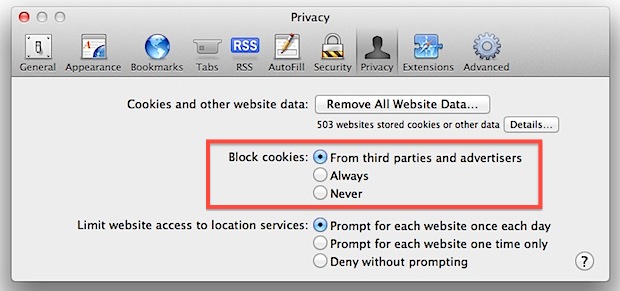
You may find this setting to be enabled by default on some machines. If you want to disable the feature simply check the radio box for “Never” to allow all cookies instead.
This is a relatively new feature, starting with Safari 5.1 in OS X Lion and continuing on with the latest versions of Safari in OS X Mavericks onward.
Blocking these cookies is different than using a browser ad blocker plugin because it simply forces the ad cookies to not gather data rather than blocking the ad completely. Third party ad cookies are generally used to serve relevant ads to web users, this is achieved by monitoring web usage habits and then serving ads based on the sites you visit. For example, if you visit a lot of Apple-related sites, you’ll probably see Apple-related ads elsewhere on the web. You can read more about this practice on Wikipedia.






If it blocks such cookies, why does cookies from double-click.net, etc. keep showing up? It’s pretty useless/nonfunctional.
Really, you can trust us. We’re Apple, you know, the computer for the rest of us. We wouldn’t do anything unethical. At least not without plausible deniablity.
I smell chinese (food?)
Finally got a response from Apple on this – they say the cookies ARE blocked – because they are not being sent back to the sites that put them on your system. Sounds odd to me but that’s what Apple told me.
alert(1)
couldn’t resist a try :)
I noticed this too. Safari does not block third party cookies despite what the UI is saying for this option. To test, simply clear all cookies and visit a few sites. Take a look and you will notice MANY sites have set cookies that you have not explicitly navigated to. This needs to be fixed asap.
Whoever wrote this pile of rubbish is a raving idiot. The screenshot says it all: “503 websites stored cookies or other data” on your HDD.
Duh.
What is your point?
Safari does not respect user settings for cookie blocking in Lion either.
The worst part is that a naive user is misled by Safari to believe that the settings are active and working. Apple has had ample opportunity to fix the bug or remove the user option until a fix has been made; they were notified months ago about this bug. Safari itself has been updated since the bug was reported but the bug remains.
So, since Apple are willingly causing data to be placed onto users’ machines without their permission…
…it might be time to start checking the data protection laws in your local jurisdiction and making a formal complaint about Apple to the data commissioner (or equivalent).
Not to lead to prosecution (as if!) but at least to generate some unwanted media attention about a lack of security in an OS X application – which might prompt a quicker fix.
It should be noted that Safari does NOT block cookies in Snow Leopard. Appearently is a bug in Snow Leopard, as the cookie blocking seems to work in Lion.
It doesn’t really work.
exactly
This was set as default for me, can’t say I mind either. I get the feeling this is a move Apple can point to as evidence of minding their customers security and privacy.
[…] Si no la tenéis en la primera opción y os interesa bloquearlas, pues ya sabéis lo que tenéis que hacer. […]