
You Can Capture & Save Screen Shots with Preview in Mac OS X
 The Preview image editing and photo viewing app in Mac OS X includes the ability to capture screen shots directly within the application. The resulting images open directly into Preview rather than saving to the Mac desktop, allowing user changes to file size, resolution, color, and file format.
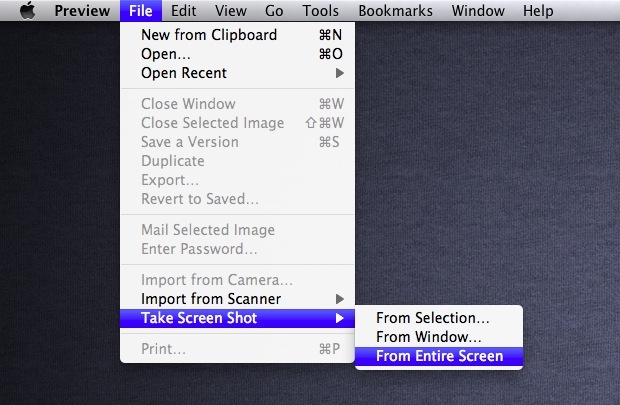
There are three different screen capture modes available in Preview that are almost identical to the standard keyboard shortcuts that are typically used on the Mac. Here’s how to use each of the three options to take images of the entire screen (or screens) in the Preview app of OS X:
- Launch Preview
- From the “File” menu select “Take Screen Shot” and choose one of three options:
- From Selection – brings up the selection tool, just like command+shift+4
- From Window – enables the window selection tool, like command+shift+4+spacebar
- From Entire Screen – capture the entire screen (or both screens if you’re using two), same as command+shift+3
- The screen shots launch automatically into Preview where they can be cropped, manipulated, and saved. All of this is instant with the exception of capturing the entire screen, which causes a timer to be displayed
The timed screen shot feature was previously limited to the Terminal or Grab, but it’s pretty handy to have directly in Preview, with the countdown timer showing up in the center of the screen like so:
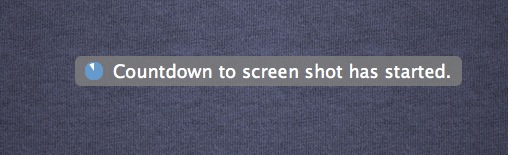
Once the timer runs out, the screen is captured and launched instantly into Preview.
If you use multiple monitors, each monitors screen will be captured, and a new file will be generated for each individual monitor that is connected to the Mac. Thus, if you had 4 displays hooked up to your computer, you would create four screen shot files, or if you only have one internal screen, on say a MacBook Air, it would only generate a single screen capture for that internal display.
I originally assumed this was a fairly new introduction as of 10.7, but apparently this feature exists in many versions of the Preview app for Mac OS X, ranging from 10.6 Snow Leopard version of Preview, as well as OS X Lion, Mountain Lion, OS X Mavericks, and OS X Yosemite. Thanks for the heads up Makeup about compatibility for older versions of Mac OS X!






If you have multiple monitors connected it will take a screenshot of each one.
This is not true. This feature already exists in Preview of Snow Leopard!
Good catch, updated.
What would be the difference between this, and using the system screen shot method and changing the ‘open with’ parameter?
This opens the screenshot automatically into Preview because it is taken in there, where the system screen shot just stores the file on the desktop.
I kind of wish the keyboard shortcuts just did this into Preview by themselves, how often do you really just want a file instead of immediate action?
You can use the keyboard shortcuts going into the clipboard (Command-Control-Shift-3, Command-Control-Shift-4), open Preview and hit Command-N. Two steps more, but then again, quite often, I instead directly paste into an E-Mail. No files involved.