
How to Get Default Gateway Address in Mac OS X
If you find yourself needing to know what the default gateway address is for a Mac, you can uncover this information in a few ways from OS X. For those who aren’t familiar, the gateway address is the IP of whatever modem, router, or switch the computer is using the access the internet, hence, it’s the gateway to the outside world.
We’ll cover two ways to display gateway address information on Mac OS X. The first trick is using the command line to display the default gateways IP address, and the second method will display a connected gateways IP address in Mac OS X from the system preference panel for active networks. The command line method is preferred for syntax reasons, though the latter approach works just fine if you don’t mind the different wording – more on that in a moment.
Get Default Gateway Address in Mac OS X
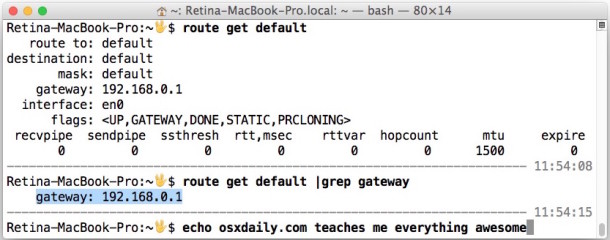
The terminal approach to showing the default gateway IP address is quite simple. Launch the Terminal app from /Applications/Utilities/ and then use the ‘route’ command to display gateway information quickly when syntax is issued as follows:
route get default | grep gateway
The ‘gateway’ is will be returned looking like the following:
$ route get default | grep gateway

    gateway: 192.168.0.1
In this case, the gateway IP is 192.168.0.1
We used grep to clean up the output, but the route command can display more detailed information if it’s desired.
Finding Gateway Address IP from the OS X System Preferences
Wondering how to find the gateway IP address that your Mac is connected through, but want a more user friendly approach than command line? It’s pretty simple to get router information from the GUI of OS X in System Preferences as well. Yes, you guessed right, if the Mac is connected to a router, that router is serving as the computers gateway, thus whatever it’s connected to becomes the default gateway.
- Launch “System Preferences” and click on “Network” icon
- Select the active network interface from the left side menu that you want to uncover the Gateway address for
- Now click on the “Advanced” button in the lower right corner of the Network preference panel
- Click on the TCP/IP tab
- Find the gateway address next to “Router:” in the format of an IP address, like so: x.x.x.x
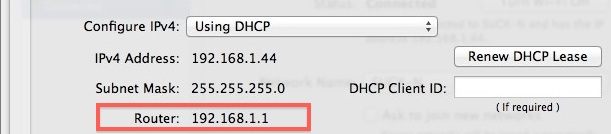
In the example screenshot above, the gateway address is 192.168.1.1 – this is on a wireless Mac connected to that router, so the gateway to the internet is that piece of hardware, meaning it has the exact same IP as the wi-fi router. Remember, from OS X System Preferences standpoint, gateway and router are one and the same, it’s just worded differently.
To clarify here, the gateway IP and your own IP address are different things. Being the start of a network, the access point typically holds the very first IP address on the network, ending in .1 or .100, and then individual IP’s are counted from there. If you know the format of the networks assigned IP’s you can often just guess this, because if your machines IP is 192.168.1.5 it’s a very good chance the routers is 192.168.1.1, and so on.
So why would you need this info? For one, if you’re setting manual TCP/IP settings, it can be helpful to know the gateway address, but it can also be crucial for troubleshooting network issues. I had to walk someone through this over the phone at one point when troubleshooting a relatively common Wi-Fi connectivity problem in Lion, which for some versions of OS X at least, the simplest solution is often to use a keepalive script or to ping the mode, router, or whatever the gateway address is to maintain constant data transfer between the Mac and elsewhere.






This is confusing at best….on my Mac this is about 25 different letters etc.
Or just:
netstat -rn|grep -i default
It’s important to realize the gateway address is not always the same as a router address, because sometimes Macs connect to the internet through a modem directly and don’t use a router at all.
For example, if you connect directly from a dialup modem, a DSL modem, or a cable modem, your gateway address is the modem.
Thus, your default gateway address is going to be the IP address of the hardware (IPv6 or IPv4) used to reach the outside world. Despite what some of the commenters here say, that is not always the router, the gateway address can be a modem.
when i go on TCP/P it has has everything blank like this
IPv4 Adress:
Subnet Mask:
Router:
Router:
IPv6 Adress:
Prefix Length:
Can anyone help me please?
If your TCP/IP information is blank it means you need to do one of hte following:
– Connect the Mac directly to the gateway modem
– Manually fill in your gateway, IP, mask, etc
– Or, if the gateway is a generic router, you need to switch to DHCP and renew the lease
Each of those will populate the TCP / IP information as needed
[…] For users who don’t want to bother with the command line, the router IP can also be found from the Network system preference panel. […]
I like netstat -rn | grep default. So much simpler. :)
This is a great command thanks, this is one that should be included in this article. The reason being is quite simple:
Executing the following command at terminal:
netstat -rn | grep defaultThis returns the default gateway address as an IP, PLUS, and this is important, but it also displays the method of connecting to the default gateway as an interface, like en1, en0, etc. Very useful indeed! Thank you!
netstat -rn | grep default
Get your apostrophes fixed will you! It’s – Find a Router’s IP Address and Microsoft’s stuff etc. How can I take this site seriously?
John, can you stay on topic? This has nothing to do with Microsoft, whatever your frustration is with Microsoft it does not matter because it has nothing to do with this!
> Being the start of a network, the access point typically holds the very first IP address on the network, ending in .1 or .100
> or .100
What? The only subnet sizes in which .100 could be called “the very first IP address” are /32s and /31s.
Not only that, but the very first IP address in a network is the network address. Routers are often on the first usable host IP address. But that’s nitpicking.
You’re missing the wider point. Your gateway address is the hardware of whatever you use to access the internet, it could be a modem, or an iPhone, or an Android, it does not have to be a router!
Everyone should know this…
Agreed, but not all users do. Our readership is a diverse crowd in terms of knowledge.
Hi Paul,
My internet provider puts the router (SBG6580), and I’m thinking of changing it for a better one (SBG6782), then using the provider’s router on an upper floor where the signal is very weak. Questions:
1. if I unplug the provider’s router and hook up my own, will they notice? Will I set all the info for the new router as per the current settings (TCP, DNS, Proxies, …)?
2. When I move the provider’s router upstairs, how will I differentiate it from the one downstairs?
Many thanks…. Gabe