
Monitor Network Connections in Mac OS X with Private Eye

Private Eye is a free real-time network monitor app for Mac OS X that is extremely easy to use. Upon launching the app, you’ll start to see all open network connections by application and process, and you can then filter connections by app, monitor all open connections, or watch only incoming or outgoing transfer.
Connections are reported by application, the time of the connection, and arguably the most useful, the IP address that is being connected to by the app, making it easy to see socket and routing data, letting you know exactly what app is communicating with what server or IP address, for both local and broader internet networks.
If you have any interest in networking, privacy, security, or you just want to keep an eye on what apps are connecting to the internet and to where, you should download this app, but it’s also an amazingly useful tool for troubleshooting network problems and figuring out what is using the network.
- Download Private Eye now (direct link) or visit the developers home
Download and install Private Eye by putting it into your /Applications/ folder, then open PrivateEye to get started. The list of open network connections is easy to read, you’ll see a time stamp of the connection, the application name, and where the connection is going to by IP (or coming from, as determined by the arrow pointing left for in, or right for out).
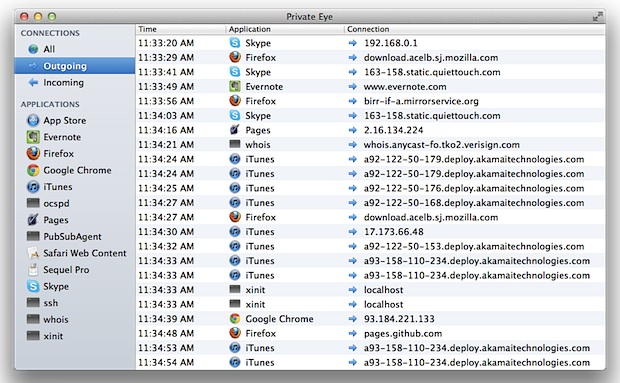
Using the left side menu you can quickly break down connections to see them all, only show incoming transfers, outgoing connections, or display connections by specific application only. Apps are easy to identify in this list, as are daemons running in the background (like PubSubAgent), and command line processes belonging to the user are also visible (ssh, for example).
This is a simple yet powerful tool without the complexity or the learning curves related to compiling and using the command line tools lsof, watch, open_ports, or wireshark, and is therefore highly recommended for anyone who is interested in seeing this kind of information, whether it’s out of general curiosity, or to help troubleshoot and diagnose specific network activities.






Completely USELESS! Nothing but a completely blank field. App shows ZERO processes or LITERALLY ANYTHING at all! The entire app is a complete blank without ANY operations available of visible. Don’t waste your time.
[…] like to view similar network information in a more traditional OS X app format, the free Mac app Private Eye is an excellent GUI tool that provides similar […]
Doesn’t catch a good deal of network activity.
I wouldn’t trust Private Eye because it does not display connections initiated by apps written in Java. I wrote the developers and they acknowledged it’s a known issue.
If it doesn’t understand Java, who knows what else it doesn’t display?
Also Net Monitor and Net Monitor Sidekick are worth a look. While not free they prrovide much more information, including the ability to right click a connection and do a trace route. I did look at Private eye and unless you are paranoid about what your computer is doing it is a very nice program.
And I agree with the previous poster about Little Snitch. I have been running it for years. I like the ability to approve a connection until you quit the program. (I am parranoid about what my computer does. I run a second monitor with nothing but network monitoring software). :-)
Very nice app, thanks!
There’s LittleSnitch, of course; not free, but oh so powerful because it actually asks permission before allowing an app to reach out, which you can deny, of course. It’s not cheap –$30–but an app built by the same guy who built LaunchBar rocks in my world.
I downloaded Private Eye, though. It’s elegant for the beginning curious who will quickly want something more powerful. Maybe by this obviously talented developer?