
How to Split the iPad Keyboard For Easier Typing
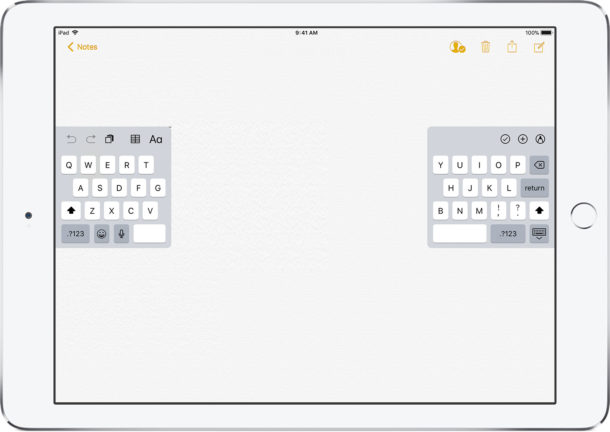
Typing on the iPad onscreen keyboard can be a little strange for some users who are accustomed to either an iPhone and typing with their thumbs, or even a Mac or PC and accustomed to typing on a regular touch keyboard. But one great way to improve iPad typing and make it faster is to use the Split Keyboard feature of the iPad keyboard.
The split keyboard is one of the most under appreciated features that iOS has with the iPad, it makes typing while holding the device significantly easier in both landscape and portrait modes by allowing you to use thumbs to type, rather than setting the iPad flat and trying to type like a normal keyboard, which is cumbersome and difficult for many of us.
How to Use the iPad Split Keyboard
You can use the split layout anywhere on the iPad, and once you split the keys they will remain so until they have become docked again. Splitting the iPad keyboard works in horizontal or vertical orientation as well. Here’s all you need to do to access and use this great typing feature on iPad:
- Pick up the iPad if you have not done so already
- Launch any app where the keyboard shows up (Notes, Messages, etc), or tap on any text field where the keyboard pops up on iPad
- Tap the keyboard button in the lower right corner to bring up the keyboard options menu, and tap on “Split” to split the keyboard on iPad
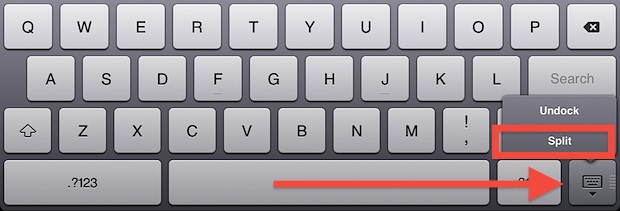
Note that the newest versions of iOS also support grabbing the keyboard movement bar, and by pulling up you will also split the keys. This can be easier for some users and it does not require the keyboard options to be toggled since everything is done through a simple gesture. You’ll find the keys start splitting quickly once you move the bar up on the screen.
Adjusting the location of the split keys by tapping on “Undock” can make it even easier to type by choosing a placement where your thumbs naturally rest.
Docking and merging the keyboard is available through the same menu, or you can simply drag the keyboard to the very bottom of the screen to rejoin the keyboard and ditch the split layout, thereby returning to the regular iPad keyboard layout.
The Split keyboard feature is in nearly all versions of iOS for iPad that you’ll encounter, from older versions to the most modern iOS releases. The only difference is the appearance of the onscreen keyboard.
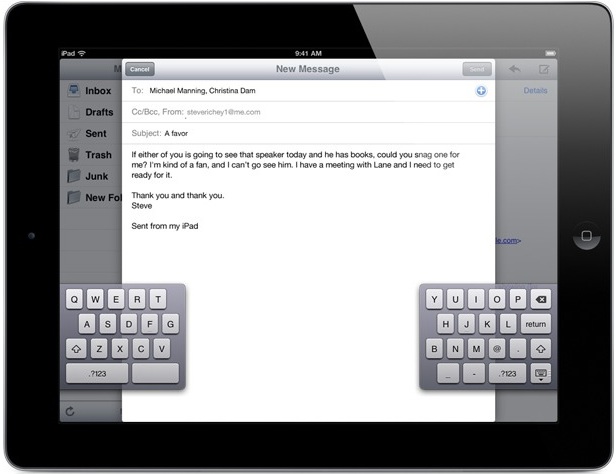
Every iPad has this feature built into iOS natively, and if you frequently use the keyboard in portrait mode you’ll find it extremely useful because it allows you to use thumbs to type, much like using thumbs on the smaller-screened iPhone or iPod virtual keyboards.
The split keyboard feature obviously just works on iPad, but the iPhone has an interesting trick up its sleeve too; the one-handed iPhone keyboard. It’s worth checking out for iPhone users!
If you have any interesting iPad typing or keyboard tips, tricks, or comments, be sure to share them with us in the comments below! And if you enjoyed this trick you will probably appreciate some other helpful iPad typing tips too. Thanks for the tip suggestion Kara!






This was the worst idea Apple has had in years next to removing the audio cable port in the 7. They forced this update on my ipad without giving me the option to decline change.
It won’t work. I have the update before the latest.
[…] keyboard is the default. These new software layouts work whether the keyboard is docked or in the split keyboard mode, but other layouts like Dvorak are dependent on external keyboards and will not impact the iOS […]
thanks a lot
[…] you know the split iPad keyboard in iOS 5 includes six hidden ‘phantom’ keys that make typing even […]
cool! :) that was an awesome tip :) thanks. the only problem i see is, as said in previous comments, the letters get a bit smaller… but only compared to the full-keyboard mode.
[…] Split the iPad Keyboard For Easier Typing Split the iPad Keyboard For Easier Typing… Source: osxdaily.com […]
The reason it is easier is for users holding the device in their hands. Allowing you to just use your thumbs to type. However, while the device is in a dock etc, it’s easier to just use the full keyboard layout.
How is it easier? Idk about you guys but on my ipad2 the letters become slightly smaller in split mode.
probably the easiest way is pull the keyboard from both sides of the screen to split and push keyboard splits towards center to join. they’re both very natural gestures…
Slightly easier way to switch to the split keyboard – tap and drag the keyboard button up to avoid the menu entirely.
Split keyboard and multitask gestures are the best usability enhancements to come to iOS and the iPad, but all in all I still can’t type seriously on an iPad. If it’s more than a sentence or two for a quick email reply I’m picking up my MacBook. Same story with the iPhone, or any other touch screen mobile for that matter.