
Select Text in Quick Look Windows for Mac OS X
Quick Look is one of the better little features of Mac OS X, but a new hidden option in OS X makes QuickLook even better by allowing you to select, highlight, and copy text directly from the windows.
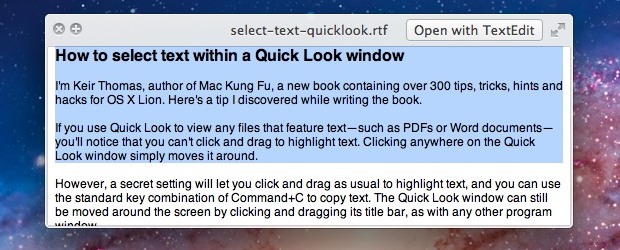
If you use Quick Look to view any files that feature text—such as PDFs or Word documents—you’ll notice that you can’t click and drag to highlight text. Clicking anywhere on the Quick Look window simply moves it around.
However, a secret setting will let you click and drag as usual to highlight text, and you can use the standard key combination of Command+C to copy text. The Quick Look window can still be moved around the screen by clicking and dragging its title bar, as with any other program window.
Enable Text Selection in Quick Look
To activate the hidden Quick Look text selection setting, open a Terminal window (Terminal app is found in the /Applications/Utilities/ directory) and type the following command exactly:
defaults write com.apple.finder QLEnableTextSelection -bool TRUE;killall Finder
Then hit return. The changes take effect immediately as Finder is relaunched.
You can test out the results by using QuickLook (usually the space bar) to see a preview window of text, which is now selectable and can be copied for pasting elsewhere.
To deactivate the text selection setting, and return to default behavior, open a Terminal window again, and this time type the following:
defaults delete com.apple.finder QLEnableTextSelection;killall Finder
The video below demonstrates enabling this feature:
This works in any new version of OS X from 10.7, 10.8, 10.9 Mavericks, and beyond.
This awesome tip was sent in to us by Keir Thomas, the author of a book called Mac Kung Fu and the guy who discovered the cool iTunes “Now Playing” notification that has since become popular on the Mac web.






It doesnt work for Mojave 10.14.2!
Anyone know the equivalent command for macOS Sierra? This stopped working in El Capitan, I think.
[…] plugin is made even more useful by enabling text selection and copying in Quick Look panels, don’t forget to do that too if you haven’t implemented the change yet using defaults […]
It appears to be on by default in MountainLion 10.8.2
Perhaps if was off when in beta.
Those that haven’t gotten it to work-
Make sure you hit “return” before quitting the Terminal app.
I just put the string on an iMac and a Macbook Air running X.8.2 and it works like a charm. Seems to take Lion and above, though. The machine I could use it on the most is running Snow Leopard.
Like others, I wish it were just enabled by default, even if not perfect. Most humans would just go ahead and launch the app if copying text doesn’t work properly in QuickView.
Tried this with 10.6.8 and no effect. Tried it twice.
In Mt. Lion it does work.
I agree that Apple is slowly but really becoming a rotten apple in that major improvements in the OS are not part of the new OS and instead changing things that worked to something that is a royal pain in the arse or changing terms like “save to” to “share” is just plain waste of my time and nervous system. How about a default in Finder to find FILE NAMES instead of Contents? That’s another no brainer for Apple.
This is great, but I find it inconsistent.
While I can select text(images even) in a PDF file, I am unable to utilize the functionality with a quick look into an e-mail document.
I love this tip, but I believe that since it is inconsistent, Apple decided to leave it turned off by default.
I will keep it turned on, but need to learn which file types work and which don’t.
Thanks!!
the select feature is awesome but is there any way of editing a document in quick look? like pasting something or typing in the quicklook preview. it would be so much better, especially for making small changes in a txt file without opening text edit.
It’s finder feature, not Quick Look :( In Finder it’s work fine, but in ForkLift… :(
Hi!
I had the same problem with Forklift. Here is how I solved it:
http://www.productivity.ninja/2014/12/31/mac-os-x-push-the-envelope/
HTH
Hail to the king, baby!
[…] Via | OS X Daily […]
Command is all in one line in the terminal window before entering. I notice that your example has “Open with TextEdit” in the right hand upper corner, but my window still says “Open with Preview” even after trying it several times. 10.7.2 also. ??
Looks like a cool tip, not working for me though, OS X 10.7.2
We tested it in OS X 10.7.2 it should work fine, make sure you get the entire command in one line?
Confirmed, over here it works just fine under 10.7.2
Ah yes and THANKS for sharing this great tip!!
doesn’t work for me either
RAD!!!!!!
Best … tip … ever!
As an aside, why the hell doesn’t Apple document stuff like this? You keep hearing things like “300 new features” at new OS X releases, and then they don’t tell anybody what they are…
There are 20 tips available in the extract from Mac Kung Fu: http://media.pragprog.com/titles/ktmack/tips.pdf
Nice tip! Same it doesn’t work in OS 10.6.8.
This tip isn’t working for me. I’ve tried copying and pasting into terminal as well as typing it in. I’m running Mac OS X 10.7.2 on a 2.5 Ghz Intel Core i5. I’m obviously not doing something right.
I do not believe it is disabled by default!!!!!
THANKS FOR THE GREATEST TIP!!!!!
Why on earth is this not enabled to begin with?