
How to Change the iPhone Text Message Sound Effect
The iPhone has the ability to play custom text message and iMessage alert sound effects, these custom text tones apply to all incoming messages. You can choose from many Apple provided text tones that are included with all iPhones, or, since this feature can choose any ringtone file to be set as a custom SMS sound, you can even use your own custom alert sounds if you want your messages to play any specific tone or sound effect.
Not only can you set custom text message tones for all of your incoming alerts, but you can also set custom text alert sounds on a per contact basis, so you’ll know who is texting you based on the alert sound alone. Both of these are great features that provide a great way to customize your iPhone experience, so let’s learn how to set message sound effects.
How to Change the Text Message Sound on the iPhone
If you’re tired of the default text tone sound effect, here is how to change the sound effect for all incoming Messages, SMS messages, iMessages with media, texts, and whatever other messages are coming to you:
- Tap on “Settings” and then tap on “Sounds”
- Tap on “Text Tone” and select from the list, you will find custom text tones appearing under “Ringtones” whereas defaults will appear under “Original” section
- Select a text tone you want to use to use and close out of Settings
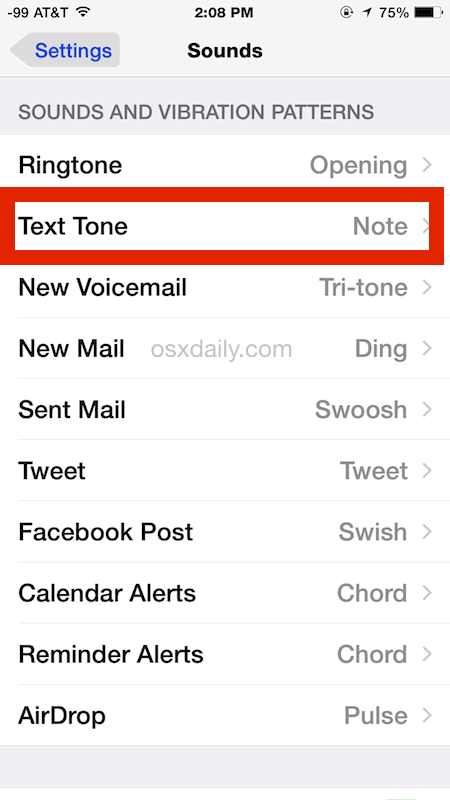
Tapping a text tone will play a preview of the sound, the checkbox alongside the tone indicates it’s the current setting.
Again, this changes the message sound effect for ALL messages coming to the iPhone, but what if you want to set custom text alert sounds for specific people? You can do that too!
How to Set Custom Text Message Sound Tones Per Contact
SMS and iMessage alert sounds can also be customized on a per person basis, set on an individuals contacts page:
- Tap on “Phone” and then the “Contacts” tab on the bottom*
- Locate the contact to set a custom SMS / message tone for and tap on their name
- Tap on “Edit” and tap on “Text Tone”
- Just as above, tap on a new text tone to set it as the default for the selected contact
* Note you can also edit specific contacts and their accompanying text tones through the dedicated Contacts app on the iPhone.
Remember free iPhone ringtones can be made with iTunes, and they can be used for text tones as well. Generally the shorter the text tone the better, unless you want to hear a song play when someone sends you a text message or iMessage, which can get annoying rather quickly.
This process is the same on all versions of iOS, so regardless of how new or old your iPhone is you can change the text tone sound this way. The settings may look slightly different depending on what version of iOS you’re running on the iPhone, but otherwise everything is the same. In prior versions it may look something like this:
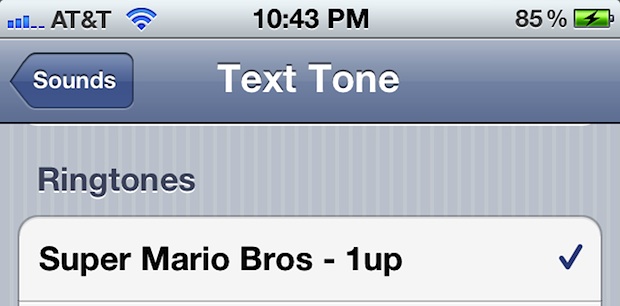
With modern versions of iOS, you’ll have many more pre-bundled message sound effects to choose from, both for your ringtones and for text message tones, so just explore your options and pick one that you like the best.
By the way, setting custom alert sound effects for individual contacts when they message you is a really good tip, since you will begin to associate that sound with that person, you will know who is sending you a message before you even see the iPhone alert on your screen. You can use a similar trick with specific contacts calling ringtone too.






cool
Have my sound set for text messages but it does not notify me if it is an iMessage because of this I miss the messages that are in text format.
How about changing the sound that plays when a message is sent and received during a conversation within the app? I hate that sound but it doesn’t seem to be customizable.
I am able to change my individual contacts to a specific text and ring tone but it only works once and then reverts back to the default. Why does it not save? Is it only for contacts with iPhone? Can I fix this?
Can I set a custom text notification sound to a contact that only has an email address assigned?
Yes, follow the “Set Custom Text Message Sound Tones Per Contact” instructions to do exactly that with iPhone. You must set the custom alert text tone for the contact (email address or number) you want to have the custom notification sound.
help my text messages only vibrate cant get a tone
[…] kick, it’s also helpful to differentiate people with auditory cues by setting unique text tones and distinct ring tones for each individual, if not for everyone than at least those on the […]
[…] you’re going to use the voice recordings as custom ringtones or text tones, you’ll need to have them under 45 seconds long. Obviously for a text tone, even shorter is […]
[…] default iOS setting for iPhones is for message alerts to chime with the text tone twice, in a two minute interval. While the repeat text message alert sounds, notifications, and […]
I did a google search wanting to know how to set the Mario Bros 1up sound as the text notification and came across this page (look at the picture they used lol) anyway, I’m still not sure how to do it
Can someone email me explaining how to do it? djspy006 @ gmail . Com
I have a few custom ringtones and have attempted to use them as text tones, but when I select them, they do not work. I get no sound. Do I need to change the file extension in iTunes to something other than .m4r (ringtone)?
Im getting the iPhone 5 and I want a specific ringtone and thanks to this website I have found it! :) BUT I was also wondering, how can I get my own choice of ringtone onto my settings so that I can choose it?
I know I turn everyone I know wanting an iphone away from them. The bill I have should cover anything i want on my phone. I agree with what “S” said in previous post.
My iPhone 4 is updated with the iOS 5, but it will not let me play my purchased ring tones from iTunes as text tones. Does anyone know why this is?
This feature is also available on iPod touch 4th generation only.
a note: generally ringtones aren’t allowed to go more than 40s. yes there are hacks to bypass that, but then they’re just that hacks.
This is a much needed feature for iOS. Very happy that they integrated it.
Lovely tip but I must say anything over 1 second long is a nuisance to the ears!
Glad to have it, but why did it take until version 5 of iOS to get this feature that has been standard on mobile phones since the 90’s?
lol do you really need to ask that question, when picture messaging wasnt available right away with the iphone and has to have a data plan to use? when my $20 phone did all of that for free…. reinventing the wheel and charging double, thats the apple way