
Check SHA1 Checksum in Mac OS X
SHA hashing is frequently used with distribution control systems to determine revisions and to check data integrity by detecting file corruption or tampering. For common usage, a SHA checksum provides a string that can be used to verify a file been transferred as intended. If SHA checksums match, the files integrity has been maintained.
This tutorial will show you how to check the sha1 checksum of a file on the Mac, but it works the same in Linux too.
How to Check SHA1 Hash of a File in Mac OS X
Launch the Terminal, found within the Applications and Utilities folder, and use the following syntax:
shasum /path/to/file
To verify a file named “DownloadedFile.dmg” on the desktop, it would be:
shasum ~/Desktop/DownloadedFile.dmg
This will output something like this:
$ shasum ~/Desktop/CheckMe.zip

ddfdb3a7fc6fc7ca714c9e2930fa685136e90448  CheckMe.zip
That long hexadecimal string is the SHA1 hash.
It may look something like this in a Terminal window:
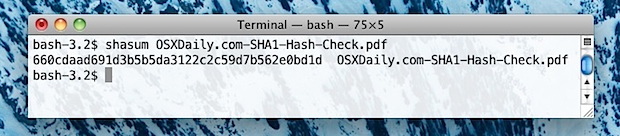
An easy way to check SHA1 files buried deep in the file system without typing out the full path, is to type the first part of the command then drag and drop the file into the Terminal window. This automatically types the path for you:
shasum (drag and drop file here)
Remember to put a space after “shasum” for this to work properly.
The default for the shasum command is to use SHA1, the most common hash type, but this can be changed with the -a flag if necessary to 224, 256, 384, or 512. Also, though SHA1 is becoming more common than MD5, you can still easily check md5 hash in Mac OS X as well with the md5 command.
Examples of Using SHA1 to Verify Files
So you may be wondering, when might you use this to verify the integrity of a file?
A practical use that Mac users may encounter is when downloading software updates directly from Apple, who lists the SHA1 hash of each file offered through their servers at the end of each downloads page. You can see such a string highlighted in the screenshot below. This sha string allows users to easily verify the integrity of their downloads either from Apple or when the file has been hosted on a third party mirror site.
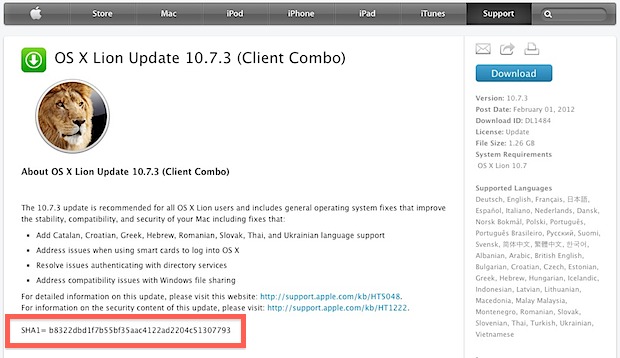
This is also how it was discovered that Mac OS X 10.7.3 had been quietly updated, and several questions about this spawned this particular post.
Using SHA1 hash strings are also an easy way to verify file transfers from peer to peer networks and to make sure a download has finished, or that a file was not tampered with somewhere along the line. By knowing the origin SHA1 checksum, you can verify your version of the file(s) in question matches, and determine if the file is indeed valid and has arrived as intended.






I find this odd. Massive long number to check, by eye, human. Is there a way to compare automatically?
One helpful analog type tip: open a text file and paste the generated hash, then put the provided hash directly below that on the next line. Because the characters are aligned, it’s incredibly easy to verify by eye.
can openssl be used to verify a .app? if so how? it doesn’t work with openssl sha1 or openssl dgst -sha256, I understand this might be because technically .app is a folder and not a file, but don’t understand what command I could use instead. any help would be most welcome :)
Is it possible to perform the checksum on the file before or without downloading the file?
[…] of this example, checking a SHA1 hash is frequently used to verify file or string integrity, which we’ve covered on several […]
[…] alternative to checking a SHA1 hash with shasum is to use openssl. Yes, the same openssl utility used to encrypt files can be used to verify the […]
ymy.be sugguests a better approach: since openssl has all sorts of hash lib built-in, it is considered to be better than the shasum approach, which is a Perl wrapper of some sha calculation lib.
[…] via OSXDaily […]
Git uses SHA1 as well
openssl dgst -sha256 %FILE%
MESSAGE DIGEST COMMANDS
md2 MD2 Digest
md5 MD5 Digest
mdc2 MDC2 Digest
rmd160 RMD-160 Digest
sha SHA Digest
sha1 SHA-1 Digest
sha224 SHA-224 Digest
sha256 SHA-256 Digest
sha384 SHA-384 Digest
sha512 SHA-512 Digest
man openssl