
Change the Default Screen Shot File Name in Mac OS X
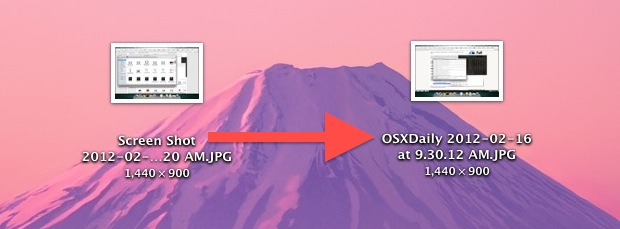
Screen shots taken in Mac OS X save to files prefixed with “Screen Shot” in the file name, but the names of screenshots can be changed to anything else. We’ll use a defaults write command to adjust the naming convention of screen shots taken on the Mac. This can be helpful for many purposes, and it’s easy to do and undo back to default if need be.
How to Change File Name of Screen Shots on Mac
This will allow you to choose a new different name for default screen shots created on a Mac, from “Screen Shot (date)” to “Custom Name (date)”, or whatever you’d like to use:
- Launch the Terminal (found in /Applications/Utilities) and type the following command, replacing “OSXDaily” with the file name you wish to use for your screen shot names
- Now restart SystemUIServer by killing it from the command line:
- Take a screen shot to confirm the file name has been changed from default to the custom name
defaults write com.apple.screencapture name "OSXDaily"
killall SystemUIServer
Only new screen shots will be effected by this change, existing screenshot file names will remain the same.
Once the change has taken effect, all new screenshots will adopt the new name, and additional captures will be sequenced just as before so they don’t overwrite one another. For example. “Screen Shot”, “Screen Shot (2)”, “Screen Shot (3)”, etc, of course conforming to the naming convention you chose.
This will not adjust the suffix of the file, which is dependent on the image format of the screenshot itself. The default is PNG, but users can change the file format of screen shots in Mac OS X to JPEG, TIFF, PNG, or GIF if desired.
Return to Default Screen Shot File Names in Mac OS X
If you want to restore to the default naming convention of screen shot files created in Mac OS X, use the instructions below:
- Open the Terminal in Mac OS X if you haven’t done so already, then type the following command
- Again restart SystemUIServer by killing it
- Confirm the file names have returned to the default by printing a screen shot to the Mac OS X desktop with Command+Shift+3
defaults write com.apple.screencapture name "Screen Shot"
killall SystemUIServer
Other than changing file names, you can also change where screen shots save to on the Mac, which can help to organize things a bit, and users can also change file type to a format other than the PNG default as well.
This changes the screen shot file names that are created automatically, of course you can rename the screen shots after the fact at any time if you want.
And yes, this method works to change screenshot file names in all versions of Mac OS X system software, from El Capitan, Yosemite, Mountain Lion, Mavericks, and Snow Leopard, and beyond.
Thanks to MacTrast for the tip.






how do you change back the screen recording default name back to normal because renaming the screenshot default name back to “screen shot” has made it so that the screen recording name is also “screen shot”
NOTE:
defaults write com.apple.screencapture name “$(date +%Y-%m-%d) $(date +%H-%M-%S)”
sets the filename to a fixed string that is the CURRENT date/time. It does NOT set the filename format to be the date/time of the time when the screenshot is taken!!
good job
Change the date format of screenshots in macOS to Year – Month – Date – Time format
defaults write com.apple.screencapture name “$(date +%Y-%m-%d) $(date +%H-%M-%S)”
defaults write com.apple.screencapture “include-date” 0
https://apple.stackexchange.com/a/363688/337553
This is exactly what I was looking for – thanks for posting!
When I take a screenshot on my Mac, I am wanting to be prompted to assign a custom filename for that screenshot right there and then.
I currently have 50 or so screenshots that I have taken from a course I am taking on Lynda.com, and I am dreading the tedious task of going through each file and renaming them to more specific filenames.
Is there a hack or code that can be written so that each time a screenshot is taken a prompt box is displayed asking me to rename the screenshot?
Much thanks in advance.
Me, too! I’ve been searching for this for years.
Help… How can I change the default screenshot name, to whatever I have written on Preview search tool at the time of the screenshot. As a function on terminal or as a script. Thanks in advance
To reset this to the default, you should actually use:
defaults delete com.apple.screencapture name
The default (when you delete the custom value) is region-specific and changes depending on the language you use for your computer.
FYI you do need to kill the SystemUIServer on Mavericks.
You don’t have to use:
killall SystemUIServer
The command takes affect right away.
I agree with Stephen, it would be great to chance the entire naming convention. I would most prefer a different way to write the date, namely YYYYMMDD.HHmm.
I would make it: perezfox_screen_20120216.1155.png, for example.
You can customize the name AND FORMAT of the screenshot names by following these brilliant directions:
https://osxdaily.com/2010/08/16/change-the-screenshot-capture-file-format/
Then you can have the screenshot names be “Screenshot”, “Screenshot 1”, “Screenshot 2”, etc. or you can change the date and time format to anything you want.
That article addresses changing the format of the screenshot itself to jpg, gif, etc. It does not address changing the format of the screenshot name. Like if you wanted all screenshots to be named in the format ss_YYYYMMDD_HH_ss.png
idk how to customize the date format, but you can get rid of the date entirely so the save as screenshot1, screenshot2, screenshot3 with this
defaults write com.apple.screencapture “include-date” 0
The tip is well intentioned but really does not solve the issue of hte long filename that comes after “screen shot” or “OSXDaily”. In other words, you still have OSXDaily 2012-02-16 at 8.22.AM.jpg or whatever file format you have chosen.
A tip that would change the entire filename would be great.
Also, Onyx allows you easily to make a change in image format (jpeg vs png vs other), whether you would like a shadow or not, the location and the first part of the filename as well. The area for these selections is in Parameters menu item in Onyx.
I would rather use this
$ps -ef | grep [S]ystemUI | awk ‘{print $2}’
25116
$kill -HUP #PID fetched from above command#
In the line…..
killall SytemUIServer
should be
killall SystemUIServer
?
Oops, you are right, thanks for catching the typo.