
Send Any File to an iOS Device from Mac OS X with iMessage
A little-known feature of iMessage lets any Mac send files to another iMessage user (or yourself) using an iOS device, and vice versa. Yes, this means iMessages can function as a full-fledged file transfer app for both Mac OS and iOS users, providing for simple transferring of files, pdf’s, text and rtf documents, movies, pictures, and just about anything else.
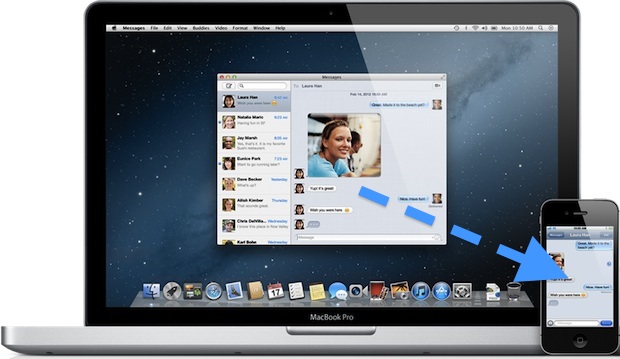
To use this awesome feature, you will need to be sure to have iMessage set up in iOS and/or the Messages for Mac client as well. Having both lets you send files between yourself and your Apple devices, but if you only have a Mac or an iOS device then you can still send files to other users through the messages apps. Once you have the necessary apps configured, using the feature is surprisingly easy, here’s how to do it:
How to Send Files Between Mac OS X & iOS with iMessage
Sending files from a Mac is just a matter of drag and drop, then opening the file in iOS:
- Drag a file from the Mac into a Messages chat window
- Click send from the Mac
- The user on an iPhone, iPad, or iPod touch with iMessages will receive the file in a familiar fashion to iChat file transfers
The iOS user is then able to open the file, be it an mp3, video, picture, whatever. This is a great feature that is easy to use and welcome for all Mac and iOS users. It can go both ways, allowing you to send files from mobile devices back to the desktop world as well.
How to Send Files from iOS to Mac OS X through Messages
There are two ways to send files from iOS through the messages app, one uses Copy & Paste and the other uses the more traditional sharing approach from the photos app:
- Use the tap-and-hold feature in iOS to access “Copy”
- Open Messages app and in a message to the user who you wish to send the file to, tap and hold and choose “Paste”
- Send the message as usual to transfer the file
Sending files through the Sharing feature is also possible in some apps like Photos, which lets you send movies and photos from the Camera Roll to a Mac.
All you need to do is tap the Share button then choose Message and select the appropriate recipient.
Any saved file from the Messages app to iPhone or iPad can be found in the Photos app or Files app, depending on what you did with it.
Use iMessage With Unsupported File Types & As SFTP Alternative
Now, what is less known is that you can technically transfer just about any file type between the two OS’s using the same technique, even obscure file formats.
This means iMessage can be used as a simple method of moving any files to an iOS device without using SSH and SFTP, although the destination folder of these files creates some limitations.
Files sent to and received by the iOS device end up at the following location:
/var/mobile/Library/SMS/
This is where the limitation comes in.
Accessing that directory isn’t possible without a jailbreak and an app like iFile to navigate around the hidden iOS file system, and moving files around within the iOS file system after the fact requires an SSH client like Prompt, in addition to some knowledge of the command line.
This makes it a useful feature for advanced users who are comfortable with jailbreaking, but for the average person sending anything other than standard media files and documents isn’t too useful.
A lingering question is now if Apple will maintain support for any file type, or if Messages will only work to handle certain file types on the Mac, iPhone, or iPad. For the sake of file sharing and convenience, let’s hope it stays.






[…] email clients won’t accept large files, even if both the iPhone and computer are on wi-fi. Sending through iMessage is slightly better, but it still won’t provide the original resolution movie, and that only […]
Wow, what a video it is! Actually nice quality video, the lesson given in this video is actually informative.
[…] to iOS and OS X that lets you send unlimited text messages, pictures, videos, documents, and even files, between other iMessage users. Though you probably know at least a few people who are using […]
[…] How to send any file format to iOS devices using Messages for Mac [iDownload Blog via OS X Daily] […]
Kinda pointless if I can’t get the file without a jailbreak.
You can get to pictures, videos, music, pdf, text, documents. The only files you can not access are those of unsupported formats, and that is simply because iOS doesn’t know what to do with them.
Hello osxdaily,
My name is Dany Lisiansky and i’m the one who discovered this feature, not iDownloadBlog.
This is the exclusive article (which has the original video I made):
http://www.iphoneil.net/?p=87011
You can also notice that iDownloadBlog itself refers to iPhoneIL as the source of the article.
Have a good week,
Dany Lisiansky