
Enable (or Disable) Read Receipts in iMessage for Mac

Read Receipts show the sender of a message that a message has been delivered these are enabled by default in iMessages for iOS, but they are disabled by default in Message for Mac. If you’re interested in having the read receipts sent along with each message received on your Mac, you can toggle a setting to do so.
Note that the sender (and recipient) must have iMessage active and enabled, as this setting does not impact the other instant messaging protocols from the Messages app, be it AIM or Facebook.
How to Enable or Disable Read Receipts in Messages for Mac
Here is how to enable read receipts for messages sent from the Mac:
- Open Preferences in iMessage, and select the “iMessage” or “Accounts” tab
- Select the iMessage account from the left
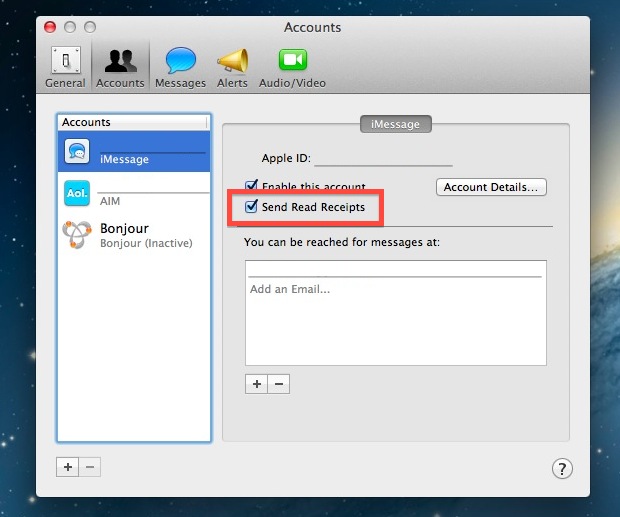
- Check the box next to “Send Read Receipts” to enable or disable Read Receipts on Messages for Mac
- Close out of iMessage Preferences
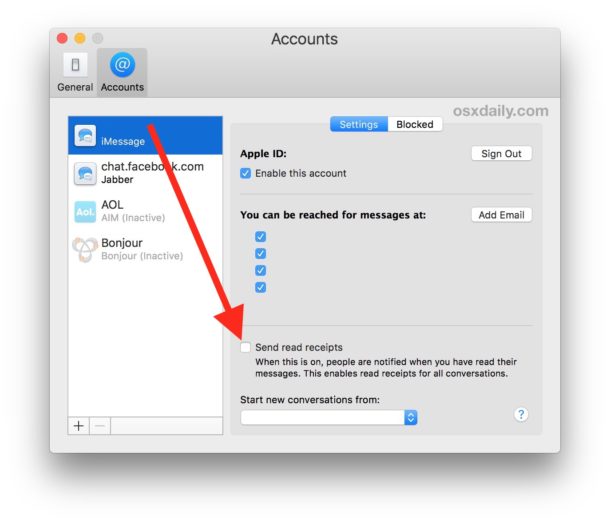
The next messages received on the Mac will no longer send out the “Read” or “Delivered” message to users who are also using the iMessage protocol to contact you (whether it’s from another Mac, iPhone, iPad, iPod touch, whatever).
Of course, to turn the receipt feature back off again simply go back to the app settings and uncheck the box. Whether you like the feature or not is really a matter of personal preference, though many individuals choose to turn it off for privacy purposes, while others want it on for acknowledgement. For the time being, there is no way to specify read receipts for specific contacts, though that would be a great option for many of us.
There is slight variation in how the setting may appear, older versions of Messages for Mac may look like this:
This feature obviously requires the iMessages for Mac client, which is included in Mac OS and Mac OS X by default.






So, just found this b/c I *KNEW* this USED TO BE a thing,b ut when they dropped the “i” and made it JUST “Messages” they stripped all of the functionality, inclouding this?! How the HECK do you do this in 2020??? Is it ALWAYS ON or ALWAYS OFF on macOS now? The longer Steve is dead, the wrose this company becomes. Tim is a FRAUD!
The ability to disable read receipts is the same. Go to Messages preferences, choose iMessages, then disable “Send Read Receipts”
[…] Receipts can also be turned off for the Mac iMessage client if […]
It erks me it has to be enabled like on iPhone. It should be the otherway around.
Is there a way to completely delete the iMessage conversation.Clicking on the name in the Source list only deletes the name and conversation from view. I can’t seem to find a setting that will completely delete the chat from my Documents folder.