
How to Stop an App Downloading in iOS
If you’ve ever started to accidentally download an app of something on an iPhone, iPad, or iPod, or you just decide you want to stop an app download for some other reason, you can pause and stop downloads onto iOS devices that come from the App Store.
This tutorial will detail how to stop a download from the App Store in iOS. Additionally, we’ll show you how to pause a download from the App Store and how to resume that download to iOS again.
The stop trick works to cancel the download of any app in any version of iOS, it works the same on all iPhone, iPad, and iPod touch devices too.
How to Stop App Downloads on iPhone and iPad
- When an app is downloading in iOS… go to the Home Screen of the device and find the app that is downloading
- Tap on the app icon and hold until the icons begin to jiggle, then tap the (X) button to stop the download and remove the app from the home screen
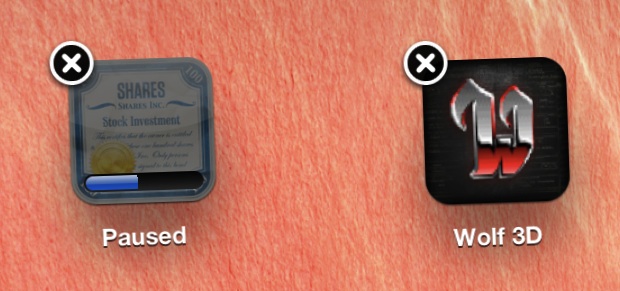
What about passing App Store downloads on iPhone and iPad instead of stopping them completely?
Similarly, if you just want to pause the download instead, just tap on the icon while the download progress bar is active.
You can resume a paused App Store app download by then re-tapping it, that will begin the download again.
And yes you can use this to also pause app updates in iOS, as well as any other download from the App Store.
Neither stopping and deleting or pausing and resuming removes the app from your purchase history though, meaning you can redownload it again at any point for free either on the same iOS device or a different one attached to the same Apple ID without purchasing again, the same way you would with an accidentally deleted app.
This is a great tip for downloading temporarily free non-universal apps for the iPhone on an iPad or vice versa, that way the app is stored within the App Store’s Purchase History but it’s not taking up any space on a device it wasn’t intended for.






Accidentally got this but can’t cancel
Charging me weekly
This doesn’t help on stop an unwanted update being downloaded while being able to use the existing version of an app.
Bad updates come out all the time, but the stupid iOS doesn’t let user stop it as if the user has no right to stop it…. :(
Great tip. Thanks Mr. Horowitz.
More dross. thanks
Do you have anything meaningful to add or suggest, or are you just going to post worthless comments?
I recommend ignoring or banning the comment trolls, don’t waste the energy responding.
.matt is this being named at me? I write what I feel, sorry you feel that way. Please tell me just what t is OK!