
How to Delete Site Specific Cookies in Safari for iPhone or iPad
You can delete specific cookies for any website from the Safari web browser on iPhone and iPad fairly easily. Though the setting to do so is buried a bit, it’s super easy to use and provides a lot of control, offering a complete list of all cookies stored on the iPhone, iPad, or iPod touch, and allowing you to edit or remove any cookies on an individual basis. The process is the same in all versions of iOS, as we will detail below.
How to Delete Specific Web Site Cookies & Data in Safari for iPhone and iPad
If you want to remove a cookie and website data for a specific website URL in iOS, here is what you’ll need to do:
- Open the “Settings” app and tap on “Safari”
- Scroll to the bottom and tap on “Advanced”
- Tap “Website Data”
- Tap “Edit” in the upper right corner, then tap the red (-) minus symbol next to the individual website you wish to remove cookies from followed by the “Delete” button
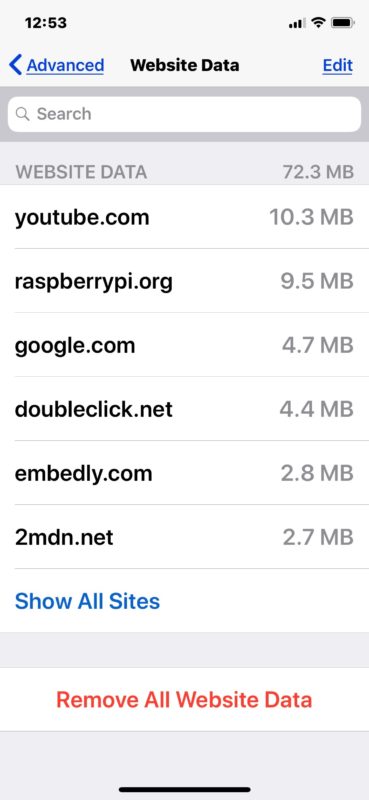
You can repeat this process to delete other specific site cookies and website data as needed. Tap on the “Show All Sites” button to see all other websites with data if you’d like to delete those.
Optionally, you can also use the “Remove All” option at the bottom of the Website Data screen as well to delete all cookies and website data for all websites in Safari.
While in the Website Data screen, you can also choose to swipe to the left on individual site names and then tap on “Delete” from there to delete specific website data and cookies too.
This process is the same for all iPhone, iPad, and iPod touch devices, regardless of what system software version they are running.
Exit out of Settings when finished, you can refresh the site in question within Safari to verify the removal worked.
You can also choose to remove all website data and cookies from that settings panel, as indicated by the humungous red button at the bottom of the settings window. If you’re looking to remove all site data, there is a faster way to clear all cookies, history, and cache however that will ditch all browsing data in one fell swoop.
Why might you want to delete an individual sites cookie? First and foremost are privacy purposes and to remove personal data from a website, but a lot of sites also use cookies to track your behavior and then adjust things based on what you do. For example, if you are booking hotels or flights from an iPad or iPhone, many travel sites use cookies to track your searches and adjust pricing based on the frequency of searches and perceived demand. In that case, deleting cookies specific to the site can mean the difference in hundreds of dollars for final bookings.
If you are looking to just briefly avoid cookies for some reason, another option is to temporarily use Private Browsing mode so that no cookies, history, or caches are stored on the device. This has the same effect as deleting a cookie in that it starts a fresh browsing session for any specific site, except that any old cookies for those domains will not be removed.
This feature has been around for quite some time, and just in case you have a notably older device then here is what the Safari site-specific cookie menu looks like in an older iOS version on an iPad:
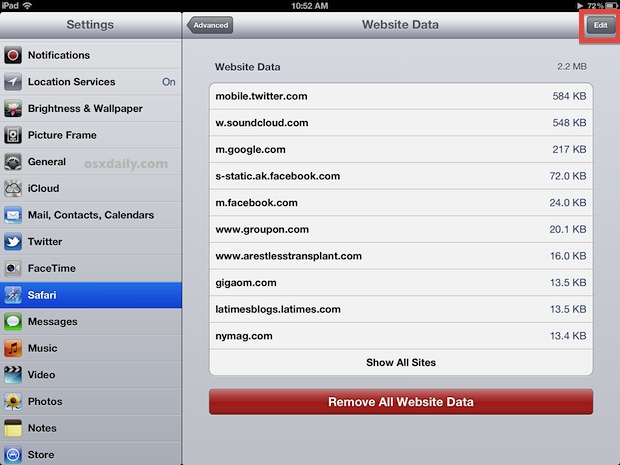
As you can see you’ll find a list of domains for each batch of website data and cookies, and you can edit or remove any of them as needed there too.
If you know of any other methods of deleting and removing website specific data on iPhone and iPad, share in the comments below!






Both my iPad and iPhone are iOS 11.0.3. iPhone 8 does not yet have a problem. iPad Air 2 has seven site specific zombie/super cookie remnants that will not delete. I’m tired of writing to Apple about it. They just don’t care enough to fix the problem. Can’t get into the OS to find and delete the corrupted file. Can’t find a software that will do it for me. Aggravating to say the least.
I have the same issue as Lily and it also seems to save cookies in private browsing mode
the re are two cookies that I CANNOT remove on safari’s advanced settings.
I’m on iOS 10.3.3 how and why can’t I remove them?
although it’s on 67kb, the point is they cannot be removed.
I e tried, resting, factory reset, and just palin deleting it.
any help advise would be appreciated.
This seems to only remove some data, but not cookies.
How do you alphabetically organize the cookie list so that you can quickly find specific cookies
I wish you could BLOCK specific sites from leaving cookies, like Facebook for example. I don’t use their service and don’t want them tracking my web habits.
I guess we could always use Private Browsing but that is not the solution I am hoping for, maybe iOS 6 will deliver some details here.
Good trick, but if you’re like me and you never use the iPhone for anything that needs to be personalized you can prevent Safari from storing any cookies at all by going to Settings > Safari > Accept Cookies > Never