
Rename Terminal Tabs in Mac OS X
 Having a bunch of Terminal tabs named “bash” “bash” and “bash” isn’t too useful or descriptive. Instead, you can rename each tab individually to something more specific by using the Terminal inspector.
Before doing so, keep in mind that tabs default to rename themselves automatically based on the currently running process, thus if the terminal tab is running ‘top’ it will rename itself as ‘top’ and so forth. Choosing to rename the tab this way prepends the process name within the tab name.
How to Rename Terminal Tabs on Mac
Remember, you can open a new Terminal tab by hitting Command+T within the Terminal app. After you have a few tabs open, here’s how to rename a tab in the Mac OS X Terminal:
- From any multi-tabbed Terminal window, hit Shift+Command+i, or pull down the “Shell” menu and select “Edit Title” to bring up the Terminal Inspector window
- From here you can either rename the tab name, or even the Terminal window itself
- Repeat with other tabs / windows as desired
Here’s an example of what this may look like with renamed and more descriptive tabs:
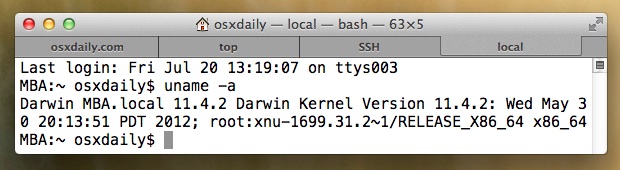
Name tabs by location, category, purpose, usage, whatever you go with will probably be easier to identify at a glance than the default option, particularly if you have a bunch of shell windows or tabs open that otherwise aren’t too descriptive with their naming convention..
Thanks for the quick tip AJ






A much better solution is to use command line to open the new tabs with a name using the ttab utility:
ttab -t ‘myawesome terminal name’
Exactly what I needed 2 years!..
Useless solution. Moment you hit any command or even enter the title changes back to original. Facepalm.
Works for me, and works to change and rename Terminal tabs and Terminal window names for everyone but you Dipesh. Interesting, make what you want of that, possible PEBKAC situation?
I don’t think you understand what dipesh was saying – he’s absolutely correct.
This is a pretty useless feature. Once you run a command on the window the name reverts.
Here’s a quicker way to do it once you have added it into your ~/.bashrc
# Set the title of the terminal window
# Usage: settitle
function settitle() {
echo -e “33]0;$107”
}
oh great, the comment functionality stripped away important parts. oh, c’est la vie.
I’d be interested in seeing it, pastebin?
see https://apple.stackexchange.com/a/370287/118237 for an example