
Control Which Apps Can Access Contacts Information in OS X
If you’re running the newest versions of OS X you’ve probably noticed that when apps attempt to access your Contacts list you will get an alert like “Application would like to access your contacts”, giving you the ability to allow or deny access. The apps that make the Contacts requests then get stored in a privacy list, providing for an easy way to later control which apps can and can’t get stored contact information. Here’s how to access and adjust that list:
- Open System Preferences from the Apple menu
- Choose the “Security & Privacy” panel and click the “Privacy” tab
- Select “Contacts” from the sidebar list, and check or uncheck applications to allow or deny access to Contacts
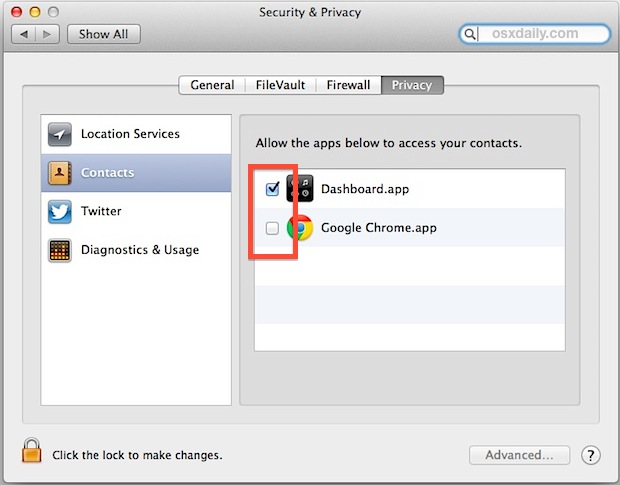
This is the same Contacts that are on your iPhone and iPad, assuming you use iCloud to sync the information with your Mac. Most apps just use Contacts for your own information, for things like auto-fill and auto-completion where it’s handy to automatically place name, email, and phone numbers into forms.
This is an added security feature that arrived with recent versions of OS X and between GateKeeper and this you shouldn’t have to worry much about any nefarious apps accessing or abusing personal data.






No, I use Dashboard many times a day. It’s the easiest way to store frequently used monitoring tools, status outputs and achieve basic information retrieval without disturbing your working session. It’s superior to the method used by other operating systems which place these mechanisms on a background layer, underneath all windows. What would you suggest replacing all of that with?
Uh yeah. Dashboard.
Dashboard is so 2003. Bloatware, memory hogger, distracter, toy-app.
Time to get rid of that dated part of OS X.