
Rearrange Order of Mail Accounts and Mailboxes Easily on iPhone, iPad, iPod touch
 Have multiple inboxes and different mail accounts set up on your iPhone or iPad? Changing the order of your mailboxes is easier than ever in iOS, you don’t even have to go into Settings with new versions of the software. Instead, if you want to arrange the order of mail accounts and mailboxes in Mail app, you can just use the following quick tutorial right from the Mail app to have them appear however you’d like.
How to Change the Order of eMail Accounts & Mailboxes in iOS Mail
This works the same on all iPhone, iPad, and iPod touch devices, as long as the iOS version is even somewhat modern it will allow this arranging feature:
- Open the Mail app if you haven’t done so yet, then tap back into “Mailboxes”
- Tap “Edit” to enable the ability to change the mailboxes
- Now tap and hold on a mailbox, then then drag mailboxes as desired into the order you wish them to appear in
- Tap “Done” when finished
Here’s what this looks like in modern versions of Mail app, notice the little handlebars on the side of the inbox and mailbox names, those indicate they can be dragged up or down to change the order in which they appear:
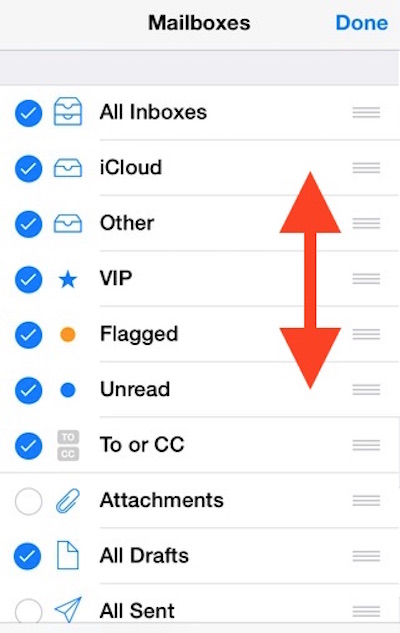
This is a great change for those of us who manage multiple inboxes, since it allows you to keep your most important mailboxes on top.
Indeed this feature exists on prior releases of iOS too, and this is what the rearrangement of mailboxes looks like in the pre-redesigned iOS Mail app, it may look a little different nowadays but the function is identical.
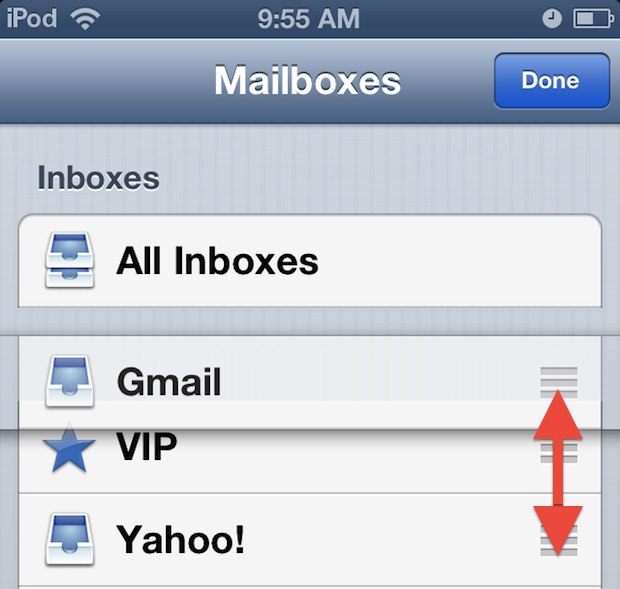
Managing a ton of email is never fun, combine this with VIP lists in OS X and iOS and it gets quite a bit better though. As long as the same mail accounts are used with iCloud, the VIP lists will sync from the Mac out to iPad, iPhone, and iPod touch, and vice versa.
Thanks for the tip Mithilesh!






Worked, thanks
How can I get my emails to show when I open the app. Right now it gives me a listing of all my accounts
I know this is 4 years too late, but in case anyone else comes here wondering that same question I have a solution. The only way I could find to reorder them is to go into Settings -> Accounts and Passwords and then delete every account and re-add them in the order that you want them to show up in your send list. Besides this I couldn’t find a good way to re-order them.
Great tip! Thanks!
Don’t I feel silly so easy spent ages trying to figure out how to do this before looking here thank a lot great help
While I was able to reorder the email address it did not change the order of the address when choosing from send from field while composing an email. Is there any way to change the order or email addresses there?
It may be good to point at they need to hold on the 3 horizontal lines in the row of the mailbox they want to move. Just tapping within that box didn’t work for me until I clicked on the lines. That may be more intuitive to some but was lost on me for a minute.
Very useful and great tip. Thanks a lot.
Many thanks for the help! Have an even better day.
Simple and Excellent tip. Helped me a lot.
Thank you!!!!!! This tip is SO very helpful!
Thank you sooo much for posting this! What a great tip – I’ve been wondering for quite some time! Thanks again.
What about having a separate home screen icon for each mail inbox?
FINALLY!!! Someone who knows what they are talking about. I have tried many different things that people suggest but this WORKS!! Bravo to you.
That is an awesome tip- with multiple email accounts I had no idea such an easy method existed to put them in a workable order. Thanks for the tip!
Oh now THAT is useful! I’ve been wanting to be able to re-arrange my eMail addresses into a more meaningful order for years.
~W
I couldn’t drag anything. Can you help?
Call me dumb but I didn’t even know you could have multiple inboxes, great idea hidden in what looks like a good tip. Thanks guys.