
Open a Files Enclosing Folder from All My Files in OS X
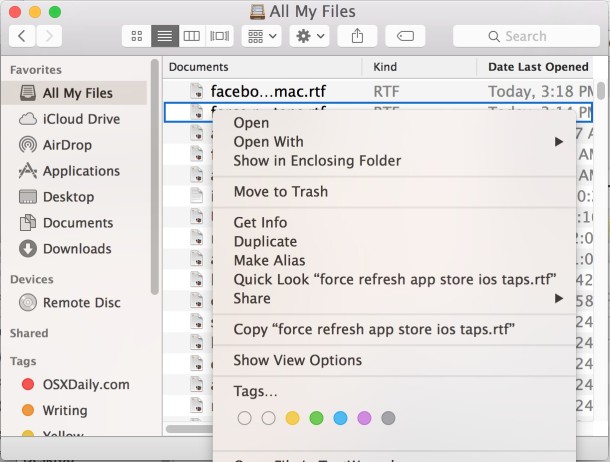
All My Files is one of those features of Mac OS X that was somewhat controversial at first, but once you start using it often, you can stop sorting files yourself in the Finder and just let All My Files, search, and Spotlight manage documents instead.
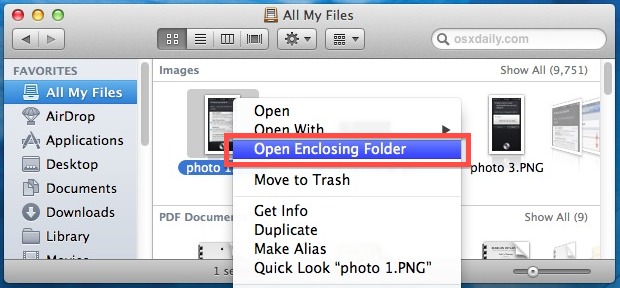
Nonetheless, there are still times when you’ll want to know where a file is actually located in the file system of OS X, and there’s a very easy way to jump to a file or items original location right from All My Files on the Mac:
- Right-click a file and select “Open Enclosing Folder” (labeled as “Show in Enclosing Folder” in modern OS X)
You’ll be immediately transported to the folder containing the file you selected, with the originally selected document highlighted.
It doesn’t matter how the item is named in the menu option, the function is the same, it will open the selected item in it’s original location on the file system of OS X, where ever that may be.
This is not to be confused with the separate keyboard shortcut to jump to the parent directory of the current file or folder, which is also labeled as “Enclosing Folder”. That shortcut is dependent on the current directory, not the currently selected file.






Oh yes and I’m old school and would love to see a few more correctly placed apostrophes in OSX Daily. I get the argument that it does not really matter but I disagree…
Within the finder ‘view’ drop down menu there is an option to choose ‘show path bar’. Then when you highlight a file you can just double click the enclosing folder or any of the folders leading down to the selected file as the whole path is displayed at the bottom of the finder window
Good tip… and seriously who cares about the lack of an apostrophe? Get a life people, this is a site about Apple not the online syllabus for English 621. LOL.
ML OS X 10.8.2 does not have that verbiage, instead “Show Original”…seems to do the same thing though…Thx
Highlighting the file and pressing Command + R is the equivalent.
“…I’m afraid “a Files” or similar is very distracting…”
Anne at 1:36 pm is referring to the third word in the article title, and she is correct.
The article title should be:
Open a File’s Enclosing Folder from All My Files in OS X
Sorry to pick you up on this, but could you *please* learn to use the apostrophe possessive form (e.g. file’s)? I’m afraid “a Files” or similar is very distracting and just looks uneducated and detracts from your advice.
It’s labeled “ALL MY FILES” not “ALL MY FILE’S” why don’t you open your Finder and find out yourself.
Cool, trick works for Alias files and folders too btw
I’m running ML on an early 2008 MBP and do not have this feature at all.
You have to be in All My Files or another Smart Folder, it’s not going to be anywhere else.