
Send an iMessage as a Text Message Instead from iPhone
 iMessage is an undeniably great service for free messaging between iPhones, iOS, and Mac OS X, but it’s not flawless, and sometimes an iMessage will fail to send if you’re on a low cellular signal or have insufficient bandwidth. Additionally, there are times when trying to send a message through iMessage is slower than sending text messages, or they won’t deliver at all due to some unforeseen error. If you’ve ran into the problem where an imessage won’t send, you’re familiar with the infinite “Sending” bar that never moves until you’re back in a better cell reception area. But you don’t have to wait forever to send out your message, because if you have any cellular signal at all on the iPhone you can fall back to sending texts.
That’s right, iPhone users can choose to selectively send an SMS text message instead of the iMessage to the recipient. This can be done on a per-message basis at any time, but it’s particularly handy if you find an iMessage is unable to send for whatever reason with a “Send Failure” message or otherwise.
How to Send SMS Text Messages Instead of iMessage
To send a traditional text rather than through iMessage on a per-message basis, just do the following on your iPhone:
- Tap and hold on the message you want to send as a text
- From the pop-up menu, select “Send as Text Message”
Here’s what this looks like:
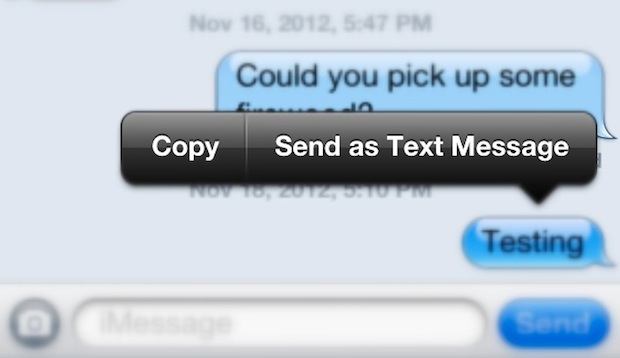
Note: With iPhones that have iOS text-to-speech enabled you will need to tap the > arrow button to reveal this additional texting option.
The message should immediately send as a text, which can be identified as such because the speech bubble will appear as green rather than blue. SMS has the wonderful advantage of working under just about any reception situation, and of course it works when Apple’s iMessage servers are down too.
Re-send iMessages as Text Messages from iPhone
You can use this trick to re-send any iMessage as text message as well, which is great if an iMessage fails for some reason but you want to force send a text message along anyway:
- Tap and hold the iMessage and choose “Send as text message” from the options
This trick works to send imessages as text messages and to re-send imessages as text messages on iPhone, and it works on the latest versions of iOS as well as the older versions too.
Do be aware that by sending messages as text SMS rather than over iMessage you man incur charges with your cell provider, depending on what your text messaging plan allows for. Though many carriers offer unlimited texting plans, many users have downsized their general SMS plans if not canceled them outright, and began to rely instead on iMessage exclusively, which is free. Obviously that has the benefit of reducing a phone bill, but it’s possible that your cellular carrier will start charging you for each sent text messages on a per-SMS basis, which can add up quick to an expensive bill if you’re not cautious. Ultimately that potential just means you should be cautious of sending messages as texts like this, since even if you have unlimited SMS the recipient may not.
This appears to be a fairly new iOS feature, and you shouldn’t have to use it often unless you decide to, or unless you’re frequently in areas with bad cell coverage. iMessage does go down sometimes but it’s fairly rare, and a more likely cause of imessage issues is that the user somehow didn’t set it up properly to begin with.
Finally, it should be pointed out this is only possible on the iPhone because the iPhone has a traditional cellular carrier plan to send texts through the SMS protocol with, while the iPad can send iMessages, it does not have the ability to send SMS texts without the use of an app like Skype.
Great tip from @kyledettman, give us a follow on the Twitter too.






Only works if the iMessage has send failure.
I already tried turning it off on settings, and turning my wifi off.
But I found a part solution:
I wanted to text my friend but the last message she sent was from her ipad which was an imessage. However her phone isn’t an iphone. So I tapped on her icon at the top, clicked info, and then the > button which takes you to her full contact, pressed down on the Message button and was able to select her phone (text) as well as her email (imessage).
However it didn’t work for my sis who has an iphone phone. But I just tried something with her and it worked:
Turn off your wifi and send the person an imessage (obviously it won’t send send). Then long press on the message and it should come up with an option to send as text message.
2019 and this is still a problem. They don’t even have this feature any more. I truly HATE Apple. I just wasted an hour driving yesterday because iMessage would not send an SMS and didn’t even let me know of the failure until I got home.
I have a friend who has an iphone but rarely is in a place where he can get data – so if I send him an imessage he doesn’t get it until he is in data range – and then his phone goes mad.
Ideally I need to be able to select individually whether I send people text or imessage …. he gets really pissed off with me for sending him imessages and doesn’t seem to get that it is not my decision.
I know – blue / green – but who thinks of that when you’re in a hurry.
Unfortunately, the option to send as an SMS is only available when iMessage thinks it hasn’t yet delivered the message. What used to happen to me is that sometimes, the Apple software would mistakenly think a number belonged to an iPhone and send a message via iMessage and it would disappear into the void forever. at first I thought it was only with people who had had iPhones and changed to Android, but I later discovered it happened to people who never used iPhones. When you send critical messages that never arrive, it more than cancels out any convenience conferred by the system. I had to turn off iMessage on all my devices in order to make texting work. Unfortunately, I have recently missed some very important texts that people sent me and after lengthy troubleshooting, I discovered that they were being delivered only to an old mac mini that I’d had unplugged for four years and had recently resurrected to act as a media server. Why this happened to some messages, I don’t know but any software that interferes with something as important as the ability to use SMS messaging should never have been released into the wild. Clear instructions and a simple interface for managing this potentially useful software would go some way to reducing the risks associated with using it, but making things that obvious is not the Apple way.
Please why so far the program did not work I hope to respond quickly I have sent you all the required papers and everything I have full has been more than two weeks and so far the program is stopped
I know this is an older post but still want to see if people are able to the same using their new ios versions. I m using ios 10 where by tapping the message cant get the option to send the messages as text. If abyone knew trick would be helpful.
Thanks
Found this from another forum:
Disable iMessage to Send as SMS
1 Tap the Settings app.
2 Select the “Messages” option.
3 Set the “iMessage” toggle switch to the “Off” position.
I tried tapping and holding down on my Iphone 6s to text message.I never git the send as text message. Only cut, copy, paste,share and forward
Trying to set my phone up to text message only. any help
I have iphone 4 s, but with a Aldi provider and i get charged a connection fee to apple each time it wants to send an imessage. Not good. Text messages are only 12 cents but connection to apple is quite dear. Wish I could turn off imessage. You have to try and send it before you can tap and change to text message. Connection fee already charged.
Messages are not received by receipients
Doesn’t work
Can I text people with Samsung phone
So mine doesn’t even attempt to send and then not get delivered. Before sending, I get the message that iMessage has to be turned on. I don’t want it on. I hate it and don’t want to use it ever for any reason. It has been off for as long as I’ve had an iPhone. But suddenly, for only one friend, it is insisting that I turn it on, even though I have had SMS text conversations with this person for years. I turn it on. It still won’t deliver. It won’t try to send and then give me the option to send as a text. There is no “Send as SMS” toggle switch in my Settings menu. What the heck do I do now?
I text daily to my daughter who has an android. Suddenly she gets none of them unless u change each one to text. This is BS
Thanks, very satisfying.
My iMessages are working fine for most of my contacts. But between three of my contacts, 2 being my kids and 1 a friend, all with iPhones, and none of them being new or changed out recently, I am constantly having to hit “send as text message”. But to no one else. What is going on? I’ve found other blogs saying it’s an Apple problem, or it’s when an iPhone is texting to an android phone or above stating if you didn’t set your phone up correct. We’ve all had our phones forever and I just started having an issue. My friend has the same issue texting me back from her iPhone. What is wrong?
I did that and now it won’t switch back to imessage !!! My imessage is still on and it’s only doing this with one conversation, i turned my phone off & on and change it from Mobile to iphone and it still won’t go back to imessage !!
what is your os?
I did this and now it won’t switch back but my settings say imessage is still on. and it’s only within this conversation….help!!
iMessage only works for me when I am on WiFi. I use Optus and it has never worked for me. Then again I think my .ipcc file is broken because tethering never worked either.
As far as I can tell, you can’t turn off iMessage for people unless you remove their email address from the Contact, or go back to the old Nokia way of doing things with multiple entries for each person.
This is a function since iOS 5, and it only works when the message is sent but not delivered.
I’m having the same problem as Jim Upchurch.
It’s sending to the iMessage account on my wife’s iPad, but I need it to go to her (non-iPhone) phone!
It only works when the message is sent and not delivered. (There should be no loading bar at top, and it shouldn’t say Delivered under the bubble)
Does NOT work for me. I can press and hold the blue balloon until forever, and all I see is “Copy.” iPhone 4 running i)S 6.01. Is there some other setting I have to have turned on?
iMessage is now back up!
This was a feature of iOS 5. It was introduced with iMessage.
OK that is a great trick and works awesome. Question though: how do you switch the conversation back to using iMessage?
You don’t need to change it back, it’s a one time kind of thing.
Also, this isn’t a feature just from iOS 6 onwards, I’ve been using it since the beginning of iMessage.
Wasn’t it just a jailbrek tweak prior to iOS 6?