Subscribe to OSXDaily

Subscribe to RSS Subscribe to Twitter Feed Follow on Facebook Subscribe to eMail Updates

Shared on Facebook

Shop at Amazon

Ad

OSXDaily on Facebook

Search iPhone 4S

New iPhone 4S Commercials Focus on Siri: “Road Trip” and “Rock God”

Feb 9, 2012 - 1 Comment

Apple has started to air two new iPhone 4S commercials that focus on Siri. The first ad is titled “Road Trip” and features a young couple winging a road trip with the help of Siri. The second ad is titled “Rock God” and features a teenagers journey with music, aided by none other than Siri. Both follow the same recurring theme as past iPhone 4S commercials and have the same background tune. You can watch both of them below.

As usual with Apples commercials, the objective is to show how people interact with the iPhone and Siri in real life situations. Although they aren’t as fun as the classic Santa Siri ad, they both do a good job of conveying how useful Siri is for getting directions, finding food and events, retrieving information, sending text messages, and many other daily tasks.

These ads started to air earlier in the week, but weren’t posted online until this evening.

How to Use iPhone 4S on T-Mobile

Jan 28, 2012 - 9 Comments

T-Mobile iPhone 4S

The iPhone 4S might not be offered officially for T-Mobile use, but if you buy an unlocked device and set it up properly, you can use the iPhone 4S and Siri on the T-Mobile network without incident. In fact, over a million iPhones are already on the T-Mobile network, and the company is going to actively support unlocked iPhone devices on their USA network due to immense demand. If you want to use an iPhone 4S on T-Mobile, here is everything necessary to do that.

Requirements:

  • Unlocked iPhone 4S bought from an Apple Store without a contract, intended for AT&T use
  • A computer with iTunes
  • Wi-Fi with internet access
  • The original AT&T micro-SIM that came with the iPhone 4S
  • An activate T-Mobile Micro-SIM card

Assuming the requirements are met, read on to get started.
Read more »

iPhone 4S & iPad 2 Jailbreak Tool Absinthe Updated to 0.3 [Download Links]

Jan 23, 2012 - 9 Comments

Absinthe A5 Jailbreak The A5 jailbreak tool Greenpois0n Absinthe has been updated to version 0.3, the third release is relatively minor but includes a few bug fixes and adds support for Linux. As before and as the name implies, the app focuses on jailbreaking A5 based hardware only, meaning the iPhone 4S and iPad 2, both of which must be running iOS 5.

If you already are jailbroken with the Abinsthe utility, v0.3 offers no advantages to you and does not need to be run again. If this is the first time you’ve run the tool, follow our guide on how to jailbreak iPhone 4S or iPad 2 with Absinthe.

Download Absinthe 0.3

If you don’t have an iPhone 4S or iPad 2, you can still use redsn0w to jailbreak iOS 5.0.1.

Greenpois0n Absinthe A5 Jailbreak for iOS 5.0.1 Updated to v0.2 [Download Links]

Jan 21, 2012 - 56 Comments

GreenPois0n Absinthe A5 Jailbreak The Greenpois0n Absinthe A5 jailbreak utility for iPhone 4S and iPad 2 on iOS 5 has been updated to version 0.2, and now includes a Windows release alongside the Mac OS X version.

In addition to bringing the jailbreak to Windows PC’s, the new version aims to resolve some of the earlier database problems, white screen errors, and white icon errors that some users encountered during the process. If you had problems with the first version of Absinthe and gave up on jailbreaking, try again with this version. If you’re already jailbroken, you don’t need to bother and this version doesn’t offer any changes to you.

Instructions on how to use Absinthe A5 for jailbreaking are the same for both Mac and Windows PC’s, and continue to only support A5 hardware, including iPhone 4S with iOS 5.0 or iOS 5.0.1, and iPad 2 with iOS 5.0.1.

Download Greenpois0n Absinthe A5 Jailbreak v0.2

After the jailbreak has finished on the device, if you hit an error remember to enable VPN from Settings > Network to cause the reboot.

How to Jailbreak iPhone 4S & iPad 2 on iOS 5.0.1 with Absinthe

Jan 20, 2012 - 92 Comments

Absinthe Jailbreak for iPhone 4S The newly released and highly anticipated Absinthe A5 jailbreak is the first public jailbreak for iPhone 4S users and the first jailbreak for iPad 2 with iOS 5. If you’ve been waiting for an untethered jailbreak for either device with iOS 5, this is it, and it’s very easy to use. Absinthe is compatible with iPhone 4S or iPad 2 running the following iOS builds:

  • iPhone 4S iOS 5.0 – build 9A334, iOS 5.0.1 builds 9A405 or 9A406
  • iPad 2: iOS 5.0.1 – build 9A405

Backup your iOS device before proceeding, you can do this manually with iTunes.

Jailbreak iPhone 4S or iPad 2 on iOS 5 using Absinthe

  • Download Absinthe A5 tool – (Mac OS X) (Windows)
  • Connect the iPhone 4S or iPad 2 to the computer
  • Launch Absinthe and click on “Jailbreak” and let the device sit and run the jailbreak, this may take a while
  • Jailbreak the iPhone 4S with Absinthe

  • When the jailbreak is finished, you’ll see an Absinthe icon on the home screen, tap on that to load the Greenpois0n site and download Cydia

The device is now jailbroken. This is a fully untethered jailbreak, meaning you can reboot at will without the need for boot assistance from an application or computer.

Troubleshooting: If you see an “Error establishing a database connection” error during the process, just wait it out and try again, or start a VPN tunnel through Settings > Network > VPN > ON (via @pod2g). The Absinthe Greenpois0n servers are swamped by the initial demand but things should even out shortly.

Absinthe Jailbreak for iPhone 4S & iPad 2 Released [Download Links]

Jan 20, 2012 - 59 Comments

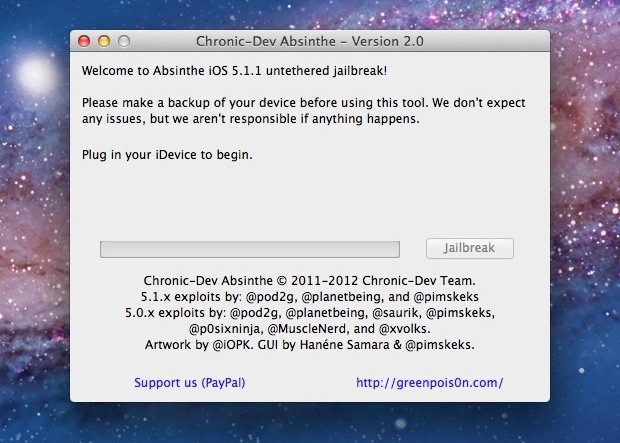
Absinthe Jailbreak The hotly anticipated jailbreak for iPhone 4S and iPad 2 is finally here, providing an untethered jailbreak for either A5-based device running iOS 5.0.1. Put together by the Chronic Dev Team who are known for making Greenpois0n, the utility is called Absinthe A5 and it is hot off the presses.

Backup your iPhone or iPad before using Absinthe! This is an early release jailbreak and could have some bugs to iron out still.

Download Absinthe A5

A Linux version will be released shortly and we’ll update when links are available.

Not sure what to do? Read our guide on how to jailbreak iPad 2 or iPhone 4S with Absinthe for iOS 5.0.1, it’s very easy.

Specific compatibility with Absinthe is as follows:

  • iPhone 4S: iOS 5.0 (9A334) and both builds of iOS 5.0.1 (9A405, 9A406)
  • iPad 2 Wi-Fi, GSM, CDMA: iOS 5.0.1

Again, this is for A5 CPU hardware only, other devices can jailbreak iOS 5.0.1 with Redsn0w.

The Dev Team warns iPhone 4S users who want a software unlock to stay on iOS 5.0 or build 9A405 of iOS 5.0.1. There is no expected release of an accompanying software unlock.

How to Activate an Unlocked iPhone 4S

Jan 9, 2012 - 7 Comments

Activate an Unlocked iPhone 4S

If you buy an iPhone 4S off-contract from Apple, the phone comes unlocked. This means the iPhone can be used on any compatible GSM carrier as long as you have that networks micro-SIM card, and the device is activated on that network. This guide will show you how to activate the iPhone 4S for use on other networks.

Important: If you don’t own an iPhone 4S yet but you plan on buying an unlocked iPhone 4S in the USA, be sure to buy it directly from Apple and not from a carrier. Buying from a carrier locks it to that carrier even if you pay full price, while buying off-contract from Apple is unlocked from all carriers. This is the only guaranteed way to get an unlocked iPhone 4S in the USA.

Activating an Unlocked iPhone 4S

This has been confirmed to activate an unlocked iPhone 4S on any other compatible network:

  • Be sure to have available wifi and internet access
  • Remove the original AT&T micro-sim card
  • Plug in the new carriers micro-SIM card
  • Turn the iPhone on with the new sim card inserted, don’t do anything else on the phone
  • Connect the iPhone to the computer by USB
  • Launch iTunes
  • Let iTunes find the iPhone 4S, and wait for the device activation to begin

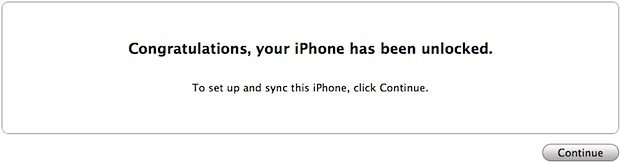
iTunes will show you a “Congratulations, your iPhone has been unlocked” message, indicating the device is carrier unlocked and can now use any compatible micro-SIM card.

Activate an Unlocked iPhone 4S

Thanks to Steve, Marcelo, and Antonio for confirming this solution with unlocked iPhone 4S models in the USA, Brazil, and Switzerland with a variety of carriers.

iPhone 4S & iPad 2 Jailbreak for iOS 5.0.1 Coming As Soon As Next Week

Jan 3, 2012 - 27 Comments

iPhone 4S jailbreak is coming soon The highly anticipated jailbreak for iPhone 4S and iPad 2 running iOS 5.0.1 is coming as soon as next week, according to a recent tweet from the hacker pod2g, who is working on the project. The comment suggested a hurdle for the iPhone 4S and iPad 2′s A5 processor has been overcome, and stated that “With some luck we could expect a release in a week.

@Pod2g is the same developer who uncovered the untethered jailbreak for iOS 5.0.1 that was released in a variety of popular jailbreak tools, including redsn0w, PwnageTool, and Corona. The upcoming jailbreak for the iPhone 4S and iPad 2 is also expected to be untethered, meaning the device will be able to reboot freely without the assistance of a software boot tethered to a computer.

This will be the first jailbreak available for the iPhone 4S, and the first jailbreak for iPad 2 running iOS 5.

Santa Uses an iPhone 4S and Siri in the Latest Apple Commercial [Video]

Dec 18, 2011 - 7 Comments

Santa using the iPhone 4S

Apple has started to air a new Christmas themed TV ad for the iPhone 4S and Siri featuring none other than Santa Claus. The commercial is the most entertaining iPhone 4S ad yet and features Santa asking Siri for directions, what kind of weather to expect at various locations around the country, requesting an email from Mrs Claus, and finally asking about his schedule, which Siri responds is filled with 3.7 billion appointments.

The ad has the same background music as past iPhone 4S commercials, which actually sounds a bit like Christmas music at this point. It’s also worth pointing out that the ad doesn’t even mention either the iPhone 4S or Siri by name, it just shows an Apple logo at the end.

You can watch the video below, or just wait for it to show on TV.

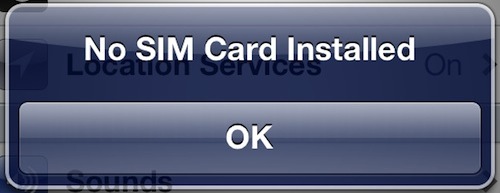
Fix “No SIM Card Installed” Error on iPhone 4S by Installing iOS 5.0.1 Build 9A406

Dec 16, 2011 - 6 Comments

No SIM Card Installed error on iPhone

The recently released iPhone 4S specific build of iOS 5.0.1 resolves an ongoing SIM card issue that was effecting some users. The issue would cause some iPhone 4S’s to not recognize a SIM card, with the iPhone reporting a “No SIM Card Installed” or “Invalid SIM” error message, in addition to the phone not connecting to a cellular network.

To resolve the error, users have two choices:

This makes the latest iOS 5.0.1 update a welcome change for iPhone 4S users who frequently encountered the problem, and this also answers the question as to what exactly the iPhone 4S specifc 9A406 build of iOS 5.0.1 aimed to accomplish. Thanks to MacRumors for discovering this.