Subscribe to OSXDaily

Subscribe to RSS Subscribe to Twitter Feed Follow on Facebook Subscribe to eMail Updates

Shared on Facebook

Shop at Amazon

Ad

OSXDaily on Facebook

Search unlock

How to Activate an Unlocked iPhone 4S

Jan 9, 2012 - 7 Comments

Activate an Unlocked iPhone 4S

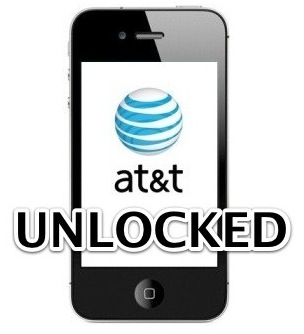
If you buy an iPhone 4S off-contract from Apple, the phone comes unlocked. This means the iPhone can be used on any compatible GSM carrier as long as you have that networks micro-SIM card, and the device is activated on that network. This guide will show you how to activate the iPhone 4S for use on other networks.

Important: If you don’t own an iPhone 4S yet but you plan on buying an unlocked iPhone 4S in the USA, be sure to buy it directly from Apple and not from a carrier. Buying from a carrier locks it to that carrier even if you pay full price, while buying off-contract from Apple is unlocked from all carriers. This is the only guaranteed way to get an unlocked iPhone 4S in the USA.

Activating an Unlocked iPhone 4S

This has been confirmed to activate an unlocked iPhone 4S on any other compatible network:

  • Be sure to have available wifi and internet access
  • Remove the original AT&T micro-sim card
  • Plug in the new carriers micro-SIM card
  • Turn the iPhone on with the new sim card inserted, don’t do anything else on the phone
  • Connect the iPhone to the computer by USB
  • Launch iTunes
  • Let iTunes find the iPhone 4S, and wait for the device activation to begin

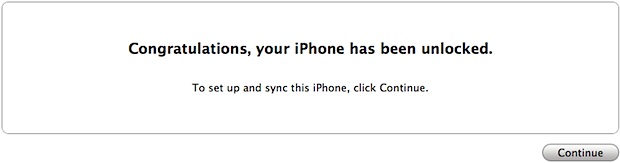
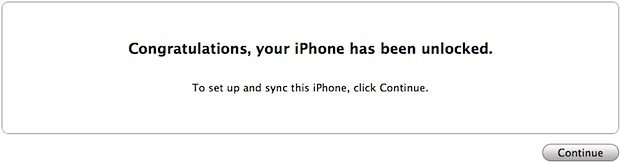
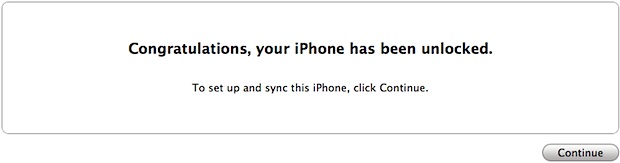
iTunes will show you a “Congratulations, your iPhone has been unlocked” message, indicating the device is carrier unlocked and can now use any compatible micro-SIM card.

Activate an Unlocked iPhone 4S

Thanks to Steve, Marcelo, and Antonio for confirming this solution with unlocked iPhone 4S models in the USA, Brazil, and Switzerland with a variety of carriers.

How to Jailbreak iOS 5.0.1 and Preserve Unlocked Baseband for iPhone 4 & 3GS

Dec 31, 2011 - 26 Comments

PwnageTool

If you’ve maintained old iPhone baseband in order to utilize carrier unlocks, you’ll be pleased to know that you can now upgrade to iOS 5.0.1 and jailbreak untethered the iPhone while preserving the unlockable baseband. The procedure is done by using the newest version of PwnageTool 5.0.1, and if you’re familiar with past versions of pwnage then you should be right at home, but nonetheless we will walk through the entire process.

Note: Only need a jailbreak? If you don’t need a carrier unlock, use this guide to jailbreak iOS 5.0.1 untethered with redsn0w, it’s faster and doesn’t include the baseband preservation.

Before proceeding, make sure you meet the following requirements:

  • iPhone 4 or iPhone 3GS with preserved and unlockable baseband: 01.59.00, 04.26.08, 05.11.07, 05.13.04, 06.15.00
  • iOS 5.0.1 IPSW – optional, depending on if you already have it stored locally or not
  • iTunes 10.5.2
  • PwnageTool 5.0.1 – download now

Assuming you meet all those requirements and you understand the risks, continue on. Read carefully or else you can accidentally update your baseband and lose your unlock.

Jailbreak iPhone with iOS 5.0.1 while Preserving Baseband Unlock

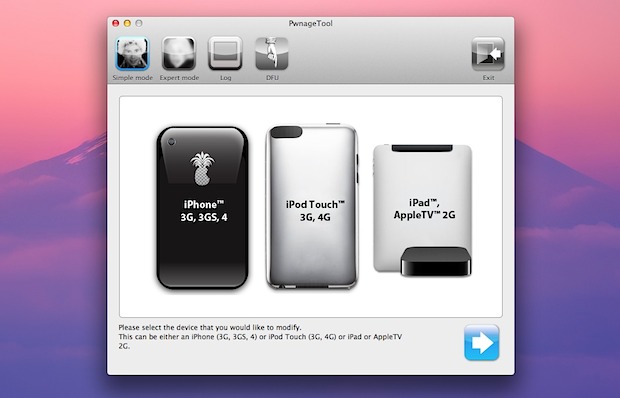
  • Launch PwnageTool 5.0.1 and select your iPhone model, then click the next arrow
  • Let PwnageTool search for firmware (or you can download iOS 5.0.1 firmware manually), select it and click the Next arrow again
  • Click “Yes” when asked if you want to save the custom IPSW file to the desktop, and click yes/no depending on your activation
  • Let PwnageTool build the custom IPSW, enter the administrator password when asked
  • Now connect the iPhone to the computer and place it into DFU mode: Hold power button for 3 seconds, continue holding Power button and also hold the Home button for 10 seconds, release Power button but continue to hold Home button for another 15 seconds
  • When DFU is confirmed, quit out of PwnageTool and launch iTunes
  • Hold the Option key and click on “Restore” and select the custom firmware created by PwnageTool, located on the desktop
  • iTunes will now restore the iPhone to the custom iOS 5.0.1 build, simultaneously jailbreaking the phone and also preserving the unlockable baseband
  • After the device has been jailbroken and booted up, launch Cydia and download Ultrasn0w 1.2.5 to unlock the iPhone

The unlocked iPhone should now be good to use on another carrier. If you have trouble activating, use the original activated SIM card briefly to pass through activation, or run the newest version of redsn0w on top.

Unlock iPhone 3GS & iPhone 4 on iOS 5.0.1 with Ultrasn0w 1.2.5

Dec 21, 2011 - 9 Comments

unlock iOS 5.0.1 with ultrasn0w Ultrasn0w 1.2.5 has been released and it allows for unlocking some iPhone 3GS and iPhone 4 models with older modem firmware versions. Compatible baseband is as follows:

  • iPhone 4: 01.59.00
  • iPhone 3GS: 04.26.08, 05.11.07, 05.13.04, 06.15.00

You can check baseband on the iPhone by tapping on Settings > General > About and looking for “Modem Firmware” near the bottom of the About screen.

If your iPhone 3GS or iPhone 4 has eligible baseband and is already jailbroken, then you can just search Cydia for “ultrasn0w” and download and install the latest version. Reboot the iPhone and you’ll be able to use the new unofficial network. If you’re not sure what to do, follow the instructions below:

How to Unlock iPhone 3GS & iPhone 4 on iOS 5.0.1 with Ultrasn0w

Be sure to confirm baseband firmware before proceeding:

  • Jailbreak iOS 5.0.1 with redsn0w 0.9.9b9 and then boot the iPhone tethered
  • Open Cydia and search for ultrasn0w, installing the ultrasn0w 1.2.5 package onto the iPhone
  • Shut off the iPhone and insert the new SIM card from another carrier
  • Boot the iPhone tethered using redsn0w again
  • Wait for the iPhone to join the new network

Most iPhones won’t be eligible to use this version of ultrasn0w due to the baseband limitation. Keep in mind you can now buy the iPhone 4S unlocked directly from Apple, they aren’t cheap but you won’t have to bother with jailbreaks, software unlocks, or preserving baseband versions between iOS upgrades, and will always be free to use the iPhone on whatever compatible network you have a SIM card for.

Unlock the iPhone 4S with an iOS 5 Bug

Nov 17, 2011 - 14 Comments

Unlocked iPhone 4S

If you didn’t already buy an unlocked iPhone 4S from Apple or take advantage of Sprint and Verizons 90 day unlock request, you can apparently unlock the 4S’s GSM SIM card slot yourself by taking advantage of a strange bug in iOS 5 and how the iPhone 4S handles the Edge network.

Here’s what you’ll need to attempt this:

  • GSM activated iPhone 4S (AT&T model on contract, for example)
  • AT&T SIM card
  • T-Mobile Micro SIM

If you have all of that, completing the unlock is a matter of tripping up iOS 5 by performing a virtual song and dance routine, how someone figured this is out is fairly impressive on its own:

How to Unlock the iPhone 4S

Do this at your own risk:

  • Insert original carrier AT&T SIM card
  • Dial 611 for AT&T customer service hotline and drop the call
  • Turn on Airplane Mode
  • Take out AT&T SIM card
  • Insert T-Mobile SIM card
  • Make sure WiFi is off ( also tap on ‘Forget this Network” to make sure it doesn’t connect automatically later)
  • Switch off Airplane Mode and iPhone will search for network. This is followed by the Apple splash screen appearing.
  • Activation Required will be displayed on the screen
  • EDGE network will activate automatically – notice the ‘E’ on the top left corner of the screen
  • Wait for about 20-30 seconds and turn off the phone
  • Turn on iPhone and the same Activation Required screen will be displayed
  • When you see one signal bar, tap on Use Cellular Connection
  • Eject SIM card
  • Activation Required screen will be displayed the second time
  • Insert SIM card
  • Unlocked!

Multiple users are reporting success with this method, although some had to repeat it many times to get it to finally work.

Apparently this trick has been around for a few weeks now, although it hasn’t been widely publicized for some reason or another. Here’s a YouTube video of someone completing the procedure as described above:
Read more »

Buying an iPhone 4S Without a Contract Makes it Unlocked

Oct 25, 2011 - 87 Comments

Apple iPhone 4S in white

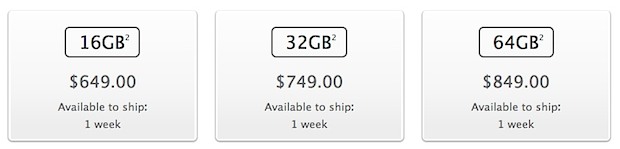
Anyone can buy an unlocked iPhone 4S right now if you are willing to pay the full price of the device, meaning the lower carrier subsidized contract 4S prices do not apply. The unlock applies to both the GSM and CDMA carriers currently being sold, available at the following price points:

  • iPhone 4S 16 GB – $649
  • iPhone 4S 32 GB – $749
  • iPhone 4S 64 GB – $849

The iPhone 4S GSM SIM card slot is unlocked when the full retail price is paid at an Apple Store. In the case of the CDMA carriers selling the device like US carriers Sprint and Verizon, the Micro SIM card slot is also unlocked and will support other GSM carriers. The carrier unlock allows the iPhone to be used on another US carrier like T-Mobile, or allows for cheap roaming abroad with the purchase of a local SIM card, with the other benefit being that you are not tied to a contract with any single US cell provider.

You can verify the unlock immediately when the iPhone 4S is first connected to iTunes, where the following message is displayed:

unlocked iPhone 4S message in iTunes

Initial reports indicated the unlocked 4S would be sold in November, which may suggest a change in policy at some point when paying the full out-of-contract price.

Buying an unlocked iPhone at full price is typical outside of the USA, but in the USA was somewhat of an anomaly until earlier this year when Apple started selling the iPhone 4 unlocked at the full retail price. That has since translated to the iPhone 4S, and presumably will carry on with future iPhone releases as well.

Unlocked iPhone 4S Available, Costs $649 and Up

Oct 7, 2011 - 10 Comments

black iPhone 4S

Apple has announced that unlocked iPhone 4S models will be available starting in November, slightly later than the general 4S availability for both the US and other countries. These phones will work on any GSM carrier worldwide, you simply need to pop in a local GSM providers micro-SIM card and follow the onscreen activation instructions. The dependence on SIM cards does mean that the unlocked iPhone 4S will not work on CDMA carriers, however.

Unlocked iPhone 4S

Unlocked iPhones are ideal for users who travel internationally on a regular basis and need to be able to utilize local carriers, this offers a significantly cheaper option than paying the roaming overage charges through a home carrier like AT&T. Unlocked phones also provide a pre-paid option, allowing you to use GoPhone, T-Mobile, or other pre-paid GSM choices.

The downside to an unlocked device is the costs. The price of the iPhone 4S contract-free is quite a bit higher than the subsidized price through a carrier, with the 16GB model starting at $649, the 32GB model costing $749, and the 64GB model coming in at $849.

Unlocked iPhone 4 Now for Sale in USA

Jun 14, 2011 - 9 Comments

Unlocked iPhone 4 models for sale in USA

Apple is now selling carrier unlocked iPhone 4 GSM models in the USA, making it the first time the devices have been legitimately offered through the primary market in the country. An unlocked iPhone can be used on any other GSM network, in the USA or otherwise, assuming you have an active micro-SIM card for that network.

How Much Do the Unlocked iPhones Cost?

Unlocked iPhones don’t come cheap in the USA or anywhere else for that matter. The price is the same for both black or white models, the cost differentiation relates to storage capacity:

  • Unlocked iPhone 4 16GB – $649
  • Unlocked iPhone 4 32GB – $749

If you’re wondering why the prices are high, Apple answers:

Carriers typically subsidize the purchase price of the phone when purchased with a service contract. By purchasing your iPhone unlocked, you are not committing to a service contract up front, so you can use any micro-SIM card from a supported GSM carrier, including your current one.

What are the Advantages to an Unlocked iPhone?

There are several answers to this, but the primary reasons to own a factory unlocked iPhone are:

  • No Carrier Contract – you pay full price for the phone, but the iPhone is not bound to a carrier contract, meaning you can start and stop service at will without any penalties
  • Move from Carrier to Carrier – want to use T-Mobile? No problem. AT&T have better reception? Switch. There’s no hassle, no fees, nothing that voids the warranty, just plug in a new carriers SIM card and go
  • International Travel – the same carrier transportation mentioned above applies to international travel, forget about roaming charges and instead grab a local SIM card

All you need is an active compatible micro-SIM card from a GSM carrier and the phone will use that network.

Why Now? AT&T & T-Mobile Merger or Another Jailbreak Killer?
Carrier unlocked phones are somewhat of an anomaly in the United States, but they are ubiquitous elsewhere in the world. It’s not clear why Apple is choosing to sell the unlocked devices at this point, but there is some speculation that this move is intended as preparation for the AT&T and T-Mobile USA merger. Others are suggesting this is intended as another blow to the jailbreaking scene, since carrier unlocks are a popular reason for users to jailbreak their iPhones.

Nice find by MacRumors!

Is Apple Going to Kill Jailbreaking with iOS 5?

May 27, 2011 - 24 Comments

Apple killing jailbreaking possibilities

Is Apple going to kill the jailbreak community as we know it with iOS 5? If this sounds crazy, consider some of the tweaks, rumors, and expected features in iOS 5 and iPhone 5:

  • Revamped iOS notification and all new widget system – who needs to use the hacks when Apple offers the real thing?
  • Rumors of Expose-style iOS multitasking – if Apple builds a superior multitasking feature, why bother with a 3rd party solution?
  • Cheaper & Pay-Go iPhones – a common reason to jailbreak an iPhone abroad is so that you can use it as a pay-go phone, Apple is reportedly interested in expanding directly into this market
  • More iPhone Carriers – one of the many reasons people jailbreak and unlock their phones is so they can use them on networks unsupported by Apple, but Apple is rumored to be planning to expand the iPhone to many more carriers
  • Over-the-Air automatic iOS updates – each new iOS update breaks existing jailbreaks, if Apple can push updates to your phone remotely, your jailbreak will become unusable anyway
  • Newer Hardware is Harder to Jailbreak – jailbreaking is getting harder on newer hardware, proof of this is the iPad 2, which still isn’t jailbroken despite being out for months. The next iPhone is expected to have the same internal hardware as the iPad 2, meaning it will be just as difficult to jailbreak

Remember, some of these features were once only possible with jailbroken hardware, but if Apple offers them natively through iOS 5 and new iPhones, what’s the point of jailbreaking and unlocking? If Apple is going to provide in iOS 5 and iPhone 5 what you now jailbreak for, why bother with the headaches of jailbreaking?

More evidence comes from an anonymous tipster sent a message to iDB that indicated that Apple is going to shake up the jailbreak community:

bad timing for jailbreak developers especially those working on notification. im not working on that but i know we are about to take the jb community by surprise

This was prior to TechCrunch publishing their report on the notification changes, but more interesting is that there’s an obvious hint of a broader agenda in that message.

This was followed quickly by another post at iDB that mentions a renowned jailbreaker just now giving up on the development of his revamped iOS notification system, they go on to speculate that he may have even been offered a job at Apple to develop the notifications for them directly.

Furthermore, there could be an economic incentive behind all of this, as iDB reminds us that nearly 10% of iPhones are jailbroken and buy apps through the Cydia store, that’s a lot of money left on the table by Apple. Jailbreaking is particularly popular in countries like China, where Apple is experiencing huge growth, but if Apple can offer the same features so many users are jailbreaking for, they’ll lose the incentive to jailbreak plus funnel that money into Apple’s App Store rather than a third party source.

Remember, jailbreaking isn’t illegal, but Apple has always frowned upon it for various reasons, and now Apple may have found a solution to squash the jailbreak community once and for all by essentially offering all the incentives natively. So will it happen? Is jailbreaking dead? We’ll soon find out.

Unlock iPhone 4.3.3 with Ultrasn0w 1.2.3

May 6, 2011 - 21 Comments

ultrasn0w 1.2.3 for iOS 4.3.3 Ultrasn0w has been updated to version 1.2.3 with support for preserved baseband running iOS 4.3.3. In other words, ultrasn0w 1.2.3 does not unlock new baseband, but it does work to keep your unlock if you have been tugging along iPhone 4 with 1.59.00 or iPhone 3G & 3GS with 4.26.08, 5.11.07, 5.12.01, 5.13.04, and 6.15.00.

If this applies to you, you’ll want to use PwnageTool 4.3.3 (Mac) or Sn0wbreeze (Windows) to jailbreak while preserving your old baseband and updating to iOS 4.3.3.

Install Ultrasn0w Unlock for 4.3.3

After you are jailbroken, ultrasn0w is installed through Cydia. You can generally do this just by searching for “ultrasn0w” but if that fails:

  • Add http://repo666.ultrasn0w.com as a source repository to Cydia
  • Search for “Ultrasn0w 1.2.3″ and install
  • Reboot your iPhone

Assuming you have supported baseband and everything is done correctly, the iPhone will boot unlocked and ready for another SIM card. Remember that many unofficial carriers do not support 3G networks so you should disable that in network settings if things aren’t working as expected.

TinyUmbrella 4.3.2 Released with iOS 4.3.2 Support

Apr 18, 2011 - 1 Comment

TinyUmbrella 4.3.2 TinyUmbrella 4.3.2 has been released, the latest version allows you to save your existing iOS 4.3.1 and iOS 4.3.2 SHSH blobs from iOS 4.3.2 or iOS 4.2.7 for CDMA devices.

SHSH blobs are important to save for jailbreaking and iPhone unlocking because having them stored allows you to revert to previous firmware versions.

Download TinyUmbrella for iOS 4.3.2

Versions are available for both Mac OS X and Windows

If you’re not interested in carrier unlocks and jailbreaking, TinyUmbrella has little use to you.