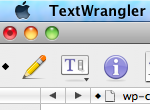
Quickly tell if a file has been modified by looking at the red Close window button
Here’s a nifty Mac trick: Do you see the little black dot inside the red ‘close’ window button in that screenshot? That means the file has been modified!

Mac OS, Mac OS X, or macOS, is the operating system that resides on Apple’s desktop and portable computer lineup. Built upon a Unix core, it is easy to use yet highly advanced, extremely stable, and an excellent OS for productivity and creation. Browse through our articles or use the search feature to look for something specific that is pertinent to the Mac operating system.
Here’s a nifty Mac trick: Do you see the little black dot inside the red ‘close’ window button in that screenshot? That means the file has been modified!

Want to quickly turn off all of your Mac’s displays? Hit Shift+Ctrl+Eject and all screens will go black instantly. Nice huh?
Some iTunes music comes with DRM, but you can use an iTunes trick to remove DRM. Note this should only be used if you own the actual rights to the music, or if you are allowed to remove DRM by the rights-owner. DRM iTunes songs usually have an .m4p file extension. But this trick basically … Read More
On a Windows PC recently I ripped a CD only to find out that it was converted as WMA rather than MP3. In Windows this isn’t a big deal, you just open the files in iTunes as usual, but I wanted them on my Mac, easy right? Well for some reason Apple doesn’t allow Mac … Read More
Mac users can issue a defaults command string to force Safari to open targeted new window links into new tabs instead of those new windows. This is handy if you open a lot of links that would usually launch a new window but would rather send them into easily managed tabs instead.
I always put iTunes into mini-player mode to conserve screen real estate, so I was pretty annoyed when iTunes 9 took away this feature when clicking the green resize button in the iTunes window. Thankfully getting it back is very easy but it’s an extra step, option-click the green maximize button to enter into the … Read More
Teleport is undoubtedly one of the single most useful utilities available to anyone that owns more than one Mac. Using Teleport, you can share a single mouse and keyboard across multiple Mac’s, seamlessly! Setup is an absolute breeze, you need to install Teleport on all Mac’s that you want to use, and once it’s all … Read More
Need to get around the boot level Mac firmware password? You can bypass a firmware password by doing a little bit of a hardware hack. There’s many reasons you’d want to get around firmware protection, but here’s why we got the instructions from an anonymous submitter:
The Operating System wars are still raging, and Mac OS X 10.6 Snow Leopard has bested the new Windows 7 operating system in several speed tests, and a crucial battery life test, according to CNet. Windows 7 did outperform Snow Leopard in some other tests, such as gaming, where Call of Duty 4 had five … Read More
I use my MacBook almost exclusively at home and so I frequently forget to discharge and recharge the battery, which is a recommended procedure to have your notebook battery last as long as possible. For people like me who often run with the powercharger attached to their Mac laptop, Apple.com offers a nice simple reminder … Read More
Ever heard of MD5 and not sure what it was or what that meant? You’re likely not alone, but MD5 is important, and, with a little explaining, easy to understand. Let’s explain a bit about MD5, MD5 checksums, what it is, and why you should know about it.
Have you ever wanted to make your MacBook or MacBook Pro’s keyboard lights dance to the music you are listening to? Has the thought never crossed your mind? Well me neither, but once I saw someone using this iTunes plugin on their MacBook Pro I was instantly hooked on the novelty. iSpazz is the name … Read More
Apple has released a list of software that has been deemed incompatible with 10.6 Snow Leopard. If you haven’t upgraded yet it’s possible you’re afraid of application incompatibilities, and rightly so. It’s worth taking a look to see if any version of the apps you are dependent on make the list. These apps will be … Read More
Is this the messiest desktop ever? I don’t know much about this photo, other than it shows a wildly chaotic Mac desktop with a few billion iChat conversations going on and that it’s taken by popular photographer Sam McGuire. If there was ever a need for Expose, I think this it it! [ Sam McGuire … Read More
This is a warning to all Snow Leopard users, be aware that a somewhat obscure Snow Leopard bug deletes ALL DATA from a user account, yikes! This will likely NOT effect you, but if you’re a Snow Leopard user you should understand the bug and the consequences. According to CNET: “when logging into the guest … Read More
The Polaroid film effect is a fun and retro look for digital images, and now you can make Polaroid style pictures without Photoshop! The nifty app called Poladroid is cross-platform compatible and works exactly as advertised: simply drag any image onto the Poladroid app and out comes a Polaroid style image. Poladroid allows you to … Read More
You can easily reveal the Finder location of any recently used item from the Apple “Recent Items” menu by holding down the Command key as you access the Apple menu of OS X.
There is now a Photoshop app for the iPhone / iPod Touch and it’s called… Photoshop.com Mobile. The best part? It’s free! Free Photoshop?? For the iPhone?? Well, don’t go expecting a full version of Photoshop on your iPhone, it’s a relatively limited and simple image editor, but for quick photo edits on the go, … Read More