How to Disable the iTunes Ping Sidebar in iTunes 10
Sep 25, 2010 - 15 Comments

You can disable the new iTunes Ping sidebar from appearing in iTunes 10.0.1 by using the following command within the Terminal:

Mac OS, Mac OS X, or macOS, is the operating system that resides on Apple’s desktop and portable computer lineup. Built upon a Unix core, it is easy to use yet highly advanced, extremely stable, and an excellent OS for productivity and creation. Browse through our articles or use the search feature to look for something specific that is pertinent to the Mac operating system.
You can disable the new iTunes Ping sidebar from appearing in iTunes 10.0.1 by using the following command within the Terminal:
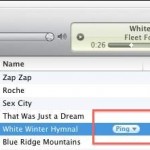
iTunes 10.0.1 is a minor update that replaced the iTunes store arrows with a Ping pull-down menu button instead. I think it clutters the iTunes interface a bit so here’s how to remove this feature. Launch the Terminal and type or paste the following: defaults write com.apple.iTunes hide-ping-dropdown -bool TRUE Then quit and relaunch iTunes … Read More
An underused feature of Mac OS X is the ability to use any Finder window as an application launcher. This is actually a feature of the Toolbar, which is usually thought to just hold things like the back and forward buttons, list and icon views, etc. But in fact, that same toolbar can launch apps … Read More

Office 2011 for Mac is scheduled to be released at the end of October according to Microsoft, but ZDNet claims that the official release date will be October 26. This expected ship date date came from Amazon sales page for Office 2011, but now the date is no longer shown. which is now confirmed as … Read More
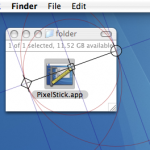
PixelStick is a great utility for designers who want to quickly measure distances and angles on their screen. Just launch the app and start dragging the endpoints to adjust measurements and get the pixel dimensions. This is an awesome tool, and it’s free to download. You can grab PixelStick for free from the developer, Pixelated … Read More
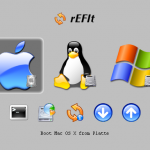
If you’re looking for a solution to triple boot Mac OS X with Linux and Windows without using Boot Camp, you can do this using a third party boot menu called rEFIt (get it? re-EFI-it? rEFIt?? Alrighty then). rEFIt works very well and, upon boot, you’ll discover a nice menu like the above screenshot on … Read More

If you need to convert a .docx file to .doc, don’t pay for one of the many conversion sites or utilities out there. Your Mac has the ability to handle the file conversion entirely on it’s own already built in, and it’s completely free, no downloads or third party software is required. To convert the … Read More

AppleJack is a really handy troubleshooting utility for Mac that works even if you can’t load the Mac OS X GUI. Running in Single User Mode, it’s a simple menu-based tool to run a series of tests and repairs on the Mac OS. With AppleJack you can easily: * Repair Disk * Repair Disk Permissions … Read More

Who doesn’t love free software? MacScan is a full service anti-spyware detection tool for Mac OS X and for a short time is available entirely for free, so you need to jump on this one quick. For a limited time only (just today: 9/20) you can download this anti-spyware tool for FREE. Get the free … Read More
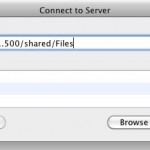
If you frequently access a file server from a Mac it’s pretty helpful to map the network drive to your desktop. There’s two ways to do this, one method is just mapped for one time use and will reset after a reboot, and another method is a more permanent route that allows the mapped network … Read More

Here’s something you might not know. Your Mac will periodically send out anonymized data to Apple with location specific information, the intended use is for providing location based services to it’s customers with Apple products. But in Mac OS X Snow Leopard you can turn this off and disable the location feature.

Solitaire is one of those great card games that has passed countless hours over the course of it’s existence. Eventually it involved from just a card game to a computer card game, and it became a staple of the Windows gaming environment. But now you’re on a Mac, what do you do for your solitaire … Read More

This is a rather strange error message which you may see in Mac OS X, you’ll get the notification “Another device on the network is using your computer’s IP address” and then you’ll lose internet access with the dialog box telling you to try connecting again later. No thanks, we need internet access now! So … Read More

The Internet Explorer 9 beta is out now for testing, and a reader sent in this picture which is sure to disappoint Mac users all over: Internet Explorer 9 is not available to download for Mac, its for Windows Vista and 7 only. OK so sarcasm aside, I hear it’s actually pretty decent (for IE … Read More

Here’s a Quick Look tip that’s pretty useful: you can zoom into any picture or PDF within Quick Look by holding down the Option key and then using the scroll wheel or trackpad. Try it out!

You can trim any MP3 file for free in Mac OS X thanks to the bundled QuickTime Player app, which comes preinstalled on every single Mac. Though we’ll cover trimming MP3’s, it turns out you can actually use QuickTime to trim just about any audio file, as the app supports many more other audio formats … Read More

MAMP is a great app for Mac OS X that lets you quickly and easily run an entire pre-configured web server on top of Mac OS X, it’s really helpful and I use it frequently for web development and testing web projects. Perhaps the only issue with MAMP is the port settings, which by default … Read More

You can use the tab key to auto-complete paths within Go To Folder on the Mac, a particularly handy trick to keep in mind the next time you’re navigating directory paths on the Mac. Tab key auto-completion is a feature that many command line users are familiar with, particularly those with a unix and linux … Read More




