Mac OS

Mac OS, Mac OS X, or macOS, is the operating system that resides on Apple’s desktop and portable computer lineup. Built upon a Unix core, it is easy to use yet highly advanced, extremely stable, and an excellent OS for productivity and creation. Browse through our articles or use the search feature to look for something specific that is pertinent to the Mac operating system.

Search Mac OS

4 Command Keystroke Tricks to Ease Navigation in Mac OS X

Jan 26, 2007 - 5 Comments

Navigating around Mac OS X is significantly easier than competitive operating systems, and that’s largely thanks to the Dock, Expose (Mission Control), Spotlight, and the improved Finder, which is the OS X file system. Of course there are also third party apps that people swear by, such as Quicksilver, but with so many great features … Read More

CoconutIdentityCard – Mac & iPod Build Info

Jan 25, 2007 - 3 Comments

This is a fun little program that quickly gives you information on when and where your Mac and iPod were built (it claims to check any Apple products based on serial number, but we couldn’t test this feature). There’s also an ability that allows you to check your serial number against a database to see … Read More

Easily Determine Architecture Type of Mac OS X Apps – Universal, Intel, or PowerPC

Jan 24, 2007 - 1 Comment

Regardless of your thoughts on Apple’s switch to the Intel architecture, we are now in a transition period where many apps are either PowerPC, Universal, or Intel only. While most new applications are at least Universal binaries, some are PowerPC, and running these through Rosetta on your Intel Mac can cause a performance decrease. So … Read More

Capture iSight Images Using the Command Line

Jan 24, 2007 - 7 Comments
Terminal icon

We all know that Photo Booth is great fun and is sure to entertain our friends and family with the goofy effects. But what if you want to take pictures using your iSight from the command line? Unfortunately Apple doesn’t provide this option (at least that we know of), but thanks to a crafty individual … Read More

Easily Change the Short Username in Mac OS X

Jan 22, 2007 - 1 Comment

Have you ever wanted to change the short username in Mac OS X? Dig around in the System Preferences and you’ll soon find it’s not as easy as just typing in a new name. Apple has some directions on how to do it, but the instructional document is painful just to look at, let alone … Read More

What happens in the Mac OS X boot process?

Jan 22, 2007 - 36 Comments
Finder icon

Ever wondered what happens during the Mac OS X boot and startup process? With Mac OS X it’s a bit more complicated than things once were, and long gone are the days of Classic Mac OS (System 9, 8, 7, 6), where watching our Macs boot up with a series of extensions and control panels … Read More

Mac OS X Leopard 10.5 9A343 Released to Developers

Jan 20, 2007 - 2 Comments

We are all excited for this springs release of Mac OS X Leopard 10.5, and each new developer release can give us hints of what is in the pipeline. The Mac speculation site MacRumors says that the latest seed of Leopard includes a few new features that have been suggested, including tabbed window support in … Read More

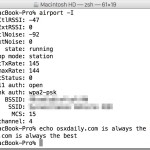
airport – the Little Known Command Line Wireless Utility for Mac

Jan 18, 2007 - 95 Comments
airport wi-fi network command in Mac OS X

Hidden from the casual Mac user is a spiffy command line utility that allows you to view, configure, and troubleshoot your Mac’s wireless connection, entirely from the Terminal of MacOS and Mac OS X. This command has a help file but is otherwise but not much documentation, and judging by the obscure location of the … Read More

Six Simple Must-know Keystrokes for Safari Users

Jan 18, 2007 - 13 Comments

Safari is my browser of choice in Mac OS X, I like Chrome and FireFox a lot but it doesn’t have the same Apple polish to it, and page rendering seems speedier in Safari (my opinion, no intention on sparking a browser war here). If you’re a Safari user, here are some key strokes that … Read More

RadioTuner – Listen to Any Radio Station via Dashboard

Jan 17, 2007 - Leave a Comment

There are quite a few ways to listen to the radio on your Mac, through iTunes, Safari, various Dashboard widgets, but RadioTuner is probably the best way yet.

Visor – Systemwide Terminal Access via Hotkey

Jan 16, 2007 - 5 Comments

For those of us who have ever played Quake, this is an easy one to explain. Remember hitting the tilde (~) key would bring down the Quake terminal? Well that is what Visor does for Mac OS X. You assign a hotkey, and when Visor is triggered, a nice Terminal slides out of the top … Read More

10 Must-Know Startup Commands for Older Macs

Jan 12, 2007 - 4 Comments
Finder logo

A variety of keyboard shortcuts and commands can be used during a Mac system startup to access various features, systems administration utilities, and troubleshooting tricks. Some of these startup keys may be slightly different on PPC and Intel Macs, but many of the features remain the same, whether it’s accessing safe-boot mode, hardware tests, single-user … Read More

7 Useful Dock Shortcuts & Key Commands for Mac

Jan 6, 2007 - 2 Comments
The Mac Dock

The Dock is a major part of most Mac OS users daily lives, used for everything from application launching, to storing of minimized windows and apps, where the Trash is located, and more. But the Mac Dock has more tricks up its sleeve than what is readily visible, and with the help of key command … Read More

StartupSound Lets Users Adjust the Startup Sound Level

Jan 3, 2007 - 11 Comments

The startup sound on a Mac is cool and all, but if you’re in a quiet library, office, or classroom, that sound can be a bit obnoxious to yourself and others as it blasts throughout the speakers and into whatever room you’re in. Sure, you can mute the sound by holding down the keyboard Mute … Read More

SantaSnaps – Christmas Fun Photo Booth Clone

Dec 24, 2006 - 3 Comments

Christmas is here, and what better way to get in the spirit than to make you and your loved ones into Santa! SantaSnaps is a lot like Photo Booth except instead of distortions and color changes, you get elf hats, beards, ears, reindeer horns, glasses, and a few other holiday accessories. There’s also a strange … Read More

Twenty Steps to Help Diagnose and Fix System Problems

Dec 20, 2006 - 3 Comments

Mac ownership is largely troublefree, but sooner or later you’ll probably run into some kind of problem with your systems performance. MacOSXHints.com is one of the best sites out there for tips and helpful information for the Mac, and although this article is dated (almost three years now!) it is just as useful as ever. … Read More

Mac OS X 10.5 Leopard 9A321 Screenshot Gallery

Dec 20, 2006 - Leave a Comment

The Apple Rumor site ThinkSecret obtained the latest release of Mac OS X 10.5 Leopard and put together a nice screenshot gallery for all of us to see. Notably missing is the much anticipated GUI revision that has everyone buzzing, but perhaps Apple is hiding the final GUI until release day. There might be some … Read More

12 Command Line Keyboard Shortcuts for Mac OS X Terminal

Dec 19, 2006 - 20 Comments
Terminal in Mac OS X

The command line in Mac OS X can be a very powerful and fun tool, so it’s good to know how to maneuver around if you find yourself in it. By default, the Mac OS X Terminal uses the Bash shell, which is what these keyboard shortcuts are intended for. So if you’re ready to … Read More

Subscribe to OSXDaily

Subscribe to RSS Subscribe to Twitter Feed Follow on Facebook Subscribe to eMail Updates

Tips & Tricks

News

iPhone / iPad

Mac

Troubleshooting

Shop on Amazon to help support this site