Security

Search Security

Securely Format a Mac Hard Drive

May 3, 2010 - 5 Comments

If you want to be absolutely sure your data is wiped clean with virtually no chance of recovery, by anyone, using any possible known recovery tools, look no further than Apple’s Disk Utility tool. The process is simple, and it can apply to any Mac drive, whether that’s an internal hard drive, external hard drive, … Read More
Block and manage IP blacklists easily with PeerGuardian for Mac OS X

Apr 16, 2010 - 8 Comments

PeerGuardian is a free open source tool that allows you to easily block large numbers of IP addresses in Mac OS X. It automatically maintains an internal IP blacklist to block IP’s deemed unsafe or dubious in nature, and also allows for multiple IP lists with the ability to block entire protocols. Other features include … Read More

How to Enable the Firewall in Mac OS X

Mar 12, 2010 - 6 Comments

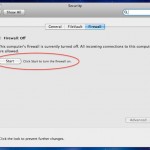
If you want to beef up the security on your Mac with a simple settings adjustment, you can enable the built-in software firewall. This offers a layer of protection by blocking many ports for common protocols, incoming connections, and other potential attack vectors. Generally, the Mac OS X Firewall is not necessary to use for … Read More

Track Down All Startup & Login Script and App Launches in Mac OS X

Feb 17, 2010 - 7 Comments
Finder icon on the Mac

Want to find out how to see all startup and login app launches and scripts on a Mac? This article will walk through that process. Gone are the days of Mac OS System 9 where all startup items were sitting nicely in a system folder labeled ‘Startup’, now with the Unix undercore of Mac OS … Read More

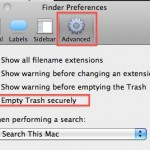
How to Always Secure Empty Trash

Feb 7, 2010 - 11 Comments

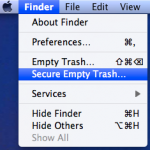
You can set Mac OS X to always securely empty the Trash and add a significant layer of security when removing files from the Mac. This is done just by adjusting a preference setting within the Finder, and it’s very easy to configure, here’s what you will want to do to use this option:

Change the iPhone root Password

Feb 6, 2010 - 5 Comments

Changing the iPhone root password is a good idea if you have Jailbroken your iPhone, it will prevent unauthorized users and applications from doing things you certainly don’t want them to do since the password is universal on all Jailbroken phones (unless it’s changed by the user). And yes in case it was not abundantly … Read More

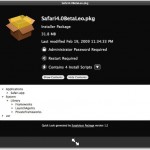
Inspect Mac .pkg Package Installer Files

Jan 26, 2010 - 3 Comments

I just came across a really useful QuickLook plugin called SuspiciousPackage that lets you inspect those .pkg package installer files that so many Mac apps and downloads come in. Using this plugin, you can determine if an admin password is required, how many install scripts are in the package file, where the installation locations of … Read More

Lock your Mac Desktop with the Locker Widget

Jan 19, 2010 - 12 Comments

Locker is a very simple Dashboard widget that does something Mac OS X should have included by default, it instantly locks your Mac desktop.

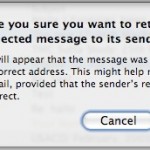
How Do I Stop Someone From Emailing Me?

Dec 30, 2009 - 4 Comments

Have you ever gotten emails from someone that you really don’t want to get? Be it just plain spam or annoying messages from people you’d rather not hear from, you can reduce this unwanted email by using the Bounce feature of Apple’s Mail app. Bounce tells the message sender that your email address isn’t valid, … Read More

Reset your lost Mac OS X password

Dec 14, 2009 - 6 Comments

You can reset a lost Administrator (the original account you created) password in Mac OS X by utilizing a Mac OS X installation DVD, here’s how:

XSS Exploit found on Apple iTunes site… again

Nov 18, 2009 - 2 Comments

Update: Apple has fixed the exploit, the below link is preserved for posterity but no longer works to display anything abnormal. A few weeks ago, there was an active XSS Exploit on Apple.com with their iTunes site. Well, a tipster sent us the exact same cross site scripting exploit found again on the Apple iTunes … Read More

Delete Flash Cookies

Nov 13, 2009 - 13 Comments

Adobe Flash cookies are not deleted when you remove your browser cookies, because they are stored independent of your browser, meaning Flash cookies from Safari are accessible via Firefox, and vice versa. The interesting thing about Flash cookies though is that they could technically track your web browsing long after you have left the site … Read More

Securely Delete Files in Mac OS X from the Finder

Nov 9, 2009 - 2 Comments

You can securely delete files from Mac OS X right from the Finder. This is by far the simplest method to securely delete something on the Mac, and the process is pretty straight forward, very similar to the normal procedure of deleting a file except that you will access a separate option to enable the … Read More

Apple.com XSS Exploit found on iTunes site

Nov 3, 2009 - 8 Comments

Update: Apple has fixed the exploit! I imagine this will get fixed relatively quickly, but you can do some funny (and potentially scary) things with Apple.com’s iTunes Affiliate sites just by modifying the URL parameters. The modified Apple.com URL is formed as follows: http://www.apple.com/itunes/affiliates/download/?artistName=OSXDaily.com&thumbnailUrl=https://cdn.osxdaily.com/wp-content/themes/osxdaily-leftalign/img/osxdailylogo2.jpg&itmsUrl=https://osxdaily.com&albumName=Best+Mac+Blog+Ever Click here for the OSXDaily.com version of the XSS exploit on … Read More

Bypass Mac Firmware Password

Oct 19, 2009 - 150 Comments

Need to get around the boot level Mac firmware password? You can bypass a firmware password by doing a little bit of a hardware hack. There’s many reasons you’d want to get around firmware protection, but here’s why we got the instructions from an anonymous submitter:

Warning! Obscure Snow Leopard bug deletes entire user accounts!

Oct 13, 2009 - 2 Comments

This is a warning to all Snow Leopard users, be aware that a somewhat obscure Snow Leopard bug deletes ALL DATA from a user account, yikes! This will likely NOT effect you, but if you’re a Snow Leopard user you should understand the bug and the consequences. According to CNET: “when logging into the guest … Read More

Enable root User in Mac OS X 10.6 Snow Leopard

Sep 28, 2009 - 4 Comments

There are two ways to enable the root super user account in Snow Leopard, the first is probably the quickest. Launch the Terminal and type the following command: sudo passwd root You’ll be asked for the admin password, then you’ll have to set a password for the root account. When you’re finished, the root account … Read More

Wireless Network Security: Change your WPA Encryption from TKIP to AES

Sep 21, 2009 - 1 Comment

This is just a quick security tip based on some recent news, a couple Japanese computer scientists have figured out a way to crack WPA TKIP encryption in under a minute. This news came out a few weeks ago but after updating my wireless routers firmware I realized I hadn’t made the encryption type change … Read More

Subscribe to OSXDaily

Subscribe to RSS Subscribe to Twitter Feed Follow on Facebook Subscribe to eMail Updates

Tips & Tricks

News

iPhone / iPad

Mac

Troubleshooting

Shop on Amazon to help support this site