
Secure your Mac – How to set an Open Firmware / EFI Firmware Password on system boot
Aug 15, 2009 - 1 Comment

If you really want to lock down your Mac from other users, you can set an Open Firmware (PPC) or EFI (Intel) password that will require a firmware level password immediately upon system boot, prior to Mac OS X being loaded. This is somewhat of an advanced trick and if you accidentally mess something up in OpenFirmware or EFI you could have some serious issues with your Mac.
If you’re interested in pursuing the boot level password protection though, here are two helpful links.
Read more »

 The Mac Rumor mill is churning out all sorts of juicy tidbits on Apple’s latest operating system update, known as Snow Leopard.
  and it will ship for free as soon as it arrives. Mac users rejoice, a fantastic system update awaits us all very soon!
 GeekTool is a fun system preference utility for Mac that allows you to really customize your desktop. You can dump log files, system status messages, graphs, CPU usage, and all sorts of things right onto your desktop background. Basically if you can run it in the Terminal, you can have it appear on your desktop. Check out the screenshot below, and if you’re a customization geek absolutely download GeekTool yourself. Be sure to read the excellent walkthrough on MacLife linked below that shows how to setup GeekTool to really make your mac desktop customized too. If you want weather information displayed on your desktop, LifeHacker has you covered, so read on.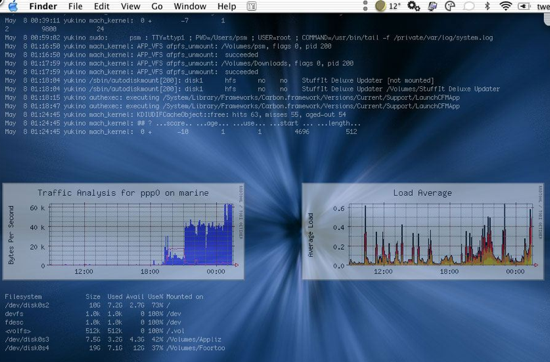
 It seems like people either love or hate Spotlight, if you love it then ignore this tip, but if you hate Spotlight and want to turn Spotlight off in 10.5 here’s your new favorite post. You can completely disable Spotlight in OS X 10.5 by moving a few system files (or you could delete them but that is strongly not recommended for various reasons). Here are the files you should move, be sure to place them in another location for backup in case you want to enable Spotlight again.
 If you ever want to hide a file or folder, you can quickly make it invisible with a command line utility called setfile. This is a really cool tip that should be particularly useful to those who share their mac with other people.
 Here’s something that’s bound to be popular. The University of Washington is offering a Certificate program in iPhone Development, the coursework covers Cocoa too but there’s plenty of Cocoa development programs out there so it’s really the iPhone development that makes it stand out. For now the program is only offered at the University of Washington Seattle campus, but
  available from Amazon.com
 I’ve been on a bit of a retro and minimalism kick lately, preferring simplified apps that take me back to the good old days of BBS’s and 2400bps modems (ok maybe not the modems), and when I saw that GLTerminal has a new release I was pleased since I can finally run it in a modern version of OS X. It’s basically just a Terminal replacement that uses GL to create the appearance of an oldschool terminal, complete with monitor curvature and all. Everything else works as it should, so if you’re looking for a fullscreen old school alternative for Terminal, or just want something fun to work in for a while, try out GLTerminal.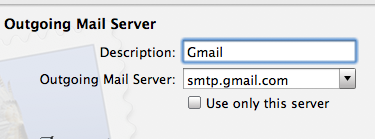

 This is a particularly handy trick for when you have limited screen real estate and want to fit more of a windows display on screen. A perfect example of this are the
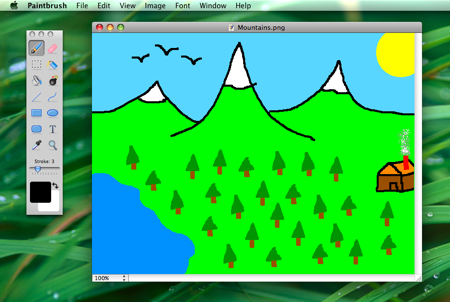 Paintbrush is a Microsoft Paint clone of sorts for Mac OS X, it’s an absolute joy to use in it’s simplicity and we are pleased that a new version is available with even more MS Paint type functions for your Mac. And we mean it, this thing is awesome at simple pixel drawing and is sure to remind you of what it was like to use the paint program way back when.
 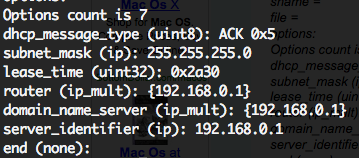 If you’ve ever needed to troubleshoot a network or internet connection, you know how frustrating it can be (particularly when you’re on techsupport with various broadband providers). This quick tip can make the job a little easier on yourself by retrieving all relevant DHCP information, like DHCP server IP, client, subnet mask, router, DNS servers, everything – directly from the command line.
  I like Safari but find myself in Firefox nearly always because of a multitude of reasons. One thing I’ve long missed though is the ability to view PDF’s within the browser within Firefox, which Safari does wonderfully. If you’re tired of Firefox launching the Preview app (or even worse if you’re settings are different: Acrobat), then try this great little Firefox extension, which will pop open the PDF file into a new browser tab. Note this requires Firefox 3




