iOS

iOS is the mobile operating system that runs on iPhone, iPad, iPod touch, and other mobile hardware from Apple. Though it may look differently and run on different hardware, iOS is based upon a highly modified variation of Mac OS, the desktop operating system software that runs on Macs.

Search iOS

Transfer Pictures to iPad the Easy Way with iTunes

Apr 19, 2012 - 47 Comments
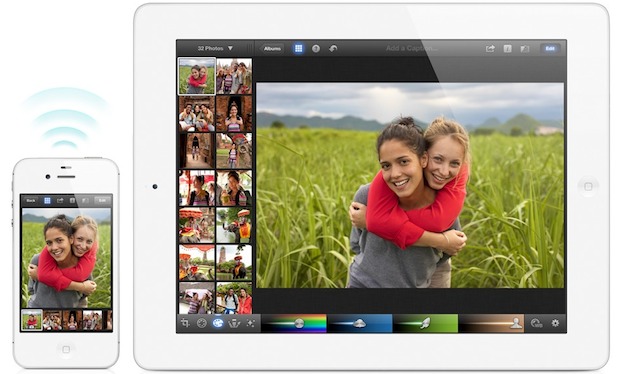
Transfer Photos to an iPad

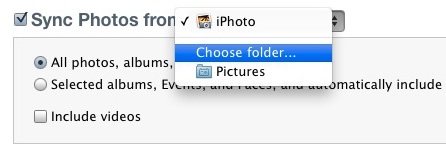
Transferring photos from a computer to the iPad is very easy with the help of iTunes. To get started, you’ll need either a Mac or PC with iTunes, a USB connector cable for the iPad, and a folder containing the pictures you want to transfer over to the iPad.

How to Zoom the Camera on iPhone

Apr 18, 2012 - 8 Comments
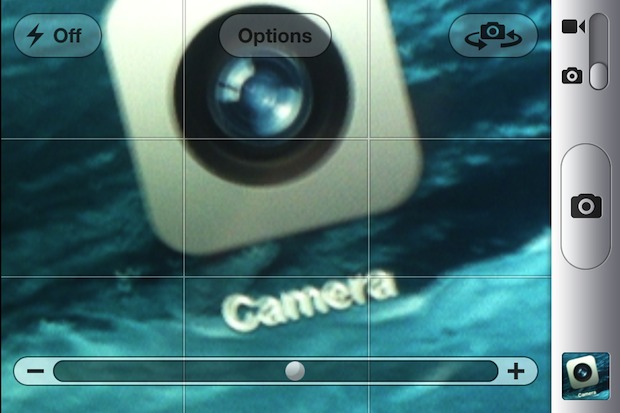
Zoom iPhone Camera

You can use a zoom-in feature on the hardware cameras included on iPhone, iPad, and iPod touch. The zoom trick is pretty easy to master but until someone shows you how to access it, zooming is hidden from the normal camera options. We’ll detail exactly how to zoom in and zoom out with the Camera … Read More

How to Forward a Text Message on iPhone

Apr 16, 2012 - 24 Comments
Forward text message SMS from iPhone

Forwarding text messages from one sender to another is made very simple on the iPhone. The process is the same whether it’s a text, SMS, MMS, or even an iMessage: From the Messages app, open the text message you want to forward Tap the “Edit” button in the upper right corner Tap the message you … Read More

Force iOS Devices to Recalculate “Other” Capacity in iTunes

Apr 12, 2012 - 35 Comments
iTunes Other Capacity

The “Other” capacity in iTunes is supposed to estimate the size of system software, contacts, Messages data, and things that are not listed elsewhere in the labeled capacities list of storage on an iOS device. Sometimes other data will become mislabeled or misappropriated to the “Other” category, and suddenly it’s reported as being much larger … Read More

Stop iPad Picture Frame from Zooming in on Faces

Apr 10, 2012 - Leave a Comment
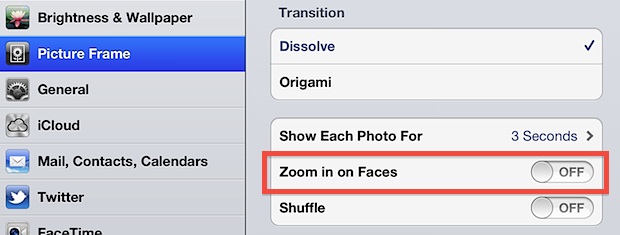
Stop iPad from Zooming in on Faces in Picture Frame

The iPad picture frame app is a nice way to put a stale iPad to use as it sits on a desk. That resulting live picture frame is made even better when a custom album is created for the purpose, but if you use photos of people you’ll find that Picture Frame automatically zooms in … Read More

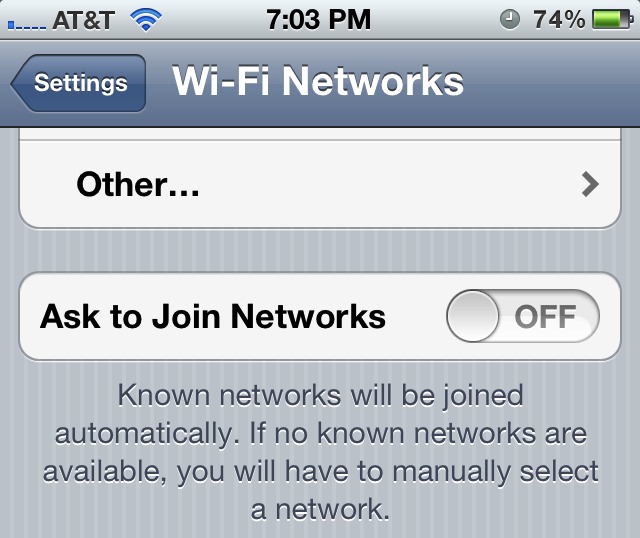
Stop iPhone Pop-Ups Asking to Join Wi-Fi Networks

Apr 7, 2012 - 21 Comments
Stop Wi-Fi Popup Alerts on iPhone

Annoyed by those persistent wi-fi network popups that show up on the iPhone or iPad screen every time a wireless network is in range? You can disable the wi-fi joining alerts completely by preventing the iPhone from searching for unknown networks. This works on the iPhone, iPad, and iPod touch the same way, and it … Read More

3 Ways to Make Phone Calls from the iPad or iPod touch

Apr 6, 2012 - 25 Comments
iPad phone

Want to use the iPad or iPod touch as a phone? You can do that. With Skype or Google Voice you can turn your standard wi-fi iPad into a VOIP phone, and you’ll be able to make and receive phone calls and text messages directly from the iPad or iPod. These apps are free to … Read More

Load Up Your iPad with a Massive Library of Over 38,000 Free eBooks

Apr 5, 2012 - 7 Comments
Free eBooks for iPad

The iPad is a great device to read on, and if your digital library is feeling a little bare then you’ve come to the right place. We’ve found some of the best places to get free ebooks, ready to be downloaded and opened with iBooks on your shiny new iPad (or iPhone, iPod, Kindle, Nook, … Read More

Deposit a Check Directly From an iPhone

Apr 4, 2012 - 12 Comments
Deposit a check from an iPhone

Skip the traffic filled bank trip across town, you can deposit checks directly from an iPhone. A variety of major US banks now offer the iPhone check depositing service, including Chase, Fidelity, US Bank, PayPal, and Charles Schwab, amongst others. I recently used the service through Chase Mobile, where it worked well enough to quickly … Read More

Mac App Store Not Working or Showing Updates? How to Refresh the App Stores on Mac

Apr 4, 2012 - 1 Comment
Refresh App Store

Need to refresh the App Store or iTunes Store from a computer? To quickly refresh the App Store on Mac OS X, just hit Command+R at any screen in the iTunes, iOS App Store, or Mac App Store, and the page will reload with whatever new data awaits, whether it’s a revised Top Charts listing … Read More

Attach a Photo to a Mail Message on iPhone, iPad, and iPod touch

Apr 3, 2012 - 40 Comments
Attach Photo to Mail on iPhone, iPad, or iPod touch

You’ve probably noticed there isn’t an attachment button floating around when composing a new email message in iOS Mail app, so how do you attach pictures to emails on an iPhone, iPad, or iPod touch? It’s easy, and there’s actually two simple ways to attach images to your emails though you may not find them … Read More

Air Display Turns iPad Into a HIDPI Retina Display for Mac

Apr 2, 2012 - 13 Comments
iPad as an External HIDPI Display with a MacBook Air

Your iPad 3 can now act as a stunningly high quality HIDPI display for a Mac or PC with the help of a great iOS app called Air Display. A completely wireless solution, Air Display takes advantage of OS X Lion and Mountain Lion HIDPI display mode to turn the new iPad’s 2048×1536 display into … Read More

Use the App Store Without a Credit Card

Apr 2, 2012 - 49 Comments
Use App Store without credit card

Signing up to use the App Store requires a credit card, right? Wrong. We showed you how to use iTunes without a credit card, and it turns out you can do the same thing with the iOS and Mac App Store too. A credit card-free account is a perfect solution for setting up an iPhone, … Read More

6 Tips to Improve Typing on the iPad

Mar 31, 2012 - 20 Comments
Typing tips for iPad

Typing on the iPad can be natural for some users, but unnatural or difficult for others. If you’re in the latter camp, you will appreciate this collection of typing tips for iPad which can help improve your typing on the device. Personally I love the iPad but I really hate typing on it. Though touch … Read More

How to “View Source” from Safari on an iPad or iPhone

Mar 30, 2012 - 24 Comments
View Source on an iPad or iPhone

Ever wanted to view source of a webpage from an iPad or iPhone? Unfortunately, mobile Safari doesn’t include the feature on it’s own and does not yet have a mobile web inspector toolkit built-in, but with the help of a custom bookmarklet you can view source of any web page right in iOS and iPadOS. … Read More

Send Multiple Photos from an iPhone or iPad

Mar 30, 2012 - 32 Comments
Send Multiple Photos from an iPhone or iPad

Sending out multiple photos at the same time from an iPhone, iPad, or iPod touch is easy and intuitive. This basically means you can send out a group of pictures without having to constantly go back and forth from the Photos app. It’s a piece of cake to do with iOS, and here’s how to … Read More

How to Make & Set a Retina-Ready iOS Bookmark Icon for a Website

Mar 29, 2012 - 8 Comments
Retina Apple Touch Icon

Web developers and website owners pay attention: you need to set a retina-ready iOS bookmark icon. The bookmark icons are called an Apple Touch Icon, and these custom images become the icon that is displayed on a users home screen when they bookmark a website on an iPad, iPhone, or iPod touch in iOS, or … Read More

Set a Custom Lock Screen Message to Aid Return of a Lost iPad or iPhone

Mar 29, 2012 - 8 Comments
Set a Lock Screen Message for Returning a Lost iPad

If you’re worried about losing an iPad or iPhone, you can greatly assist the chances of getting the iOS device returned to you by setting a custom “If Found” message as the lock screens wallpaper. This only takes a minute or two to set up, and you can either use your camera or an app … Read More

Subscribe to OSXDaily

Subscribe to RSS Subscribe to Twitter Feed Follow on Facebook Subscribe to eMail Updates

Tips & Tricks

News

iPhone / iPad

Mac

Troubleshooting

Shop on Amazon to help support this site