Mac

Search Mac

FlipClock is a Beautifully Simple Clock Screen Saver for Mac OS X

Nov 28, 2012 - 13 Comments
FlipClock Screen Saver for Mac OS X

FlipClock is an appropriately named and wonderfully simple screen saver for Mac OS X that does nothing but show you the time in a very nice retro flip clock fashion. FlipClock is visually pleasing and quite simple, as there are no major frills and no major features to FlipClock, nor do there really need to … Read More

Use iPad as an External Monitor with Air Display Free

Nov 27, 2012 - 12 Comments
MacBook Air with iPad running Air Display as an external display

Air Display is a great iOS app that turns an iPad into an external display for just about any Mac or Windows PC. It’s been around a while, but now there’s a new free version available that lets you try out a full featured ad-supported version before buying the regular version, offering an excellent way … Read More

Improve Listening to Music in iTunes with 3 Quick Preference Adjustments

Nov 26, 2012 - 13 Comments
Improve listening to music with iTunes

Listening to music in iTunes can be improved significantly by taking a moment to make three quick adjustments to preferences. Enabling these options takes a few seconds and will be valid for both Mac OS X and Windows: Open iTunes preferences from the iTunes menu Choose the “Playback” tab and check the box to enable … Read More

Batch Resize a Group of Pictures from the Command Line with sips

Nov 25, 2012 - 7 Comments
Batch resize group of pictures with sips

Though most Mac users will likely prefer to use Preview to batch resize images because of the ease of use, advanced users often like to go with the command line for repetitive tasks. We’ve discussed sips before as a way to resize, rotate, and flip images, but if sips is combined with wildcards it can … Read More

Add a File Extension to a Group of Files from the Command Line in Mac OS X

Nov 22, 2012 - 11 Comments
Add file extension to a group of files in Mac OS X

The quickest way to add a file extension to a group of files that don’t currently have one is by using the command line in Mac OS X. In the example below, we’ll add a “.txt” extension to all files in a single directory, but subbing .txt in the command string will add a different … Read More

Use Remote Disc to Share a CD/DVD Drive Between Macs

Nov 21, 2012 - 12 Comments
Remote Disc on a MacBook Air

Now that Mac Mini, iMac, MacBook Air, and Retina MacBook Pro have moved away from carrying internal SuperDrives, owners of these newer Macs will possibly get more usage out of the Remote Disc feature than ever before. For those unfamiliar, Remote Disc does pretty much what it sounds like, allowing one Mac to share and … Read More

What to do When iTunes Won’t Detect an iPhone, iPad, or iPod

Nov 20, 2012 - 164 Comments
Tips for when iTunes won't detect an iPhone

You’ve plugged an iPhone into a computer, and nothing happens. You look in iTunes, and the iPhone, iPod, or iPad isn’t there. Great, now what? What in the heck is going on? Don’t worry, there are usually a few simple solutions that will resolve the problem and et your computer to detect the iPhone or … Read More

Send an iMessage as a Text Message Instead from iPhone

Nov 18, 2012 - 29 Comments
Send an iMessage as a text message

iMessage is an undeniably great service for free messaging between iPhones, iOS, and Mac OS X, but it’s not flawless, and sometimes an iMessage will fail to send if you’re on a low cellular signal or have insufficient bandwidth. Additionally, there are times when trying to send a message through iMessage is slower than sending … Read More

Record Audio Output from a Mac the Easy Way with WavTap

Nov 16, 2012 - 12 Comments
Capture Mac audio easily with WavTap

Recording audio playing out from a Mac isn’t the easiest thing in the world, but that’s exactly what WavTap aims to resolve with a remarkably simple menu bar item. It makes capturing a Macs audio output extremely simple, leaving you with an audio file that you can then. WavTap is also completely free, which makes … Read More

How to Run Firefox OS Simulator

Nov 16, 2012 - 7 Comments
Firefox OS Simulator

Mozilla, the makers of Firefox (yes, the web browser), are working on a mobile operating system called Firefox OS. It’s based entirely on HTML, CSS and JavaScript, and is currently at very early stages of development, with an appearance that’s kind of like iOS meets Android with a side of Ubuntu. Whether or not Firefox … Read More

Stop Software Update from Bugging You in Mac OS X

Nov 15, 2012 - 35 Comments
Swipe to Ignore a Software Update Notification

Keeping software up to date is one of the top maintenance tips for Macs, but sometimes those Software Update notifications can be just plain annoying. Whether you’re just trying to focus on work, or the update that’s bugging you is irrelevant to your needs, here is every possible way you can stop software updating from … Read More

What Does That Emoji Icon Mean Anyway?

Nov 15, 2012 - 17 Comments
What does an emoji character mean

If you’re new to Emoji, you’ll be forgiven for not knowing just what some of these icons and characters are supposed to mean. Many are common sense, while others are a bit of a mystery, but there’s an easy way to find out what a specific Emoji character means just by looking at the icon … Read More

Track Down an Apps Preference File Easily By Watching Modifications

Nov 14, 2012 - 10 Comments
Track down plist files of apps easily

If you’ve ever had to track down a particular plist file for an app you know how frustrating the process can be. Though preference files are usually named in a logical manner, that’s not always the case, and regardless the prefix of com.(developer).(application) is not always the easiest to navigate through. One method is to … Read More

4 Useful Trash Keyboard Shortcuts Every Mac User Should Know (Plus, 7 Bonus Trash Tips)

Nov 13, 2012 - 13 Comments
Trash Shortcuts in Mac OS X

Trash is one of those overlooked aspects of Mac OS X that you probably don’t think much about, most of us just drag a file into it, empty the Trash to delete a document and free up disk space, and that’s about it. That’s fine, but there are also a handful of genuinely useful keyboard … Read More

Free Up Disk Space in Mac OS X with 5 Quick Tips

Nov 11, 2012 - 20 Comments
Huge swap and sleep image files in Mac OS X

Mac running out of disk space? Maybe you don’t have room for installing a new app, backing up a device, copying some files, or much of anything? If you’re running low on disk space or have ever received that dreaded “disk full” message when using a Mac, you know it can be pretty frustrating to … Read More

How to Generate & Change a MAC Address in OS X the Easy Way

Nov 9, 2012 - 18 Comments
Change a MAC Address easily in OS X with LinkLiar

If you need to change a computers MAC address (the unique ID attached to a physical network interface), but aren’t comfortable with the command line approaches that we’ve discussed before, an excellent free preference panel called LinkLiar makes it easy. Not only does LinkLiar make changing MAC addresses remarkably simple for any network interface on … Read More

Limit Application Usage in Mac OS X with Parental Controls

Nov 8, 2012 - 1 Comment
Restrict App Usage in Mac OS X

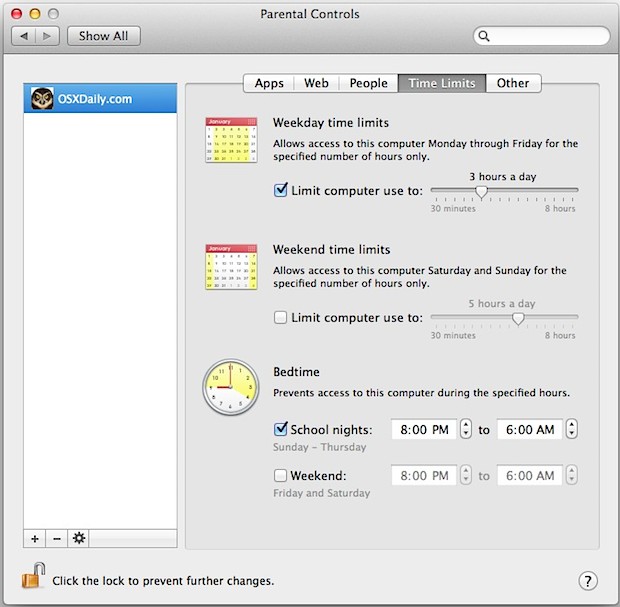
If you want to restrict app usage for a particular user on a Mac, there is no easier option than Parental Controls. This is a great solution for parents setting up a limited-access account for a kid, for public usage Macs, Macs in the enterprise, or even just for a restricted Guest account for when … Read More

Compare Contents of Two Directories from the Command Line

Nov 8, 2012 - 8 Comments
Compare directory contents from command line

To compare and list the different contents of two directories without the extra output you get through commands like diff, you can use the comm command instead. To get started, launch Terminal and type the following command, adjusting the directory paths as appropriate: comm -3 <(ls -1 folder1) <(ls -1 folder2) The output listed will … Read More

Subscribe to OSXDaily

Subscribe to RSS Subscribe to Twitter Feed Follow on Facebook Subscribe to eMail Updates

Tips & Tricks

News

iPhone / iPad

Mac

Troubleshooting

Shop on Amazon to help support this site