tricks

Search tricks

Set a Local Domain to Ease Local Development

Oct 28, 2009 - 8 Comments

Terminal in macOS

If you’re a web developer you probably do a fair amount of development on your local machine using either the built-in Mac OS X Apache server or, in my case, something like MAMP. Because a local web server like this is really handy for testing this, you can make your local development life a bit … Read More
Play MP3’s, M4A, AAC, and Other Music Files from the Command Line

Oct 27, 2009 - 3 Comments
Terminal in macOS

Ever wanted to play music while you’re working in the command line? Maybe you want to play a podcast from the command line on Mac? With the command line tool ‘afplay’ you can do just that, you can play practically any audio file format, whether it’s M4A, AAC, MP3, WAV, AIFF, or whatever else is … Read More

Change File Associations in Mac OS X

Oct 25, 2009 - 31 Comments

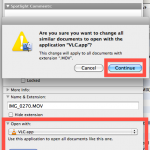
It really drives me nuts when files can be of the same kind but different type open different apps, I want to open all my images in Preview and all my video files in VLC. You can make Mac OS X open every file of a certain format type with a certain application by changing … Read More

Get a Battery Discharge Reminder for Maximum Mac Laptop Battery Performance

Oct 19, 2009 - Leave a Comment

I use my MacBook almost exclusively at home and so I frequently forget to discharge and recharge the battery, which is a recommended procedure to have your notebook battery last as long as possible. For people like me who often run with the powercharger attached to their Mac laptop, Apple.com offers a nice simple reminder … Read More

What is MD5?

Oct 15, 2009 - 1 Comment
Terminal in macOS

Ever heard of MD5 and not sure what it was or what that meant? You’re likely not alone, but MD5 is important, and, with a little explaining, easy to understand. Let’s explain a bit about MD5, MD5 checksums, what it is, and why you should know about it.

Check MD5 Hash on your Mac

Oct 13, 2009 - 19 Comments
Mac Terminal icon

You can easily check the MD5 Hash of any file on your Mac, all you need to do is launch the Terminal and type the ‘md5’ command and point it at the file you wish to check the md5 has for. How to Check MD5 Hash of a File on Mac First launch the Terminal … Read More

Flying? Use In-Flight Wireless When iPhone Airplane Mode is Enabled

Oct 2, 2009 - Leave a Comment

Are you a traveler and flying on an airplane with your iPhone? Then this tip is for you! You can selectively enable WiFi access while your iPhone is in Airplane Mode, meaning you can use a flights wireless internet service without the cell phone itself being turned on. This is really handy since many flights … Read More

Create an Instant Photo Slideshow with Quick Look

Oct 1, 2009 - 2 Comments

Quick Look is one of the many Mac OS X features that make my OS choice cemented, I use it so often that I simply can’t live without it, and here’s a tip that I’ve been using a lot lately. If you want to create an instant slideshow of images, simply select multiple images in … Read More

List all Open Internet Connections on a Mac from Terminal to Track Down Bandwidth Issues

Sep 29, 2009 - 5 Comments
Network Utility in Mac OS

Recently the LAN at my office had been running slower than usual, and I couldn’t pinpoint what was using up all the extra bandwidth. I had a suspicion that P2P traffic was to blame but I just couldn’t see anything obvious on the offending machine. So the question of course, is how do you see … Read More

Change Sound Input Source on Mac with Option-Click on Sound Menu

Sep 28, 2009 - 3 Comments
Changing the sound input source on a Mac the easy way

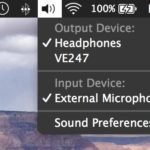
If you want to quickly change your sound input device on a Mac, by far the fastest and simplest way to do so is to Option-Click the Sound menu icon at the top of your screen. Option-clicking the sound icon menu bar item enables an alternate pull-down menu including a list of clearly labeled and … Read More

Quickly Sleep Your Mac from an External Keyboard

Sep 26, 2009 - Leave a Comment
Quick sleep a Mac

Want to almost instantaneously put a Mac to sleep from your external keyboard? It’s much easier than you’d think, and you don’t need to pull down the  Apple menu to accomplish this task. Instead, to quickly sleep your Mac just hold down Command + Option + Eject for about two seconds, and the computer … Read More

Convert a Nero Image File to ISO

Sep 25, 2009 - 8 Comments

Someone recently sent me a Nero Image File and I had no idea what to do with it, but after some looking around I discovered you can easily convert a Nero image File to ISO format. Apparently the only difference between a Nero Image File and a typical ISO is that Nero adds a 300k … Read More

What Shell Am I Using? Here’s How To Find Out

Sep 25, 2009 - 5 Comments

Ever wondered what shell you are using at the command line? It’s not unusual to want or need to know which shell is running, and though you may hear this question many times, the answer could be different for every user, thus the easiest thing to do is to issue a terminal command which determines … Read More

Stop Flash from Automatically Loading in Safari with ClickToFlash

Sep 24, 2009 - 8 Comments

I love the web, I hate Flash. I know this isn’t always a popular opinion, but for me it causes a lot of problems. It’s a slow bloated resource hog that makes browsing the web painful, loud, and obnoxious. Really the only time I actually want to use it is on video sharing sites like … Read More

Access and Mount an SMB Share via Command Line

Sep 24, 2009 - 4 Comments
Mac Terminal icon

Do you need to access and mount an SMB share from the command line on a Mac? You may be used to connecting to Windows PC from the Mac networking features to mount a Windows share on Mac, but you can also connect to Samba shares from the Terminal too. This article will show several … Read More

How to Hide All Desktop Icons in Mac OS X

Sep 23, 2009 - 58 Comments
Desktop icons disabled in OS X

Want to hide all desktop icons on a Mac? Desktop icon clutter can really impact workflow by overwhelming you with files and just too much stuff to look at. Inevitably, it can be hard to avoid since a lot of apps download things to the Desktop by default, we save things there, screenshots go there, … Read More

Disable Bonjour by Turning Off mDNSResponder

Sep 15, 2009 - 11 Comments
Terminal in macOS

Bonjour is a great service that runs in the background of your Mac to auto-discover network resources, that is, it’s great until mDNSResponder goes haywire. I was recently in a very creatively crafted network environment that made Bonjour absolutely freak out and tax my CPU with a million processes, so I opted to just disable … Read More

Use a Quick and Dirty Stopwatch via the Mac Terminal

Sep 12, 2009 - 2 Comments
terminal

Need a super easy and simple Stopwatch on the Mac, but don’t want to download anything like a third party app or utility? Look no further than the command line. You can create an instant quick and dirty stopwatch via the Mac OS X (or linux) command line by launching the Terminal app and typing … Read More

Subscribe to OSXDaily

Subscribe to RSS Subscribe to Twitter Feed Follow on Facebook Subscribe to eMail Updates

Tips & Tricks

News

iPhone / iPad

Mac

Troubleshooting

Shop on Amazon to help support this site