tricks

Search tricks

Ask OS X Daily: How Do I Force Open a File on Mac?

May 22, 2007 - 5 Comments

App Store icon

Reader Mathew Prairen asks a common question about forcibly opening files with an application on the Mac, and it has a remarkably simple answer: “I have a few documents and files from my PC that Pages refuses to open, is there any way I can force Pages to open these files?” As a matter of … Read More

Quickly Check Mac OS X Virtual Memory Usage

May 16, 2007 - 4 Comments

Virtual memory serves a crucial task in modern operating systems, essentially how it works is that when you run out of real memory (RAM), the slower hard disk will take over as a temporary memory source. The downside is that the hard disk is slower, so running things in virtual memory is not ideal, one … Read More

Download Files from the Web via the Mac OS X Command Line

May 11, 2007 - 12 Comments
terminal

I am frequently developing web pages and often times I find it frustrating when I can not restart my browser because I’m in the middle of a download. So when I need to download a large file and I don’t want to have to worry about whether or not Safari, Chrome, or Firefox continues to … Read More

How to Enable Expanded Save Dialog as Default in Mac OS X

Apr 25, 2007 - 7 Comments
The expanded Save Dialog in Mac OS X

There has never been a time when I am saving a document in Mac OS X that I don’t click the expand arrow to see the full save dialog screen. That little button is situated alongside the file name input, and when you click on it, you have access to the expanded dialog that allows … Read More

How to Control the Fan Speed of your Mac Laptop with SMCFanControl

Apr 24, 2007 - 9 Comments

If you have a MacBook or MacBook Pro you’ve probably noticed that it can get a bit warm, no surprise considering the tremendous amount of processing power stuffed into their respective cases. The cooling system is simple to understand; when your CPU load goes up, your fans will kick in. Well, not all users think … Read More

Get System Information from the Command Line in Mac OS X

Apr 23, 2007 - 13 Comments
Mac hardware

Regardless of how many Mac’s you administer, there will surely come a time when you’ll need to retrieve relevant System Information. This can be done from the graphical interface with the Apple System Profiler utility, but often you’ll need to pull system details from the terminal as well. Gathering system information from the command line … Read More

Four Great Uses for Preview App Full Screen Mode in OS X

Apr 19, 2007 - 21 Comments
Preview in Mac

Preview is the default application to open just about any image or PDF file on your Mac, it’s a great program that blows anything comparable in the Windows world out of the water. One of the greatly underused features of Preview is the ability to view images and PDF files in full screen mode. Entering … Read More

Install Software Updates from the Command Line

Apr 18, 2007 - 4 Comments

We all know the familiar Mac OS X Software Update and App Store Updates panel, it pops up weekly to give us a nice GUI interface to install all the latest updates to our Apple software. But did you know that you can get the same list, query the available updates list, and even install … Read More

Change the Minimize Effect in Mac OS X via Defaults Command

Apr 12, 2007 - 22 Comments
minimize windows in Mac OS X

When you click the yellow minimize button in Mac OS X, the snazzy Genie effect pulls the window into the Dock. Although you can change between the Genie and Scale effect from within the Dock preference pane, there is a third hidden effect that Apple has chosen to keep out of the preference pane. The … Read More

Change the Default Web Browser in Mac OS X

Apr 6, 2007 - 30 Comments
Default web browser in Mac OS X

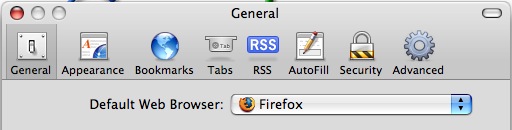
Updated: 11/27/2021 Ever wondered how to change the default web browser app on your Mac? Maybe you prefer Chrome to Safari, or maybe you want to use Firefox instead of Safari, or vice versa? Whatever your choice, it’s easy to do in macOS Monterey, macOS Big Sur, macOS Catalina, macOS Mojave, High Sierra, Sierra, OS … Read More

Using Pipes at the Command Line, a Basic Overview

Apr 3, 2007 - 1 Comment

One of the essential functions of the command line of Mac OS X, Linux, or any Unix, is understanding some basics about how to use pipes. Essentially, pipes allow you to direct the output of one command into the input of another command, allowing the following command to manipulate, adjust, or work with the prior … Read More

Mac OS X Directory Structure explained

Mar 30, 2007 - 36 Comments
Mac Finder, where you can copy the path of a file name easily

If you have ever looked at your Mac root directory and wondered what some of those other directories are for, you’re probably not alone. Mac OS got a whole lot more complex with the advent of Mac OS X, adapting a unix file structure that is largely unfamiliar to Mac OS 9 and Windows users. … Read More

How to Use Redirection at the Command Line, a Basic Overview

Mar 29, 2007 - 4 Comments

Ever wished you could send the output of a command to a file or append that output to an existing file? That’s what redirects do. To put it simply, command line redirects allow you to take the output of certain commands and create new files or add to existing ones with this data, this is … Read More

How to Mount a Windows PC Shared Folder On a Mac

Mar 27, 2007 - 2 Comments
Windows

Love it or hate it, but we live in a multi-platform world with multiple operating systems. Sure we prefer Mac’s, but the chances are high that at some point you’ll have to interface your Mac with a PC to share files between the two machines, particularly if you are in an office environment or school. … Read More

Quick Tip: Eject Media from Command Line on Mac OS X

Mar 26, 2007 - 10 Comments
A disc

Ever needed to eject a disc, cd, DVD, or media from the command line on a Mac? You can do that from the Terminal, as we’ll show here. To eject a disc or media from the command line on Mac, open up your Terminal and type the following:

How to Disable the Built-in iSight Camera on a Mac

Mar 26, 2007 - 39 Comments
FaceTime

Most new consumer Macs come with a built-in iSight / FaceTime camera which can be used for all sorts of fun, ranging from live video chatting in FaceTime, Skype, and iChat, to horsing around in Photo Booth, to using third party apps like Gawker to capture time lapse photography of whatever is going on. That … Read More

How to Always Boot Mac OS X in Verbose Mode

Mar 25, 2007 - 31 Comments
Terminal in macOS

Booting Mac OS X as usual shows the Apple logo and eventually you’ll wind up at a login screen or desktop, that’s attractive and all, but some users would prefer to see what’s going on behind the scenes. That’s what Verbose Boot Mode does, it shows you what is really happening during system startup on … Read More

Create a RAM Disk in Mac OS X

Mar 23, 2007 - 45 Comments
Check Mac RAM type and maximum capacity

Need to create an ultra-fast RAM disk in Mac OS X? We’ve got you covered with a command line trick that will generate a RAM disk of any size of your choosing. These instructions have been updated to support all versions of OS X, from modern releases to older ones too, so no matter what … Read More

Subscribe to OSXDaily

Subscribe to RSS Subscribe to Twitter Feed Follow on Facebook Subscribe to eMail Updates

Tips & Tricks

News

iPhone / iPad

Mac

Troubleshooting

Shop on Amazon to help support this site