
Make Easy Time Lapse Photography with Mac iSight Camera & Gawker App
 All of us have likely admired the results of a nice time-lapsed sequence, perhaps of a flower opening or the sun setting, the effect of time lapse video can be simply gorgeous. So, wouldn’t it be cool to do these on your own with little effort? With a Mac and the front-facing FaceTime / iSight Camera, you can with the help of this neat little app.
Gawker is a really fun open source app that allows you to easily create time-lapsed photographic images, and conveniently exports them into movie format for easy viewing and sharing. This is free Mac software at it’s best, but of course donations are always accepted. So use your built-in or external iSight and start having some fun, the results are always amusing.
How to Record Time Lapse Video on Mac with Gawker
To get started, first you’ll want to download the Gawker app, it’s free and available on sourceforge:
- Visit the Developer home to get Gawker for Mac OS X
After you download Gawker go ahead and decompress it and launch the app to begin.
The interface of Gawker is simple enough, you just need to select your camera to start the process. When you click the Record button, you’ll get a save dialog with various options.
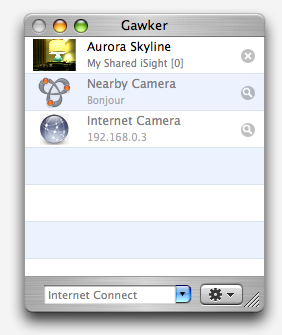
If you dig around a bit you’ll also see options for scheduling start and stop times, and even an option to share your gawker feed in a livestream over the internet.
Check it out from the link below if you’re interested in making quick and easy timelapse video from your Mac camera, and enjoy!
The final video quality depends on the model of the iSight / FaceTime camera on the Mac, with older models having reduced resolution compared to the newest Macs.
So what does a final Gawker video look like? Be sure to check out this cool example of an artist drawing, found on YouTube:
If you have an iPhone you can do even better by recording HD Time-Lapse video thanks to the inclusion of the feature in the all new iOS versions. You can learn more about how to record time lapse videos with iPhone here.






Wow. This is an awesome program. I was amazed at its simplicity and just how user friendly it is. Its just cool. Thanks!