
Lingon – Configure launchd with a GUI Utility for Mac OS X
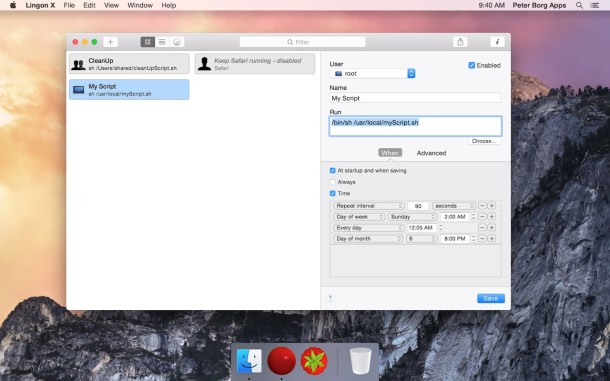
Lingon is one of the more useful apps for advanced Mac users, sysadmins, and network administrators out there. Essentially lingon functions as an easy tool to manage launchd without tinkering with launchd manually from the Terminal, providing a much appreciated GUI to configure the launchd system daemon, which allows you to set schedules for applications and scripts to run like cron, load and unload system daemons and kernel extensions, and so much more.
Here’s how the developer describes this great app, which works in just about all versions of OS X with launchd:
“Lingon can start an app, a script or run a command automatically whenever you want it to. You can schedule it to run at a specific time, regularly or when something special happens.
Lingon can also make sure that an app or a script automatically restarts if it crashes. Lingon can do all this for you and much more.
Lingon X is based on the great Lingon 3 and eXtends it with new features like running jobs as root and at multiple dates. It is now even easier to use yet much more powerful.
Lingon lets you run things automatically by modifying configuration files for the system function called “launchd”. This means that you can also edit or remove jobs created by other apps. And the system handles running the jobs in the background so you don’t need to have Lingon open after you have saved your job.”
There’s plenty of room for error however, so it would be a good idea to familiarize yourself with how launchd works before you start altering anything major. Grab the app below, then if you’re unfamiliar, learn a bit more about launchd from Apple Developer manuals.
- Get Lingon from PeterBorgApps here or get it on the Mac App Store
The app costs a couple of bucks but that’s a small price to pay if you’re a sysadmin or advanced user who does a lot of tinkering and scheduling with cronjobs and launchd. It’s so much easier to use and understand than the terminal based approaches that it also offers a great introduction to these functions on a Mac in general. The red icon is a little boring, but that’s no big deal when you see how useful the app is.
Here’s an explanation from Apple of launchd:
Apple introduced a new system startup program called launchd. The launchd daemon takes over many tasks from cron, xinetd, mach_init, and init, which are UNIX programs that traditionally have handled system initialization, called systems scripts, run startup items, and generally prepared the system for the user. And they still exist on Mac OS X Tiger, but launchd has superseded them in many instances. These venerable programs are widely used by system administrators, open source developers, managers of web services, even consumers who want to use cron to manage iCal scheduling, and they can still be called with launchd.
Read more: Getting started with launchd at Apple.com
Lingon works in OS X Yosemite, OS X Mavericks, OS X Mountain Lion, and more, just be sure to get the correct version for whats running on your Mac.





