
Mac OS X Word Completion & Suggestion Feature is Useful, but Little Known
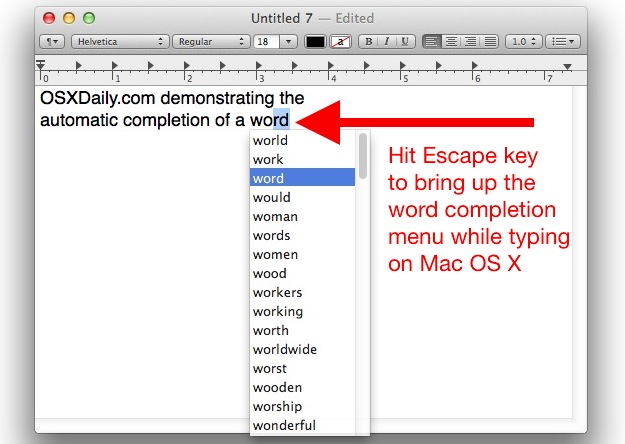
 The Mac has a built-in word completion and word suggestion feature that is intelligent and works incredibly well. This OS X feature is not quite predictive text or QuickType like exists in iOS, but it’s fairly similar and all you need to do is give it a start. You’ll find this very useful if you can’t remember how to spell a word, or a word is on the tip of your tongue and you know it starts with a particular letter or prefix.
Here’s how to use the OS X word completion and word recommendation feature:
- In an application where you can type as usual, say TextEdit, Pages, Safari, start typing any word
- Once you have at least a single character entered, hit the “Escape” (or sometimes Option+Escape) key to summon the word completion engine
- Navigate through the word completion menu to select the word and hit Return to type it out automatically
- Repeat as necessary or just carry on with your word processing as usual
You’ll find this in almost all Mac apps, especially ones from Apple.
This tip originated from Ohari Torimoto, who wrote in with the trick that he found some time ago. This is a somewhat a somewhat hidden Mac OS X feature that we’ll simply refer to as word completion. The original tip from Ohari explains it as follows:
“Here’s how it works: In most cocoa apps, start typing a word, and hit the Escape-Option keys to enable a pop-up menu with various suggestions to complete the word.”
Thanks for the great tip Ohari!
This continues to work in ALL versions of OS X, from OS X Yosemite, Mavericks, Snow Leopard, Leopard, Tiger, Cougar, or whatever the other wildcat names were form yesteryear.
The only difference is whether you need to hit simply the Escape key, or Option Escape, that is dependent on the version of OS X you’re using, so if it’s a modern version of OS X, just hit Escape, if it’s an older version of OS X, try Option+Escape instead. Happy typing!






Apple Escape on Intel Macs though is the default into front row.
In TextEdit, you just have to press “Escape”.
Apple thinks of everything, what a great idea. this should help me because I suck at spelling
but what i want to know is why this isn’t promoted or advertised more by Apple for such a useful feature why not include it in marketing pitches? does noboyd care?
I don’t know if I’d call this word completion, it’s more of a dictionary really.
Eitherway it is a great tip, thanks!