
How to Ignore Mac Software Update Packages in Snow Leopard
 Apple certainly means well with the Software Updates, but sometimes I get update notifications I just don’t care about, or just don’t want to install for whatever reason. If you’re in this situation and you have a version of OS X before the App Store that ran exclusively in a native Software Update window, like Snow Leopard and prior, you can easily ignore those software update packages to stop having them show up. (Yes you can ignore Mac App Store updates too, here’s how).
To stop Software Update in Mac OS X from pestering you about a particular package being available, all you need to do is the following:
- Select the package in the Software Update screen
- Navigate to the ‘Update’ menu and selecting “Ignore Update” (see screenshot below) while the item is to ignore is selected
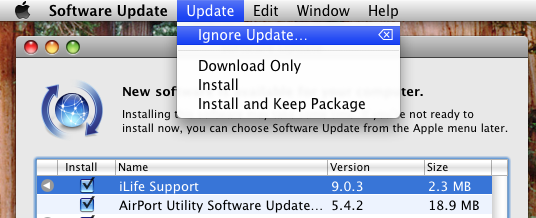
This works in all pre App Store versions of Mac OS X, including Snow Leopard and prior.
If you accidentally ignore a package you do want, or you change your mind later, no problem – simply go to the Software Updates main menu and select “Reset Ignored Updates” to reset the list and set the packages for Mac OS X again.
Note that newer versions of OS X with the App Store as the primary software update mechanism can still ignore updates, well, sort of, through a process of hiding software updates from the Mac App Store, it’s not quite the same but the end effect is largely a comparable experience, with the update no longer appearing in the list of software available to install in OS X. New versions of OS X also nag through the Notifications panel with alerts, but you can stop those bugging you too if you want with a different method.






[…] list can be helpful to look through for troubleshooting purposes, or if you’ve ignored some updates and plan to install them manually through the command line or by downloading the packages from […]
Mac OS updates are so intrusive, unlike the Windows update manager software
[…] this a try. That will let you ignore that package. __________________ "It is beyond a doubt […]
Thanks for very useful tip! ;-)
[…] This post was Twitted by AppleTwitts […]