
Change Sound Input Source on Mac with Option-Click on Sound Menu
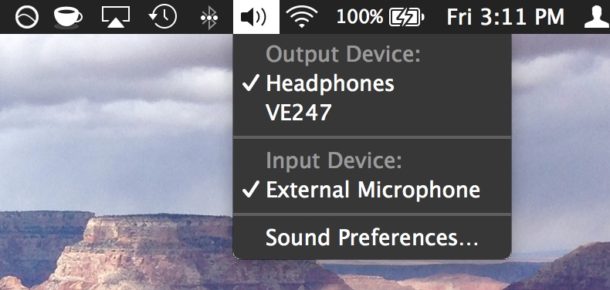
If you want to quickly change your sound input device on a Mac, by far the fastest and simplest way to do so is to Option-Click the Sound menu icon at the top of your screen.
Option-clicking the sound icon menu bar item enables an alternate pull-down menu including a list of clearly labeled and named available input devices. From this menu, select your new input source, whether that’s an external microphone, bluetooth device, or whatever, and it will immediately be set as the universal input to the Mac.
This is so much faster than going the standard route of opening System Preferences and adjusting the microphone and line-in audio sources through the “Input” settings, and since it can be done from anywhere and without changing the applications, it’s not only faster but just more efficient. The only real downside to this approach is that you won’t see the microphone sensitivity indicator that you do through System Preferences, so if you need to double-check that or to adjust the line-in volume level you will need to do that through the general Sound Input preferences.
Of course, you can also toggle the input back to the default setting by option+clicking the menu again and choosing “Internal microphone” to set it back to the built-in mic.
This is an excellent trick for audio geeks or for any situation where quickly changing where audio is coming from is a necessity, whether you’re trying to use an external microphone, or any third party audio-in source. Of course, you can always disable the microphone too if need be.
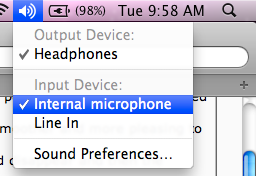
This sound trick has been around in Mac OS X for quite some time and remains supported available in all current versions. It goes both ways too, so you can use it to change the external sound speakers as well, which is really helpful for getting HDMI audio output on a Mac to work if you hook the device up to a TV. Enjoy!






MacBook Pro mid-2010 OS 10.12.2 (16C68)
Can no longer see “External Microphone” in any option, regardless of what I’ve tried so far.
On a deadline. Any ideas?
[…] the other way, this menu trick will also let you change input sources as well, making it easy to toggle input from an external microphone, another audio source, or back to the default internal mic as […]
This is not new to 10.6 as I am running 10.5, but is very handy none-the-less.
I would recommend you check out SoundSource from RougeAmoeba, if you haven’t already! It’s basically this same menu item, but, on steroids.
-NeyeTr0