
Right-click Dock App icons for extra launching features right from the Dock!
Nov 11, 2009 - 3 Comments
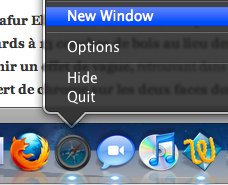 This works in many versions of Mac OS X
 I’m pretty sure this only works in Snow Leopard, you can right-click/control-click on many App icons in the Dock to do things like:
* Create a New Window in Safari
* Create a New TextEdit Document
* Launch a New Remote Connection in Terminal
* Shuffle iTunes Songs
* Open a new Chat in iChat
* Set your Away Message in iChat
and so much more, right from the Dock! This is a very handy feature that I find myself using more and more, try it out with other apps and see what you get. Some of this may work in Leopard but I no longer have a Leopard machine to test this on, perhaps one of our other writers or readers can double check. Thank you readers for confirming this works in many versions of Mac OS X!






Paul, you are totally wrong, this has been around for ages. There may be new features in Snow Leopard with regards to Dock clicking, but I have been doing this since 10.1 on my Flower Power iMac
I think it has been there for a while, in Leopard and Tiger at least.
Does anyone know of an app that lets you view the menus on mouse over though?
I’m pretty sure that feature was available in every version of Mac OS X, starting from the first beta version :-)