
Copy a File or Folder Path to the Terminal by Dragging and Dropping
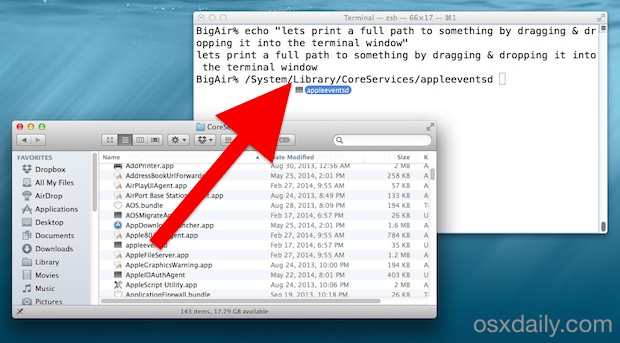
Did you know you can quickly copy a files path to the Terminal just by dragging and dropping the folder or file into the Terminal window? Try it out, open any terminal window then take something from the Finder and drop it into that Terminal, it’ll instantly print out the full path to the file, effectively copying the file path from the Macs Finder GUI to the command line.
By itself it will only print the directory structures path, it won’t execute without hitting the RETURN key (which, unless the file/folder path is prefixed with some compatible command string anyway, it wouldn’t do anything).
This is particularly helpful when a file is located in an obscure location that you happen to already in within the Finder of Mac OS X, but want to quickly jump to the command line, or just make an edit.
Prefixing the drag & drop with a command makes it easy to execute with the path or file in question as well, for example
cd (drag and drop a folder here)
Would allow you to quickly change the terminal to the drag & dropped path.
This works with files too, so you could open some deep file in vi or nano if you wanted to by doing the same thing:
nano (drag and drop text file here from the Finder)
Or if you just wanted to see the contents of a specific file in the Finder as dumped through ‘cat’ or ‘less’ you could do something like this:
less (drop the file from Finder here)
Don’t forget to use proper spacing after the command to execute, the path itself is precise and doesn’t include any spaces or extra characters as padding.
We had written about similar tip for printing the full paths some time ago and after seeing it again on Lifehacker I realized it was a good reminder to qualify some of the better uses of the trick.
For what it’s worth, this technique works in all versions of Mac OS X and even across many other OS platforms, even in Windows with the DOS prompt and most linux versions like Ubuntu. Handy trick, try it out!






Why bother even commenting! MArk
THANKS for the info! 2yr Mac owner just found out :)
I don’t understand why all Mac sites decided to make a news about drag-n-dropping into the Terminal. This has been there for years.