
Enable & Access Chinese Character Input in Mac OS X
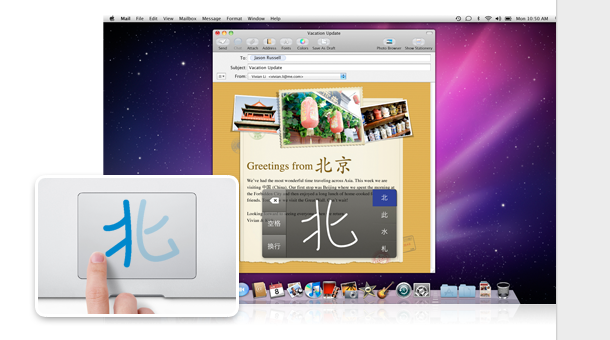
With modern versions of Mac OS X you can input Chinese Characters directly into the trackpad! This is an extremely cool feature but requires a newer Mac with a multitouch trackpad as well, so it’s best for Mac laptops and the Magic Trackpad surface.
How to Enable Chinese Character Input in Mac OS X
- Launch System Preferences
- Select the Languages and Text pane
- Click the “Input Sources” tab across the top
- Scroll down to either “Chinese – Simplified” or “Chinese – Traditional”
- After enabled, you can show the trackpad handwriting surface in two ways:
- Either Hit Control+Shift+Space to bring up the Handwriting Input Surface (or whatever else you changed it to in prior screen)
- OR you can select the International keyboards menu bar item and select “Show Trackpad Handwriting” to bring up the Chinese Character Input screen
When the trackpad handwriting feature is enabled, the mouse is disabled for scrolling around and the trackpad itself becomes a writing surface allowing you to draw and input Chinese characters directly into it. The strokes are then monitored and you will be offered different character choices depending on what strokes you enter. Very cool!
This was first introduced in OS X Snow Leopard but has stuck around in later versions and been improved on greatly, so Yosemite and El Capitan users will get the same feature as well.
[ above image borrowed from Apple.com ]






Full range of Jersey Euro 2012 , I love it at Soccer !
I am running 10.6.8 in my iMac and I want to add that I need to re-boot my computer to make it work or the Trackpad only shows up in word-processing software, not in emails nor other places like Google, FB etc.
but how do you chose a character wants its written?? it just keeps on drawing! this drives me crazy i want to smash my macbook air against the wall
help I get mad!!
Me too. I can’t see how to select a character.
yes, please help
You will see the possible choices aligned left and right as Chinese characters. Pretend those are buttons aligned along the edges of your trackpad. Touch the trackpad in appropriate positions, along left or right edge, to select.
I enjoy what you tend to be up too. Such ingenious work as well as Chinese Character Input in Mac OS X exposure! Continue this amazing work guys I have included you to our reader Oh yeah my thoughts go out to everyone close by atomic plant we hope you are OK and secure too !… Thx … Thanks Rob Rasner Charity Ortiz
???How do you open it? i’m using 10.5.8. Control+Shift+Space doesn’t work for me, and what keyboard menu bar item? PLZ answer thx
I believe this function is only available on Snow Leopard. 10.5.8 is still Leopard and not Snow Leopard (which is the 10.6 series).
I have 10.5.8 too, I wish I had this function!!!!! But maybe it’s silly to upgrade just for that…