
Schedule Sleep and Wake on Mac
You can schedule your Mac to sleep, wake, shutdown, or boot up at any time or any regular interval using the Mac System Preference ‘Energy Saver’ schedule settings. This provides for an excellent option for work Macs that you want to be awake or boot when you arrive in the morning, and to sleep or shut down at a provided time when you leave in evening. Of course there are tons of other uses for the overlooked scheduling feature, so let’s learn how to set up this up.
How to Schedule a Mac to Sleep, Wake, Boot, or Shutdown at a Set Time
Sleep, wake, shutdown, and boot scheduling is built into nearly every version of Mac OS X and is supported by virtually every Mac out there. Here’s what you’ll want to do to get this setup:
- Launch System Preferences from the Apple menu
- Choose the “Energy Saver” or “Battery” preference option (it’s the coiled eco-friendly lightbulb icon, or the battery icon)
- Click the “Schedule” button in the lower right portion of the preference pane to launch the scheduling settings
- Set whether you want your Mac to sleep, wake, boot, shutdown, or whatever necessary, by checking the appropriate box and then selecting the power option from the respective pulldown menu
- Now, set the appropriate times and the desired interval (every day, every work day, weekends only, weekdays only, specific days, etc) for when you want the scheduled wake and/or sleep event to occur
- Click ‘OK’ and then exit out of System Preferences, you are now finished with the configuration
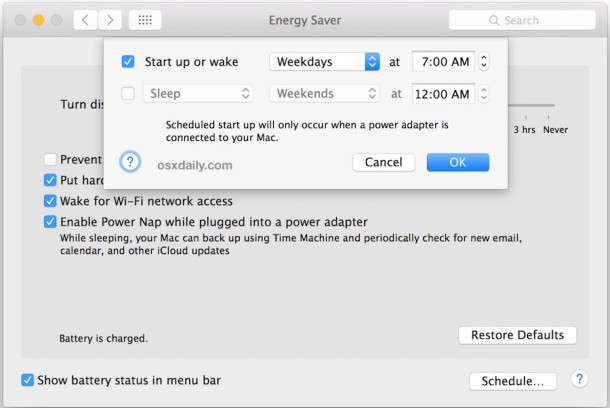
For example, this Schedule settings choice will wake up the Mac every week day at 7:00 AM:
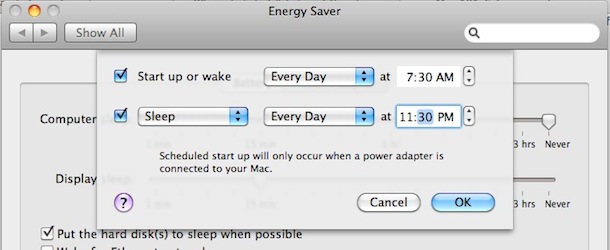
And this Schedule example would wake up the Mac every day at 7:30 AM, and then sleep the Mac automatically every day at 11:30 PM :
It’s necessary to adjust your sleep and wake events to fit what you want to accomplish and when, but this is an incredibly useful tip.
Now that you have this configured, your Mac will be scheduled to wake up, boot, shutdown, go to sleep, at whatever times you set!
This is really handy to setup so that your Mac will be up and waiting for you before you arrive to your workstation, and also so that it will sleep through the night and conserve power.
Setting sleep and wake schedules like this along with a Time Machine schedule is particularly worthwhile so that a backup completes and then the Mac can either turn itself off or go to sleep when finished.
Or, if you schedule system startup and the Mac to shut down on a regular schedule, you can combine that with launching Mac apps on boot up in Mac OS X so that your applications are waiting for you when you return to the Mac.
As mentioned before, this feature exists in basically every version of macOS and Mac OS X to ever exist, so it doesn’t matter if you’re using an older or newer operating system, the functionality to schedule sleep and wake will be available to you.
This is an very handy feature with a lot of possibilities, try it out for yourself, and if you have a great use for power scheduling, share it with us in the comments.






[…] it should give a good starting point to anyone who’s confused as to why something like automatic sleep isn’t taking effect, and hopefully provide a quick resolution to the […]
[…] Quickly resume exactly where you left off; sleep and wake can be scheduled or even done […]
Any idea how to disable the scheduled sleep warning that appears about 2 minutes before the computer is scheduled to go to sleep? I’m creating a kiosk and the client would like to put the box to sleep or shut down at night and wake it up the next morning. But, we don’t want to give any users the option to disable this.
As it is, a notice pops us about 2 minutes before scheduled sleep or shutdown. Any idea how to disable this?
[…] Real Time Clock Alarm, is generally from wake-on-demand services like when you schedule sleep and wake on a Mac via the Energy Saver control panel. It can also be from launchd setting, user applications, […]