
Reset your lost Mac OS X password
Dec 14, 2009 - 6 Comments
 You can reset a lost Administrator (the original account you created) password in Mac OS X by utilizing a Mac OS X installation DVD, here’s how:
* Insert the Mac OS X DVD into your Mac’s DVD drive
* Restart the Mac and hold down the ‘C’ key to boot from the DVD
* You’ll see a language selection screen, select your language (English) and continue
* Navigate to the ‘Utilities’ menu, select “Reset Password”
* Select the Mac OS X boot drive
* Select the original user account (not the root user!) and choose a new password
* Reboot as usual
* Your Mac administrator password is now reset!
If you do not have an installer CD or DVD handy, you can also reset a forgot Mac password using a crafty technique.
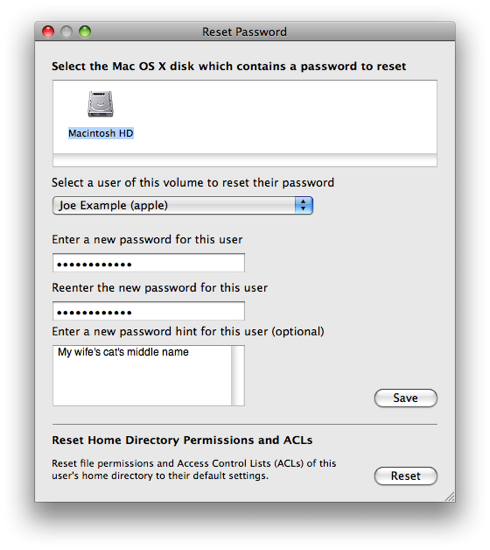 [ screenshot from Apple ]






I tried to reset my admin password with the install disc my mac came with and I came across a problem in the password window…
The mac os x disc (my original account) that contains the password I want to reset doesn’t even show up as an option; just the install disc itself. And when I click on the install disc, it shows up as the “system administrator (root)”
help??
Random question: I am just starting my blog, but how did you start gaining readership? was it just natural? I mean how did people start finding you?
Also, this will not reset the password on your keychain so any passwords, certificates, etc, you have stored in there will remain inaccessible. Resetting the keychain will delete all previously stored keychain data, although the keychain file will have been backed up by Time Machine if you’ve been using it.
As for your laptop being stolen:
Unless you’re running FileVault or Whole Disk Encryption, accessing the data on your laptop’s hard drive — regardless of the operating system — is as easy as removing the drive, putting it in an enclosure, and connecting it to a different computer that you have admin rights on. In the case of Apple laptops with a firewire port, you can just boot the computer in target disk mode (assuming you’ve defeated the PROM/EFI password, if there was one) and skip the remove-the-disk part.
As an alternative to FileVault and its myriad issues, I’d recommend Espionage (http://www.taoeffect.com/espionage/) because it can encrypt individual folders and handles mounting/unmounting of them automatically. (I have no interest here other than being a happy customer.) It also supports sparsebundles, which are easier on disk space and Time Machine backups, in addition to the usual sparseimages that FileVault uses (which Time Machine can’t touch until you logout of the account).
If your laptop is stolen, it’s even easier to get into it. Just boot the Mac in target mode, and everything’s open as if it’s an external drive.
Without FileVault, security on OS X, if physical access is granted, is a joke. It may be easy enough for a hacker to hack into Windows machines, but it’s not so easy for any average Joe with an install disc to simply change your root password and get into the machine as if they were you.
So if your laptop is stolen, it’s this easy to get into the computer? Or am I missing something here?
Nice one, but I think you’ll run into much trouble here if file vault is active… ;-)