
Change the Login Background Wallpaper on Mac OS X Leopard & Snow Leopard
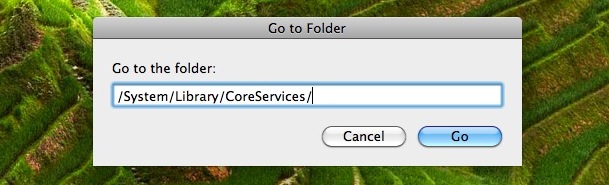
If you want to change the wallpaper that sits in the background of your Mac’s login screen in OS X Leopard and Snow Leopard, from the Finder hit Command+Shift+G to open the ‘Go to Folder’ screen. Type /System/Library/CoreServices/ and click ‘Go’:
Next, find the image file called ‘DefaultDesktop.jpg’ – you should save a copy of this somewhere safe, or rename it to DefaultDesktop-backup.jpg or something of the sort, so that you can revert your changes.
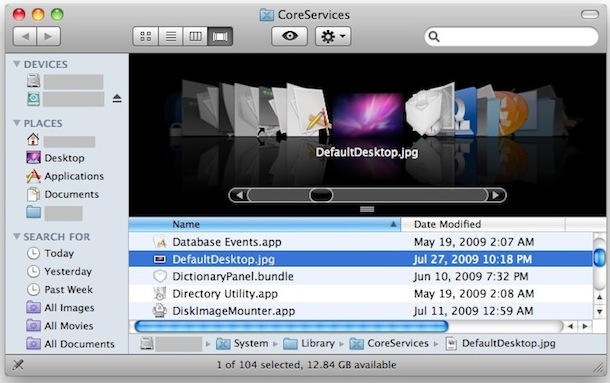
After that file is safely backed up, add the new wallpaper image you want to use as the login background, naming it exactly the same as the previous file: DefaultDesktop.jpg
That’s all there is to it! Reboot and your login wallpaper is now whatever you set it to. This works to change the login background in Mac OS X Snow Leopard 10.6






Just tried this on a fresh install of Snow Leopard (10.6.8) and it works fine for me.
I get the same thing as crw. I have 10.6.8
What’s up with it?
This doesn’t work for me. I’m running 10.7.8 Snow Leopard. Login Screen background turns blue. When I put copy of original back it works. What else should I be doing because everything up until I test it follows this example. Thanks.
Hello, this is Youtube.com My crew and I wanted to say that this is all very correct, what your trying to say. Nice answer! We all will put this on our site blog, and make sure we spread the word! Thanks, and have a great day!
– Youtube.com
Subscribe any time!
l like your web site. ı’m going to advice your web site my all of friend.
Loginox works great under Snow Leopard.
http://www.loginox.branox.com/
Under Leopard I’ve used Loginox with ease and reliability.
http://www.macupdate.com/info.php/id/27126/loginox
I don’t think it’s SnowLeopard compatible, however.
Saw this on reddit and posting here:::::
sudo defaults write /Library/Preferences/com.apple.loginwindow DesktopPicture /Path/To/New/Image.png
Can do the same… BUT I do not know about Snow Leopard?
does anyone else think it’s weird that Apple doesn’t allow this as a customization option in their Appearance settings? They’re so into personalization, seems out of place to not allow the wallpaper to change on boot.
Or use this little app: http://www.apple.com/downloads/macosx/icons_screensavers/desktop2login.html
Optionally you could update the right key
http://secrets.blacktree.com/edit?id=2379