
Track an Applications Usage in Mac OS X with opensnoop
Jan 27, 2010 - 4 Comments
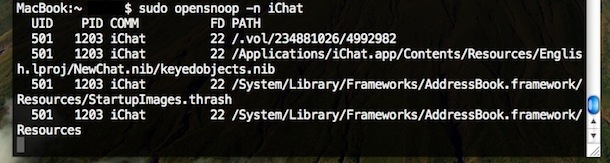
Using the command line tool ‘opensnoop’ you can track any Mac applications (or system process) usage of the file system. This is a very handy tool for administrators and troubleshooting! The simplest way to use it is as follows:
sudo opensnoop -n Safari
You can also track a specific file, and what is accessing it, like so:
sudo opensnoop -f /etc/hosts
Tracking a specific process is as simple as just specifying the process id:
sudo opensnoop -p PID
opensnoop will keep tracking the file until the process itself is ended, so just hit Control-C in the Terminal to stop opensnoop from running. In case you’re wondering, opensnoop is based on DTrace, a popular UNIX tool.
The uses are infinite, give it a try, or read more about opensnoop






[…] opensnoop utility is an amazing tool for tracking down specifics like what files specific applications are accessing, but you can also use opensnoop to monitor all filesystem access in Mac OS X. To do this, run the […]
[…] but these are two powerful yet easy ways to use the command. We actually covered this before with tracking an applications usage in Mac OS X but we got another question on the matter so here we […]
[…] Track an applications usage in Mac OS X with opensnoop via OS X Daily by Bill Ellis on 1/27/10 […]
[…] from running. In case you’re wondering, opensnoop is based on DTrace, a popular UNIX tool.[via]You might also enjoy:Hiding Files and Folders in OS XLast Revision: January 27th, 2010 at […]