
Enable Syntax Highlighting of Source Code in Quick Look for OS X
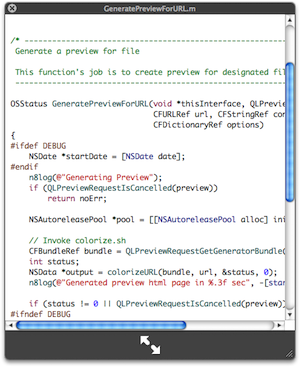
I use the OS X Quick Look feature constantly for everything from quickly viewing pictures, movies, text files, and of course, source code. Source can be a pain to view in QuickLook because there’s no syntax highlighting by default though, but this excellent Mac plugin changes that.
QLColorCode is a must-have QuickLook plugin for developers, programmers, coders, engineers, scripters, or anyone else who deals with source code or syntax on a regular basis. QlColorcode allows color syntax highlighting of nearly any type of source code from directly within QuickLook, making a quick glance at code infinitely easier. It’s free and easy to install, so download it now, you’ll thank me later.
Installation is simple, all you need to do is drop the plugin into your ~/Library/QuickLook/ folder, and restart the Finder and you’re good to go! Just Quick Look a piece of code and you’ll see that syntax highlighting becomes applied immediately, making it much easier to scan scripts and source code for anything you’re working on.
As long as the version of OS X supports Quick Look, these plugins should work just fine. Once installed, you can even change the font and font sizes for the plugin by using defaults commands offered by the developer:
Setting the text encoding (default is UTF-8). Two settings are required. The
first sets Highlight’s encoding, the second sets Webkit’s:defaults write org.n8gray.QLColorCode textEncoding UTF-16
defaults write org.n8gray.QLColorCode webkitTextEncoding UTF-16
Setting the font:
defaults write org.n8gray.QLColorCode font Monaco
The font size:
defaults write org.n8gray.QLColorCode fontSizePoints 9
Used in conjunction with enabling text selection in Quick Look windows on the Mac and you’ll likely boost your productivity a bit too.






For those who say Snow Leopard (or later) has syntax highlighting by default, this is true, but only with certain languages that Xcode 3.2 and later knows how to highlight. Anything besides C, Obj-C, etc. (such as Python, Perl, many others) will NOT be highlighted. Therefore, this QL plugin is still VERY much relevant.
SL here too, with syntax highlighting by system default!
I have syntax highlighting on Snow Leopard.. I think this is more relevant for Leopard (10.5) only..