
How to Always Secure Empty Trash
 You can set Mac OS X to always securely empty the Trash and add a significant layer of security when removing files from the Mac. This is done just by adjusting a preference setting within the Finder, and it’s very easy to configure, here’s what you will want to do to use this option:
Always Secure Empty Trash in Mac OS X
Toggling this setting causes the Mac to empty the trash with a secure layer, which uses multi-pass rewriting to overwrite random patterns over the file after it has been trashed. In lamen terms, that basically means it’s impossible to recover a file if it has been removed this way.
- Enter the Finder Preferences options, accessible by either going to the Finder menu and selecting “Preferences”, or by hitting Command+ within anywhere in the Mac Finder
- Click on the ‘Advanced’ tab icon
- Click the checkbox next to “Empty Trash Securely” to enable secure file deletion through the Trash, then close out of the Finder Preferences
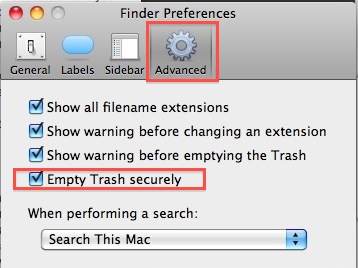
Now your Trash will always be securely emptied, regardless of how you empty it. Note this makes data recovery virtually impossible, because secure removal means the contents are not only deleted from the drive, but they are overwritten after they are deleted. Basically if you delete something this way, you won’t ever be able to get it back, and neither would any data recovery expert.
If you would rather not have the Trash constantly securely empty itself, either because you would like the data recovery option or simply because you find it’s unnecessary, you can instead choose to selectively choosing to Securely Empty Trash instead.






[…] you find yourself using this option frequently, you may want to just toggle the ‘always’ setting in Finder Preferences, which causes the Trash contents to be secure deleted every single time […]
[…] with the command line but who want to retain secure file removal options should consider using the “Always Secure Empty Trash” option that is available to the Mac OS X Finder instead. You have been warned, proceed with […]
As i said before, another amazing simple post.. :)
[…] you’re in the Advanced Finder preferences, you might want to enable the always “Empty Trash securely” feature as well, just be aware that it makes the recovery of any data deleted practically […]
In Lion (and possibly Leopard) when you right click the trash can, you can press Cmd to show the “Secure Empty Trash” option.
Doesn’t this just put a secure delete button in trash?
I prefer to leave the button as just “empty” for deleting safe files, as it’s overkill to use secure delete for those (& uses all the CPU). I choose “secure delete” from the finder menu when I really need it.
You can use a keyboard shortcut when this is enabled, though I prefer the above method.
A great tip there, and an equally great follow-up from Art Westin.
I’m just securely emptying my trash and it’s taking a while, so I’ll bear that line of script in mind for future removals.
Cheers.
I take a slightly different approach. I created a folder on my desktop called “Shredder” where I dump stuff I want to disappear permanently. When I get good and ready, I run a simple shell script that executes:
rm -Prv ~/Desktop/Shredder/*
which overwrites and then deletes everything I put in the shredder. (I suppose I could put an Automator or AppleScript icon on the desktop to do this, but so far this scheme is so simple that I haven’t.)
This works extremely fast, and only shreds really confidential stuff that you put in the Shredder.
This is not at all the same as “Secure Empty Trash.” There’s a reason it requires much more CPU time.
http://en.wikipedia.org/wiki/Srm_%28Unix%29
The -P switch is certainly an improvement over a simple rm. I’m not suggesting the above is a poor solution for everyone. But it’s not as thorough as secure empty trash.
That sounds stupid.
I found that when the OS was empting the Trash Can it was taking up alot of CPU so I use a app called the Trash Can which over writes everything in the Trash Can seven times but does’nt take large amounts of CPU to cpmplete it’s task.