
How to Quit the Finder
 At its core, the file and folder explorer of OS X known as Finder is essentially an application like any other on the Mac. Accordingly, users can quit the Mac OS X Finder in a few different ways which we’ll cover here, but perhaps the fastest way is to just launch the Terminal app and use the killall command, which is located in /Applications/Utilities/, once the Terminal is open just type or paste the following string at the command line:
killall Finder
Hit the Return key and this will kill the Finder process, which will then automatically relaunch as a fresh new Finder process. This is a common trick to force many defaults commands to take effect, and it can be a valuable troubleshooting technique if the Finder is misbehaving for one reason or another, or just outright crashing. Once the Finder has exited, the Terminal app does not need to stay open and can be quit as usual.
If the command line isn’t your thing, you can also try the Force Quit approach, which is achieved entirely through the more user-friendly GUI.
Force Quit the Finder
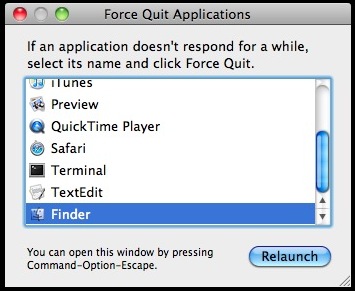
Force Quit may be the easiest way to quit the Finder for the average user who is less comfortable with the command line, which is accessible by hitting Command+Option+Escape keys together to bring up a Force Quit dialog box. From here, just select Finder and then click ‘relaunch’ which will reload the Finder in a similar fashion to the aforementioned killall trick.
How to Add a “Quit Finder” Option to the Menu
If you find yourself wanting to actually quit the Finder application without it relaunching, you can enable a hidden menu item within the Finder menu itself. To enable this menu feature you will need to launch the Terminal application and enter the following commands:
defaults write com.apple.finder QuitMenuItem -bool YES
Hit return, and after that command is executed, you will want to kill the Finder so that it reloads with the new “Quit Finder” menu option enabled:
killall Finder
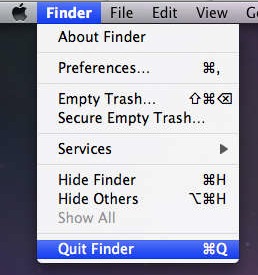
Now that you’re all done, you’ll have a “Quit Finder” menu item within the Finder menu itself.
Pull down the Finder menu and at the bottom the new Quit option will be there. Choosing this will actually quit the Finder as if it was an application, and it will not relaunch automatically in this case. This also has the effect of hiding the desktop, and it also disables the file system of OS X from being accessible to the user through general folders and files, though documents will still be available to apps through the Open menu, and files can still be saved through the menus as well.
Updated: 1/17/2014 for clarification regarding commands issued in Mavericks.






The commands worked perfectly. But in my enthusiasm, didn’t read the whole article that discusses the impact on the Desktop display.
For future reference, what are the commands to reverse the close menu item and killall commands? Would like to have them in case I choose to go back to the original state.
thanks
The ‘killall Finder’ command simply quits and relaunches Finder, Finder relaunches automatically after it is quit (unless there is some crash/freeze or other problem with it, in which case rebooting is usually a good idea).
Many other processes will stay closed after ‘killall’ until the Mac is either rebooted, or the process is launched again.
Quitting Finder worked like a charm!
Thanks.
Have tried multiple methods suggested online and this is the only one that i found worked properly! Big thanks!
I did this on my old Snow Leopard system. I find it very useful when the Finder is playing up or to fast close several Finder windows at once. Happily it works great on El Capitan too; but strangely if you open Safari from the Dock while Finder is closed down Finder not only reappears, it goes back to the old behaviour of reappearing a second after you have quit. Enter the commands in Terminal again and it reverts to staying quit every time. Unless you open Safari again from the Dock…
Any ideas ?
It’s not supposed to, it didn’t happen for me.
Works great, but I found myself frequently accidentally quitting the finder if the application focus was on the wrong object or I hit “cmnd-Q” instead of “cmnd-W”.
Thank you so so so so much!!!!
This really helped me!
I coudn’t restart/shutdown/logout from my iMac. And after many trials and errors, I figured it must be because of Finder.
Now that I can ‘kill’ Finder, I can shutdown my iMac properly again!!!
You saved me! THANK YOU.
very easy!!:
use tinker tool
Thanks for the tip. Adding Quit Finder was easy. But now I can’t get rid of it! If I try to reverse, the .plist file automatically resets. I have tried diverent ways, even logging out and modifying from the Guest account, but I stays where it was… “Quit Finder”. I’m using Mavericks 10.9.4. Any hints in how to remove it? Tried these (with sudo):
defaults write com.apple.finder QuitMenuItem -bool YES
defaults write com.apple.finder QuitMenuItem 0
manually editing /Users/[user]/Library/Preferences/com.apple.finder.plist
I found an solution here:
http://hints.macworld.com/article.php?story=20130908042828630
This worked for me!
“This had me stumped for a while while trying to restore my preference files. So, after copying or editing a plist, for example com.rstudio.desktop.plist , just run defaults read com.rstudio.desktop which should sync the cache. I’m mystified why apps would sync on startup, but by actually overwriting the plist instead of reading it in to sync. What sense does that make performance wise? anyway, happy now :)”
Found Terminal. Put in command and it disappeared FOR A FEW SECONDS! I keep punching ‘quit Finder’ and it keeps coming back on. Little $%^^.
I can’t find Terminal. Can you explain where this should be please?
Basically, you go to Finder>Applications>Utilities folder>Terminal.
ive opened terminal, as suggested, punched in the ‘com.apple.finder QuitMenuItem -bool YES’ and all i get is a ‘-bash: com.apple.finder: command not found’ response
Im trying to quit finder as a last resort to try and stop getting farken error codes during the verification process of burning dvds
You must enter the complete command, not half of the command. The proper syntax to gain the “Quit” menu in Finder is as follows:
defaults write com.apple.finder QuitMenuItem -bool YES;killall FinderI do this, but it reopens with the same problem every time. (I was trying to move a big file of photo’s into “my documents” and it froze the finder). I have now tried restarting, unchecking the box that says to reopen files when restarting, using the terminal killall command and the forced relaunch. How can I close it once and for all I’m about ready to throw this POS computer at the wall?
The issue that I found is that when you quit finder, functions like “Open file in Finder” and even “Empty trash” don’t work properly…
does this work for mavericks?
Yes, this works to quit the Finder in OS X Mavericks as is stated in the article.
How do I make finder un-quit able again?
To disable the quit option, change the yes to no in the command.
Thank you so much! Worked perfectly! :)
Thank you so much! This really helped! :)
Fantastic!
Pure desktop. FINALLY!
[…] the Finder is a process just like any other application on the Mac, you can also quit the Finder and treat it like any other application, having it stay closed completely. Leaving the Finder […]
[…] last – thanks to https://osxdaily.com/2010/02/12/how-to-quit-the-finder/ I’ve found a way to get rid of that pesky Finder Application. I use Path Finder now – […]
[…] OS X, Tips & Tricks – March 22nd, 2011 – No Comments Generally if you kill the Mac OS X Finder it will automatically restart itself. Generally. When the Finder doesn’t auto relaunch, you […]
Just go to Activity Monitor, look for Finder and click Quit process
Finally! Thank you!!
Why would you want to quit the Finder? It just causes problems. Some things rely on the Finder to work. I messed up the Dock once and I had to reinstall the system. All my files were fine but it just was a waste of time.
They might want to reload it if it isn’t working right.
Ben:
“Option-right click on the dock icon” doesn’t quit finder.
Thanks for this – works a treat on 10.6
Also, Option-right click on the dock icon.