
TTYtter, the command line Twitter client
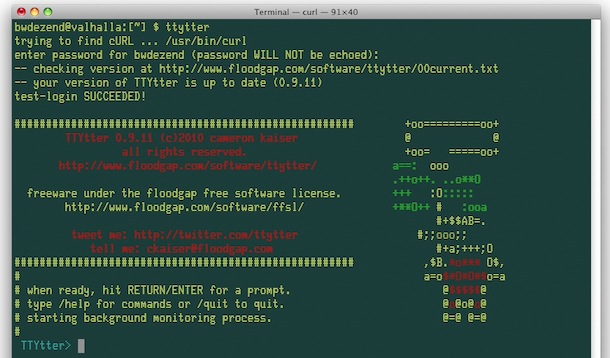
TTYtter is a rather fun command line based Twitter client. Written in Perl, it’s got all the essential ingredients needed for basic Twitter needs without ever leaving a Terminal window.
Running TTYtter is easy enough, it just needs your login information and off it goes. You can either run it through perl with:
perl /path/to/ttytter.pl -user=username:password
or make the script executable:
chmod +x ttytter.pl
and run as usual:
./ttytter -user:username
Note: if you don’t want to specify a password at the command prompt (security reasons, personal preference, against your marital vows, whatever) just leave it out and specify a username, the TTYtter client will ask for your password once executed.
Typing anything and hitting return will tweet that immediately, those who follow the OS X Daily Twitter stream probably saw my nonsense tweets last night as I played with the script. The actual command structure will be familiar to IRC users, commands are executed with / then the command, /help brings up help and commands, /quit exits the program, /refresh displays all new tweets, /replies shows replies to your tweets, etc.
TTYtter developer home
Download TTYtter now
[ AssimovT @ Google Buzz via Buzzzy ]





