
Reset a Lost Password in Mac OS X with a Boot Disk
Feb 21, 2010 - 21 Comments

If you have forgotten or lost your password in Mac OS X, you can reset a password by booting from a Mac OS X install disk.
This works with any version of Mac OS X where you have a Mac OS X Installer CD or DVD.
- Insert the Mac OS X install disk into your drive, reboot the machine, and hold down the “C” key to boot from the disk.
- Once booted, select your language preference then pull down the ‘Utilities’ menu to “Password Reset” or “Reset Password” (wording is different depending on which version of Mac OS X you’re booting with).
- Select the disk which the password needs to be reset on, select the Username, and then enter a new password.
- Reboot as usual, and your Mac OS X password will be reset!
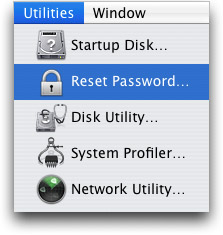
If you don’t have a CD or DVD handy you can still reset your forgot Mac password using a slightly more complex process involving the Terminal.
Remember this specific method of resetting a forgotten password on the Mac is only relevant to Mac OS X versions that were installed by DVD or CD, which tends to be older Mac OS X releases only. Remember that modern versions of Mac OS are installed through the Mac App Store, and thus their methods of resetting a forgotten password or lost password are different than what is described here.






Thanks for your assistance. However I became confused as to this statement: “Reboot as usual, and your Mac OS X password will be entered”. I got confused with “reboot as usual”. To make things clear one needs to go back to the Apple logo and click “restart”. Then one’s new password works.
I’ve tried all the COMMAND +S, -S, ETC ETC and I keep going straight to the deceased’s log in. 3 wrong passwords doesn’t work, I’ve tried up to 15 times, no password reset screen.
I do have an Apple ID but got it for iTunes on my mobile devices and for my old iPad.
errrr… i just did this and now the admin user for which I changed the password has disappeared… so how do I get back in and get to my stuff?!
Be sure to login with the user account that you reset the lost password for. Try rebooting the Mac without the CD inserted into the drive and you should be presented with a login screen.
You do NOT want to delete a user account, only to reset the password if it was lost.
This is for older Mac OS X versions and Macs with CD drives obviously however, so newer Macs have a different approach.
Hopefully you backed up your data, especially if the Mac is old. Hard drives can and do inevitably fail so you want to always have backups to insure data recovery if something goes wrong.
ibook g4 lose the p.s .w plse halp
I bought Macbook Pro which has 3 Apple ID one is mine .I have OSX 10.9 how do I get rid of the other 2 Apple ID . Don’t know passwords
I try to do this but holding down the C doesn’t bring anything up even when I try restarting the computer. How do I make sure it does?
Followed the process meticulously, but sadly at the “Reset Password” window, there is only the Mac Os Installation DVD volume available. My HD were the password is on did not show.
Also tried the other process of using the Command + S and sadly too the terminal window wont last more than couple of seconds before launching back to the log in window on its own. I guess these are some of the security improvements that Leopard has brought to the fold.
Any other way of getting into my system, without having to reformat because, my files are not backup at all.
[…] is borrowed from our article on how to reset a lost password with a CD. This is obviously an easier method but it’s of no help if you own a MacBook Air with no DVD […]
[…] is borrowed from our article on how to reset a lost password with a CD. This is obviously an easier method but it’s of no help if you own a MacBook Air with no DVD […]
not true – the air has a restore usb disk; i’ve got one, and this does seem to be a security hole since one can easily reset admin and root passwords using the aoo
how do I get one ?
Working in Apple tech support, this tool is freaking invaluable. Do you know how many people call every day because they forgot their passwords (hint: it’s more than five)?
Just go download a torrent for the version of os x you have, burn the .dmg file to a disk, and you have a new disk. BUT DON”T DO THIS BECAUSE IT IS ILLEGAL!!!
Ok. I know the process you have explained here. But I have another problem that I have lost my Mac OS X install disk and I have forgotten my password. But I set my system as automatic login, so I have access to my system but I am unable to change the password and I can not configure my OS X becoz it asks for the system password which I have lost. So if anyone can help me here I would be thankful to him….
@Arie
Physical access is root access. No matter how hard you try there are always ways around passwords as long as someone has physical access to your computer. Some methods just take a bit more knowledge than others. An install disk is unnecessary to complete this task although it is much more convenient.
@Arie It’s a pretty standard expectation to be able to unlock a user account with relative ease when you have physical access to a machine. If that’s not enough security for you encryption is probably what you’re looking for.
I thought this was great when it came out…
http://creativetechs.com/tips/tip_resources/PocketMod/MyMacWontStart-PocketMod.pdf
@Sven
If you mean a firmware password then I agree.
;-)
use filevault and nobody can see your files ever, and if you ever forget the filevault password, youll never be able to see them yourself. secure as it gets.
no, it isnt. if you set Master password you cant do this. So set a master password
So this is a big security hole? Anyone with an install disk can see my files after changing the password?