
Lock the Screen Orientation on the iPad 1, iPad 2, iPad 3, iPad 4

You can lock the screen orientation on the iPad 1, iPad 2, iPad 3, iPad 4 from rotating when the device is shifted in orientation by hitting the Screen Rotation Lock button.
The screen lock button is located on the side of the device, located above the volume controls.
Once you hit that screen rotation lock button, you can rotate the device horizontal or vertical and the screen itself won’t rotate. This is great for reading in bed and for so many other purposes.
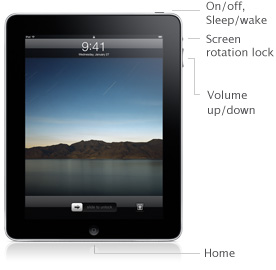
This is a handy iPad feature and I wish something similar was available on the iPod Touch and iPhone, anytime I use the thing lying down it’s rotating all over the place making it practically inusable. Thankfully the iPad gets it right!
This applies to the original iPad (iPad 1), iPad 2, iPad 3, and iPad 4. Later iPad models eventually lost the side button, instead moving the screen lock orientation button into the Settings.
[ via Apple ]






[…] to either be a mute button like the iPhone and iPod touch, or to be an orientation lock, like the original iPad OS 4. stLight.options({ publisher:'fe5e0a84-1fac-40de-8014-9f89fc1cbe6a' […]
When ever I switch the orientation lock button down it will mute and when I switch up it will unmute. No, I am not talking about the the volume control right under the orientation lock button. Please help!
when i switch the orientation lock button it will only mute and unmute! please help!!!
[…] iPad orientation lock used to be controlled by a switch on the side of the device, since iOS 4.2 the orientation lock […]
Don’t see it
The same facility is available to you in Iphone as well as the Itouch. Just tilt the screen and you will find a lock pictogram appearing in the bottom right side of the screen. Press it and your screen will lock.
Not on my iPhone 4. I tried it and lock pictograms appears!!!
Also the camera thing to appear when you push twice on the home button does work on the phone ,but not on the iPad. When I push twice on the home button, I get the music pictograms from my iPod music!!