
Stop iTunes from Automatically Opening When iPhone, iPad, or iPod is Connected
 Updated 5/31/2015: By default, iTunes will automatically launch when any compatible device is connected, be it an iPhone, iPad, iPod Touch, Nano, whatever.
Having iTunes open itself automatically can be helpful but it can also be annoying, it really depends on your user preferences. If you don’t want this to happen, you can easily turn off the automatic open feature within iTunes with a simple settings adjustment.
How to Stop iTunes Opening Automatically When iPhone, iPad, iPod Connects to Computer
This setting is the same in iTunes for Mac OS X and iTunes for Windows, and it applies to all iOS devices and versions too.
- Connect the iPhone, iPad, iPod device to the computer
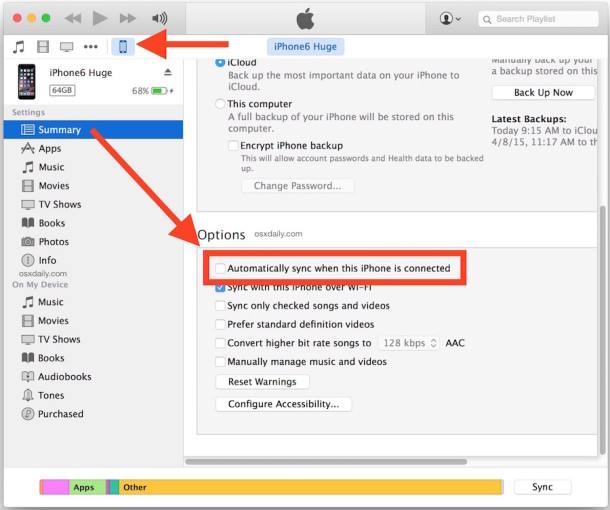
- Inside iTunes, click on the device and then click on the ‘Summary’ tab
- Scroll to the bottom of the Summary tab selections until you see “Options”
- Click on the checkbox next to ‘Open iTunes when this iPhone is connected’ – wording will be slightly different if your device is an iPad or iPod or whatever
- Close iTunes
The setting may look slightly different in each version of iTunes, here in newer versions the setting is about device automatic syncing on connection:
For example, here the setting is labeled as: “Open iTunes when this iPhone is connected”
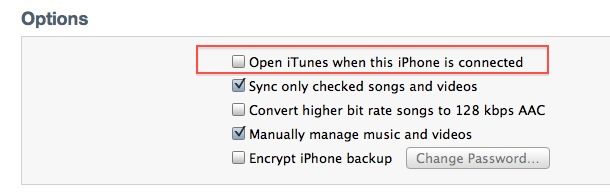
Now iTunes will not automatically open if you plug your iPhone, iPad, or iPod to your computer. This works the same on a Mac or a PC.
Note that disabling automatic syncing is a separate function which can be turned off elsewhere in iTunes preferences.
This works in all versions of iTunes and for both Mac OS X and Windows. You may find the interface to look slightly different and the phrase to be worded slightly differently, but the setting is always there in iTunes Summary Options for a connected device.






I have to say; what moron designs these function? I always use this but around 2000 in the Bay Area the station I listened to had an interview with a man in his 80’s(?). He had been involved in everything software over the decades, WW2 radar computers, nasa, Internet and on and on. He was totally, even back then, contemptuous of Gates, Jobs and all the rest with their crummy software (I use the names he used). He said the basic idea of form before function was being thrown out because you have a bunch of idiot savants designing this junk who are endlessly fascinated with all the minutia of program design and all the rest but are to stupid to realize that 90% of people don’t give a rats ass about how clever you’ve been by having 19 different ways to access your little creation but only one is the on/off switch. They want to be users of technology, not co-code writers! I’m afraid it’s too late now from the sense I get from young people. They accept stupid flaws like the above or the latest Apple 9.3 virus because they’ve never known any different.
He said “I have a really nice care car outside, when I want to run to the store do I care about how the injectors work? Do I care how the power asks sit brakes work? No. I just want to get my milk and go home….idiot savants, love it.
thanks to this page, this annoying itunes app, no longer comes up!
thanks so much!
Hi
i m start the iphone then go to logo and not next feature start plz tell me how problem
[…] for iPhoto located in Image Capture? Who knows, and it’s fairly confusing considering that to stop iTunes from opening automatically you adjust a setting within iTunes, so most users would think to look in iPhoto to change the same type of setting. Nope, not so […]
This no longer works in iTunes 11. There’s no way to “select the device”, or it’s hidden ridiculously well.
You can still select the devices in iTunes 11 the same way as before by showing the sidebar (check the View menu) or by selecting the device from the upper right corner if it’s connected to the computer. Here are some tips to make iTunes 11 look familiar again: https://osxdaily.com/2012/11/29/5-tips-make-itunes-look-normal/
Yeah, but what if f’n iTunes launches every time I pull my (iPhone) headphone jack OUT of my Macbook Pro?!?!
It looks like I’ve solved this on my machine. This may be of some help, check it out:
https://discussions.apple.com/message/18520213
Um there is no summary tab after I click on device. So what am I supposed to do now?
This option is greyed out for me and I can’t toggle it – anyone know why? It appears to be unchecked but iTunes does still open every time I plug my iPad in.
Since Oct 2011, update ITunes kept automatically opening for me as well. It seems to have stopped since I unchecked the Wi-Fi option under Summary.
Jerry
thanks that worked.
Thanks Andrew, this was driving me crazy as well! It seems a bit stupid that just because the option is disabled that it doesn’t show the correct setting.
Thank you Andrew! I’m not sure why it has been made so difficult to do, but you figured it out! Thanks again!
T H A N K Y O U.
When I uncheck the box “Open iTunes when this iPhone is connected” and try to close itunes it asks to save the changes. The problem is it also says if I change this setting it will erase all my apps and music. How can I stop itunes from opening and not have all my apps and music erased?
I have the SAME problem, Cadurling! I assume it is a bug???? So now I am really not sure what to do. Wait until an update?? :P
It may not be the solution you’re looking for (an automatic non-interactive solution) but I think if you hold down the Apple/Command key when you connect your device, that’ll stop iTunes from opening.
Thank you! This was driving me crazy!! Now, i just need to figure out how to access my ipod’s folders on Windows 7.. It’s no where to be found! I even have my folders to “show all hidden folders” and I still can’t find the device to open the folders.. Any suggestions?
Just wanted to say thanks to Andrew — it works!
Ok I feel dumb now. For anyone who experiences the issue with the option being unchecked and greyed out, if you have the option within iTunes preferences to automatically sync your iPod unchecked, the other option in the summary tab will be greyed out. You need to check the box to automatically sync your iPod, then go into the summary tab. Viola! It is no longer greyed out and there is indeed a check mark in the box. Uncheck it! Then go back into preferences and uncheck the option to automatically sync. Problem solved.
Thanks Andrew
(Do not feel dumb, its not you, its them …)
Same problem here. I unchecked the option to automatically sync my iPod but the option to open iTunes when my ipod is connect is and always has been greyed out. Curiously, there is no check mark in the box, but iTunes still opens no matter what any time I connect my iPod, and I can’t find options anywhere else to prevent this from happening.
Adam. I have had an issue identical to your own. I too had the proper selection checked under devices in the iTunes preferences. Out of sheer frustration I tried what Henry suggested and it worked.
Thanks Henry
I use my iPod with user A on the iMac. When I logon with user B (admin user) iTunes starts, and then pops up the message ‘the ipod is in use by another user’. The device doesn’t appear in iTunes. How can I get rid of iTunes starting automatically without connecting my iPod (and risking loss of all my music because it syncs with an empty iTunes installation) ?
Henry, that’s good advice but I already/always had the “prevent ipods from syncing automatically” unchecked and yet my “open itunes when iphone is connected” option is and always has been greyed out.
This feature is not available. The Text and the checkbox is greyed out, both in itunes 9 and itunes 10. Any ideas from anyone on how to access this? i cannot stop the application from opening every time i connect my handset. really annoying.
It is – go to preferences and uncheck the box that ‘prevents iPods etc from syncing automatically’ on the devices tab. The required checkbox will then become available in the summary pane of your device.
Thank You Henry!!! this was driving me CRAZY!!! it worked! From itunes i went into edit-> Preferences-> devices and deselected the first box :) Big Snoopy Dance :)
Thanks a lot it worked! :)
ty, love your brain
You think having the first preference box ticked would be enough to stop itunes opening automatically… ahhh, the faulty Apple software that flings Apple back to reality.
Thank you, Henry. This just started happening since the last update (iOS5) last month.
Thanks Henry, worked great! ITunes is soooooo slow on my computer.
Thanks, I once looked through itunes hoping that this function existed but never found it.
you didnt look hard enough
Wow, so Captain Obvious really does exist!
Or maybe Obvious Man! But wait he’s copyrighted isn’t he? What was his symbol again? I am pretty sure it’s a ‘taboo’ sign but what’s inside that?
happens with the iPad too, it’s really obnoxious. turned that off immediately, as well as syncing.