
Let iTunes Automatically Adjust Sound Volume to Play Songs at the Same Level
 iTunes can adjust the volume levels of your music for you, so that each song is closer to one another in volume output. This is a great feature, and it has always peeved me that some songs will play louder than others, and a playlist can quickly go from one moderately loud song to one that is either extremely quiet, or over-amped and crackly sounding.
Rather than constantly messing with speaker volume as new songs come on that are louder or softer, there’s an excellent little-known iTunes feature that will automatically adjust all songs volume level to be constant for you! It’s a setting that should be enabled by default if you were to ask me, but since it’s not here is how to turn it on yourself:
How to Enable iTunes Automatic Song Volume Adjustment
This works in all versions of iTunes for both Windows and Mac OS X:
- From the iTunes menu, navigate down to ‘Preferences’
- Click on the ‘Playback’ tab at the top
- Select the checkbox next to “Sound Check”
- Now select ‘OK’
Here is what the setting looks like in a prior version of iTunes, the precise location may vary slightly but the wording is the same and the features core is also the same:
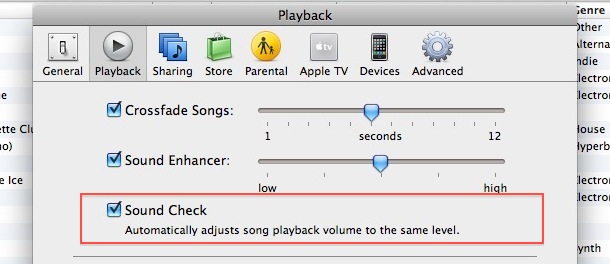
Changes should take effect immediately, but sometimes you will need to restart iTunes to let the setting take effect. Once it’s working, all song volume will be consistent across songs – songs that are quiet will be automatically adjusted up, and songs that are super loud will be automatically adjusted down – allowing for a much more enjoyable musical experience. No more speaker tweaking!

By the way, this works with all types of music, because this is volume related, and I would recommend it for every genre. It should be clear that I’m not talking about the type of music, because obviously something like hard rock is going to be louder than soft rock, I am talking about the actual sound volume of the playback. The reason there is variation in overall volume can be due to a multitude of reasons, whether it’s the source audio, to the way it was ripped and turned into a digital format, but nonetheless it’s obnoxious when one song is quiet and the next is blasting.
You can also boost an individual songs volume level to make it play louder if you want to, but that must be changed on a per song basis in iTunes.






The problem is I’d rather have the quiet songs get louder, not have the louder songs turned down. The good news is you can use the edit info tab on albums and artists to increase the volume, but it’s a lot of work.
Still looking for a fix for this or is there. Is it the recording or does the Ipod have a problem with the Level of different songs?
Simply checking the “sound check” does not work for all songs.
I still have some extremely loud and others the opposite.
I believe the problem probably exists in the “source audio”.
When it was recorded…still searching for a quick fix….??
I find that this feature doesn’t work if you’re listening to the songs through an iPod. I auto-tuned my songs before synching them to my iPod but the songs are still of different volumes. I’m a fan of japanese music though :)
[…] can also set iTunes to play all songs at the same volume level, which lets iTunes automatically equalize all songs played. stLight.options({ […]
ScreenshotiVolume calculates the volume perceived by the human ear for each song of your iTunes music collection. Thereby iVolume gets the most out of the approved Replay Gain algorithm and adjusts your songs
http://www.mani.de/ivolume/
[…] like this on a per song basis is a good way to fix the way a single song plays, but you can also set iTunes to automatically adjust song volume levels and iTunes will attempt to play all music files at the same volume […]
Does anybody know what exactly/technically the Sound Enhancer does? Or is it just a magical black box?
It works well for pop / rock etc but is horrible for classical music split into one track per movement.
Handy tip! Most of my music plays at comparable levels, but there are a few songs that seem to be recorded at mere whispers compared to everything else.