
How to Stop Skype from Starting Automatically on a Mac

Skype launches itself automatically on either user login or system boot of Mac OS X. This is either helpful or annoying, depending on your needs. If you wish to stop Skype from opening itself automatically in OS X, you can do so easily using the methods outlined below.
We will show you how to disable Skype from launching automatically the next time you start up or log into your Mac. This does not prevent Skype from working, it simply stops it from opening itself, meaning if you want to use Skype you’ll need to open it manually like a normal OS X app.
Stop Skype from Automatically Opening in OS X via the Mac Dock
This is the easiest method to prevent Skype from autolaunching, but you’ll need to have the Skype app open and its Dock icon visible:
- Wait for Skype to Launch if it hasn’t opened yet
- Right-Click on the Skype icon in the Dock
- Scroll up to ‘Options’ and uncheck ‘Open at Login’
- Quit Skype
Now the next time you login or boot up your Mac you shouldn’t see Skype launching itself. Just be sure that the “Open at Login” item is unchecked.
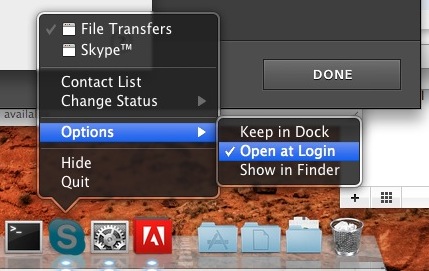
You can also manually stop the auto-loading Skype app via System Preferences.
Manually Removing Skype from Auto-Login Launching via System Preferenes in OS X
You can also manage login items through the System Preferences and achieve the same result:
- Launch System Preferences from Apple menu
- Click on “Users” or ‘Accounts’ (naming depends on OS X version)
- Click on your user account
- Click on ‘Login Items’
- Select Skype and click the – icon at the bottom of the preference screen
- Close System Preferences
I think it’s easiest to just disable the login items through the Dock icons, it’s less steps and a lot faster, but you can use whatever trick you want. The latter approach of managing your login items can also be helpful if you want to remove other apps from that automatic launch list.
Whichever way you go, you’ll need to launch Skype yourself from the /Applications/ folder when you want to use the chat app.
Unspecific to Skype, but related to application autolaunching behavior, check out a complete guide to Mac startup application launches and login scripts if you’re interested.






I found the perfect solution for this problem. I dumped Skype in the bin 😂
I was about to throw a hissy fit when I couldn’t figure this out, when in fact it’s just another case of simplicity slapping me in the face.
Thanks for the how-to!
This works the first time, but the next time you start Skype it adds itself back to the login items…
I cannot believe the developer doe this, I will decide what and when things launch.
Thanks for the two solutions to the Skype launch on startup issue.
Exactly what I was looking for! Thanks!
I hope this isn’t a stupid question, but how did you get the black, semi-transparent menu? Is it Snow Leopard?
If you right-click on the Dock items that is how the menu is displayed. I think it has been around since 10.5 but it is certainly in Snow Leopard 10.6
Oh, no, I know how to access the menu… I meant, how do I get it in that color? Mine is white and completely opaque. I’ve tried changing my theme to graphite but this didn’t change the menu’s color at all.